Everything else is a 4, but since you had more maps than anything else here, I'll round it up to a 5.
Some Maps, a Key and Lightning

Overview
Creator:
a guy and his game
Updated: 08 Aug 2004
Downloads: 43
|
Download Tile (15.23 KB) |
||
| Tags: Collection, Cutscene, Item, Misc, Subscreen | |||
Information
Pre-changed to GIF format
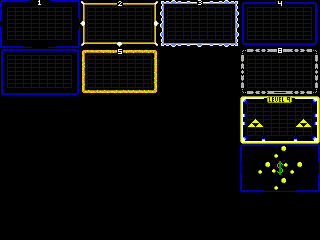
As the title suggests, it's some map borders, an alternate Master Key, and Lightning. These are some tiles I just ripped from my quest to submit. I didn't know whether to put them in different submissions or just one big one.
=======INSTRUCTIONS========
You might have to mess around with the key a little bit to get the right a. speed but for the lightning, copy it onto a completely empty page. Set the frames to 180 and the speed to 2. Like any other tiles, you might [View Full Description]
As the title suggests, it's some map borders, an alternate Master Key, and Lightning. These are some tiles I just ripped from my quest to submit. I didn't know whether to put them in different submissions or just one big one.
=======INSTRUCTIONS========
You might have to mess around with the key a little bit to get the right a. speed but for the lightning, copy it onto a completely empty page. Set the frames to 180 and the speed to 2. Like any other tiles, you might [View Full Description]




About Reviews
Description
Pre-changed to GIF format
As the title suggests, it's some map borders, an alternate Master Key, and Lightning. These are some tiles I just ripped from my quest to submit. I didn't know whether to put them in different submissions or just one big one.
=======INSTRUCTIONS========
You might have to mess around with the key a little bit to get the right a. speed but for the lightning, copy it onto a completely empty page. Set the frames to 180 and the speed to 2. Like any other tiles, you might have to tweak it a little bit to get it working. Feel free to make your own pallete to use them in. It just looked good to me the way I did it.
The way it's organized...
Shot 1: The correct pallete for the key, first page of maps, and the lightning.
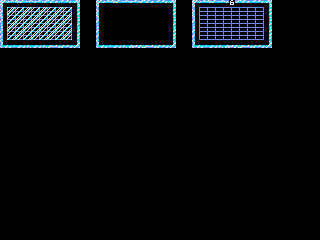
Shot 2: The correct pallete for the ice maps.
Shot 3: A bunch of map borders. Don't mind the numbers on top of them. you can take them out if your Dmap title doesn't cover it.
Shot 4: Some frozen maps. Good for an ice dungeon.
Shot 5: The alternate master key...
Shot 6: Lightning...shiny...
If you couldn't tell, I based the palletes off of the classic set.
=====UPDATE=====
Okay. I needed these in my quest so I decided to add them to this. Yes I did make them. Shot 7 is my new lightning strike tiles. These come with special lightning that is synced with the strike.
The A.Frames are 20
The A. Speed is variable. I thought 5 looked best.
These also have some simple instructions. Put the lightning on Layer 1, and the Strike on Layer 2. Not too hard is it?
As the title suggests, it's some map borders, an alternate Master Key, and Lightning. These are some tiles I just ripped from my quest to submit. I didn't know whether to put them in different submissions or just one big one.
=======INSTRUCTIONS========
You might have to mess around with the key a little bit to get the right a. speed but for the lightning, copy it onto a completely empty page. Set the frames to 180 and the speed to 2. Like any other tiles, you might have to tweak it a little bit to get it working. Feel free to make your own pallete to use them in. It just looked good to me the way I did it.
The way it's organized...
Shot 1: The correct pallete for the key, first page of maps, and the lightning.
Shot 2: The correct pallete for the ice maps.
Shot 3: A bunch of map borders. Don't mind the numbers on top of them. you can take them out if your Dmap title doesn't cover it.
Shot 4: Some frozen maps. Good for an ice dungeon.
Shot 5: The alternate master key...
Shot 6: Lightning...shiny...
If you couldn't tell, I based the palletes off of the classic set.
=====UPDATE=====
Okay. I needed these in my quest so I decided to add them to this. Yes I did make them. Shot 7 is my new lightning strike tiles. These come with special lightning that is synced with the strike.
The A.Frames are 20
The A. Speed is variable. I thought 5 looked best.
These also have some simple instructions. Put the lightning on Layer 1, and the Strike on Layer 2. Not too hard is it?
Credits
Phantom Meanace & Dark Nation for ZC & classic set
Me for tiles and modified palletes
WildBill for PureZC
Me for tiles and modified palletes
WildBill for PureZC