Expanded Link Tile Modifiers Link (For DoR)
Overview
Creator:
Jared
Added: 12 Mar 2012
Downloads: 80
|
Download Tile (8.79 KB) |
||
| Tags: 16-color, Player, Sprite, Dance_of_Remembrance | |||

Information
You know that quest rule (In Animation), where it says "Expanded Link Tile Modifiers"?
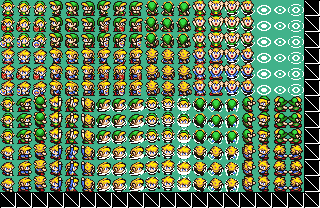
Well, this is the setup for it! It includes No shield, Wooden, and Magic DoR Link tiles, with swimming, attack, and all the basics. Also with Pajama Link!
Setup:
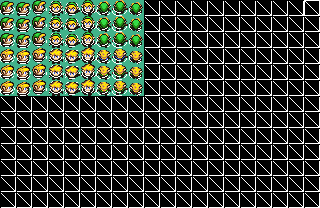
1. Rip them like in the photos I arranged.
[View Full Description]
Well, this is the setup for it! It includes No shield, Wooden, and Magic DoR Link tiles, with swimming, attack, and all the basics. Also with Pajama Link!
Setup:
1. Rip them like in the photos I arranged.
[View Full Description]
About Reviews
Description
You know that quest rule (In Animation), where it says "Expanded Link Tile Modifiers"?
Well, this is the setup for it! It includes No shield, Wooden, and Magic DoR Link tiles, with swimming, attack, and all the basics. Also with Pajama Link!
Setup:
1. Rip them like in the photos I arranged.
2. Go to the tile editor, and make note of the number of the tile.
Notice how I put the first shield under the no shield? From the tile you're on, 20 tiles ahead it the one directly below.
3. Go to the Shield 1 (Small) (Or whatever you named it), and put 20 in "Link Tile Modification" in "GFX". Do this for the Shield 2 (Magic) as well, except put 40, because it's 40 tiles under the original.
4. Go to Quest -> Graphics -> Sprites -> Link, and set up the FIRST Link. (Not the first or second shield).
Also, make sure you put the first tile in each set for everything, including the swimming, hammering, etc. Or else, when swimming, etc., the sprite will be invisible.
5. Go to your quest, and it should work.
If you can't get it to work, please send me a PM, and I can help you further.
Well, this is the setup for it! It includes No shield, Wooden, and Magic DoR Link tiles, with swimming, attack, and all the basics. Also with Pajama Link!
Setup:
1. Rip them like in the photos I arranged.
2. Go to the tile editor, and make note of the number of the tile.
Notice how I put the first shield under the no shield? From the tile you're on, 20 tiles ahead it the one directly below.
3. Go to the Shield 1 (Small) (Or whatever you named it), and put 20 in "Link Tile Modification" in "GFX". Do this for the Shield 2 (Magic) as well, except put 40, because it's 40 tiles under the original.
4. Go to Quest -> Graphics -> Sprites -> Link, and set up the FIRST Link. (Not the first or second shield).
Also, make sure you put the first tile in each set for everything, including the swimming, hammering, etc. Or else, when swimming, etc., the sprite will be invisible.
5. Go to your quest, and it should work.
If you can't get it to work, please send me a PM, and I can help you further.
Credits
Prospekt for the original "WW Pajama Link": https://www.purezc.co...ge=tiles&id=987
Russ for letting me use his left walking shield sprites.
Radien for DoR and it's original Link.
Nintendo for Zelda.
Me for compiling them and setting them up for ELTM.
And you guys for using them!
Russ for letting me use his left walking shield sprites.
Radien for DoR and it's original Link.
Nintendo for Zelda.
Me for compiling them and setting them up for ELTM.
And you guys for using them!