Jump to content

Photo

Inconsistencies with large Link tiles, and Zelda 3 Animation.


  • Please log in to reply
4 replies to this topic

#1 Anthus

Anthus

    anthus

  • Contributors
  • Real Name:Antbus
  • Location:Ohio

Posted 12 January 2016 - 07:58 PM

For Z3 animation, walking tiles use 8 frames, plus a stationary frame at the beginning for 9 in total. I got that working.


I did a test using numbered tiles to see how many frames are in the slash animation. The Link Sprite editor shows up to 6 frames per slash, plus Link's standing animation (used from his walk animations). This makes sense. However, when I play the game, Link only uses 3 frames to slash. I don't know if I'm doing something wrong, but I thought this seemed odd, since the player doesn't show all the frames you use in the editor. Any ideas?


Huh, I guess slashing just uses 3 frames, no matter what animation mode you have set :shrug:


EDIT: After messing around, it seems like the large tiles are ignoring all the frames after the first slash frame, and reverting to the default 16x16 tiles. I layered a number over each frame to test this, and took some screenshots to further show what I mean. I'm just trying to make some full size, well animated LttP Link tiles. Maybe this is why there's none in the database yet :P


ZbcRrKQ.png


Three frame sword slash in-game. The fourth frame is just Link's standing position established in the walk tiles. As you can see, the first frame has a 1, and is 32x32, but then the other two are small.


Xn1u4Bs.png


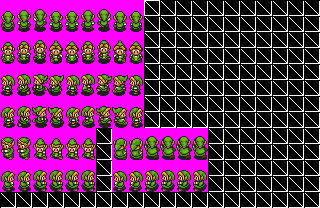
I made up to 9 frames, seen here in the tile page.


eXM4gYu.png


In the editor, the circle shows frames 1-6 from the above shot, plus the standing frame.


I hope this makes it more clear what I mean.


#2 Lightwulf

Lightwulf

    Master

  • Members
  • Real Name:I'm not telling you my secret identity!!!
  • Location:Ainrofilac, Ceh Sha Ah (I'm libingual)

Posted 13 January 2016 - 05:15 PM

From what I understand, the "Slash" sprites are just added onto the "Stab" sprites.  The second and third sprites you show look like "Stab" sprites, which would be normal if you still had the "Stab" sprites set to those 16x16 sprites.  (Not sure if this is supposed to be any different with Big Link sprites, though.)


If you haven't yet, try messing with/assigning the 32x32 versions to the "Stab" sprites and see how it turns out.


  • Anthus likes this

#3 Anthus

Anthus

    anthus

  • Contributors
  • Real Name:Antbus
  • Location:Ohio

Posted 13 January 2016 - 07:54 PM

Yep, that seemed to have some effect on it. Wow, I didn't even think about that. It is showing sprites I've selected now, after picking stab tiles. The frames are still odd, and I'm going to have to experiment more to find out exactly how many frames each action uses. But thanks so much, I really thought it was a bug. 


  • Lightwulf likes this

#4 Jared

Jared

    Deified

  • Members
  • Real Name:Jared
  • Pronouns:He / Him
  • Location:Massachusetts

Posted 13 January 2016 - 10:00 PM

I think I figured this out with 1x2 Link tiles. Here as two of my database entries. I know you're using a 2x2 Link, but it might be a help to you!


http://www.purezc.ne...e=tiles&id=1381

t1381s1.png


http://www.purezc.ne...e=tiles&id=1267

t1267s1.gif


  • Anthus and Lightwulf like this

#5 Anthus

Anthus

    anthus

  • Contributors
  • Real Name:Antbus
  • Location:Ohio

Posted 14 January 2016 - 01:14 PM

Thanks Jared. :) It's funny cause I actually already snagged these to look at them before. The only difference is these are 'tall', and not 'large', but it is still a good template.


This is what I've figured from my experiments with large Link tiles, and Z3 animation:

Walking = 8 frames +1 Stationary.

Stabbing = 3 frames.

Slashing = Stab + 3 more frames.

Floating = 2 frames

Swimming = 4 frames.

Everything else uses 3, or 2.


  • Jared and Lightwulf like this


1 user(s) are reading this topic

0 members, 1 guests, 0 anonymous users