Jump to content

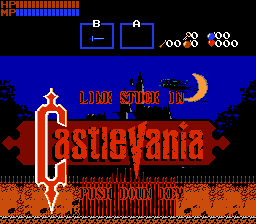
Link stuck in Castlevania

Photo

Castlevania Door Transition Scene test


  • Please log in to reply
6 replies to this topic

#1 Alucard648

Alucard648

    Magus

  • Members
  • Location:castle Dracula

Posted 28 May 2014 - 01:06 PM

Do you remember that transition effect that occurs when going trough doors in old-school Castlevania games? This is the ZC script I have written to simulate this effect for my upcoming quest project: Link stuck in Castlevania.
Here is a test video of this transition effect:
http://youtu.be/ZSAEYBmX58Y

This is a small part of what would await you in the future of the quest project.


Edited by Alucard648, 28 May 2014 - 05:20 PM.

  • KingPridenia likes this

#2 ShadowTiger

ShadowTiger

    The Doctor Is In

  • Members

Posted 28 May 2014 - 06:27 PM

I'm often really saddened by the apparent lack of sideview-related quests that employ features of this caliber. My hat is off to you for this script here!

#3 Geoffrey

Geoffrey

    Chosen One

  • Members

Posted 28 May 2014 - 06:42 PM

ijWzmd0.gif


  • Evan20000 likes this

#4 umbrello

umbrello

    I am a hero

  • Members
  • Location:Alefgard

Posted 28 May 2014 - 08:40 PM

I agree with Frodo!


#5 MabusTheDark

MabusTheDark

    That thing in the corner of your vision...

  • Members
  • Real Name:Joshua
  • Pronouns:They / Them, Ask Me
  • Location:Springfield, Illinois

Posted 09 June 2014 - 04:05 PM

All you need now is CVIII sound effects for the door.  ^_^  That's so cool, though!


#6 Cjc

Cjc

    Cor Blimey!

  • Members

Posted 09 June 2014 - 06:36 PM

Wow.  I'm really impressed by this transition, and I find myself wondering how to do something like this.

Are you willing to discuss certain aspects of your script?  Specifically, would you be willing to explain how to place a function in the middle of a screen transition?


From the video, it looks like you placed a command during the scrolling itself (something I'd REALLY like to know how to do), but the door action also triggered roughly 9 pixels from the edge of the screen (which might suggest that you rescripted the transition from scratch).


If it's a trade secret, I'll retract my question.  But again, I'd really like to know how to pause a screen transition and execute a function.


#7 Alucard648

Alucard648

    Magus

  • Members
  • Location:castle Dracula

Posted 09 June 2014 - 09:05 PM

Cjc, on 10 Jun 2014 - 03:36 AM, said:

Wow. I'm really impressed by this transition, and I find myself wondering how to do something like this.
Are you willing to discuss certain aspects of your script? Specifically, would you be willing to explain how to place a function in the middle of a screen transition?

From the video, it looks like you placed a command during the scrolling itself (something I'd REALLY like to know how to do), but the door action also triggered roughly 9 pixels from the edge of the screen (which might suggest that you rescripted the transition from scratch).


If it's a trade secret, I'll retract my question. But again, I'd really like to know how to pause a screen transition and execute a function.

Actually the script runs in separate empty screen and calls Screen->DrawScreen twice every frame of transition scene to create scrolling effect.
As for triggering 9 pixels too early, the door`s bottom combo is a sensitive insta-warp that sends Link to afromentioned screen where script runs.
As for secret, or no secret, I am currently documenting setup instructions for this script.

Edited by Alucard648, 10 June 2014 - 12:23 AM.


1 user(s) are reading this topic

0 members, 1 guests, 0 anonymous users