I am using 2.5 RC3. I have not checked windowed and im using windows 7.
When you use ZC you get used to problems
 so no worries.



Where is ma hearts?


Posted 17 August 2012 - 08:49 AM
so no worries.
Hey Listen, Kid


Posted 17 August 2012 - 09:38 AM

IPv7 user


Posted 17 August 2012 - 09:41 AM
Where is ma hearts?
Posted 17 August 2012 - 10:05 AM
Anyways it begun on the new version of ZCM, i think, though now i know where i can switch it off. Maybe the setting Saffith showed could be in the ZCM too?
Hey Listen, Kid
Posted 17 August 2012 - 10:13 AM
 Anyways it begun on the new version of ZCM, i think, though now i know where i can switch it off. Maybe the setting Saffith showed could be in the ZCM too?
Where is ma hearts?
Posted 20 August 2012 - 06:40 AM
Hey Listen, Kid
Posted 20 August 2012 - 07:30 AM
 I'm glad to hear that ZC is working better for you.
Hey Listen, Kid
Posted 03 September 2012 - 01:00 AM
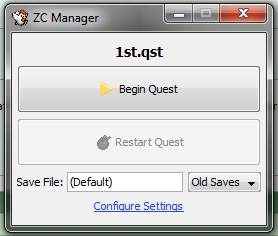
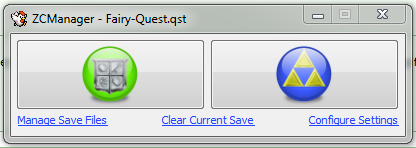


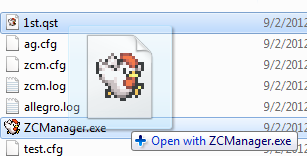
 If you have any suggestions or ideas, just let me know.

Posted 03 September 2012 - 01:34 AM
Thank you for putting your time and effort into this - I definitely think this is a great contribution to the ZC community.
one point nine hero


Posted 03 September 2012 - 01:58 AM
Where is ma hearts?
Posted 03 September 2012 - 06:14 AM
This site is still a thing?


Posted 03 September 2012 - 06:43 AM

P͏҉ę͟w͜� ̢͝!


Posted 03 September 2012 - 09:55 AM
Wizard


Posted 03 September 2012 - 03:25 PM
Hey Listen, Kid
Posted 04 September 2012 - 07:14 AM
I'm really glad that you all are liking the update. If there's anything else you all can think of that needs to be added, just let me know.
0 members, 1 guests, 0 anonymous users


