
Pushable Pillars
Overview
Creator:
Mr. Z
Added: 30 Apr 2014
Tags:
FFC
Downloads: 51
|
View Script
Download Package (1.49 MB) |

Information
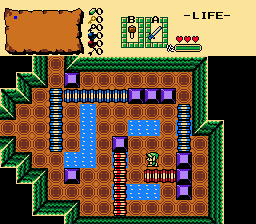
This lets you make wide pushable blocks up to 4 combos big, such as seen in the Gameboy games (see screenshot)
The push distance can be adjusted, so these can be used as ice blocks as well, although they'll be either vertical or horizontal.
The push distance can be adjusted, so these can be used as ice blocks as well, although they'll be either vertical or horizontal.
Description Setup Reviews Comments
It requires some setup:
-First: Import the script to any ffc slot you want.
-Second: Go to Tiles and make two 4 by 4 grids of the tile you want to push. Like this:
For the horizontal pillars:
==== 1
==== 2
==== 3
==== 4
And for the vertical pillars do it like this:
| | | |
| | | |
| | | |
| | | |
1,2,3,4
These numbers are the frames of the graphic as it's standing still (1) or is being pushed (2-4). You need to make all these tiles even if you're not using an animation.
-Third: Turn each tile into a SOLID combo using the same 4 by 4 pattern as the tiles.
-Fourth: Place a FFC on the grid. Use the top-left combo of the graphic you want to push around. Then attach the script.
-Fifth: Now adjust the size.
Set ComboW to 16, 32, 48 or 64 if you're using a horizontal pillar. Use ComboH for vertical pillars.
Set TileH or TileW to 1, 2, 3 or 4 (a 16th of the Combo-W/H)
-Sixth: You have to set 2 Arguments:
*Set D0 to 1 if you're using a vertical pillar, or to 2 if the pillar is horizontal.
*D1 is the amount of tiles the pillar will move when pushed, can be as big as you want, although more than 16 would be pointless. Use at least 1, or the pillar won't move.
-Seventh: Layer 1 is used as the under combo, so any tiles that the pillars may cross over have to be drawn on layer 1. (Just copy the whole screen)
There is 1 constant integer, PILLAR_SENSITIVITY, which is the amount of frames you have to push the block before it starts moving.
Resources
std.zh as usual.

