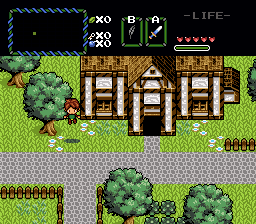
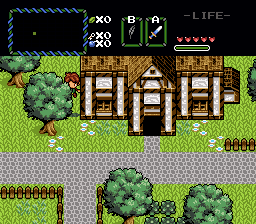
I'm sure you've met this problem with trees and other layered objects:
You have the Roc's Feather and decide to jump around. Now there are two ways to set up your layers and init data to determine if Link will appear over or below the layer of the trees.
Method 1: Trees appear above you when jumping. Probably the most used in quests, but when you're standing below the tree, it will still appear over Link! That's nasty...
Method 2: Trees appear below you when jumping. This way you can stand below a tree and not appear below it when jumping, but when you stand behind it you'll suddenly show up in front...
Simple. For a clean global script I suggest you import this script as a file: import "TreeLayers.z"
Then just put "TreeLayers();" in your main loop so this script gets called every frame.
Don't forget to import "std.zh" as well.
"std_functions.zh" misses GetLayerComboC and GetLayerComboI, so I added those to this script. You'll still need to import "std.zh" for GetLayerComboT though.
You can use a combo type or an inherent flag type for the tree combos.
Right now it's set up to transform Overhead combos (since those don't work on layers, if they did this script would have been easier to make)
Treetops that have been placed on layer 4 will be overlayered to layer 5. In the quest I used to test this I had my Jump Sprite Layer Threshold set to 5.
Resources
std.zh