Expanded Directional LockBlocks
Overview
Creator:
ShadowTiger
Added: 13 May 2007
Downloads: 40
|
Download Tile (8.12 KB) |
||
| Tags: Dungeon, Edited, Interior | |||

Information
I did include a ReadMe within the .zip file, but I'll just copy and paste bits of it here. This really isn't a MAJOR submission like some of the others we've all seen. It's just a nice little modification and expansion to something we all use often enough. I hope it's helpful to people, if at least in that tiny way I was expecting. The ReadMe just comments on everything. Things are actually pretty self-explanatory through out.
----------------------------------------------
Just a litt [View Full Description]
----------------------------------------------
Just a litt [View Full Description]
About Reviews
Description
I did include a ReadMe within the .zip file, but I'll just copy and paste bits of it here. This really isn't a MAJOR submission like some of the others we've all seen. It's just a nice little modification and expansion to something we all use often enough. I hope it's helpful to people, if at least in that tiny way I was expecting. The ReadMe just comments on everything. Things are actually pretty self-explanatory through out.
----------------------------------------------
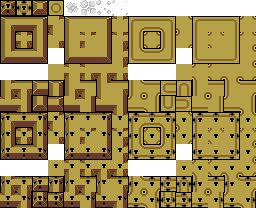
Just a little something I assembled within ZQuest in about ten minutes. Really nothing major. It's basically a way of setting up a more intricate "block" of them. Everything from larger blocks to branching segments is included within.
There are 4 forms of these blocks:
1) Locked Copycat. [Upper Left ]
2) Locked Lockblock. [Lower Left ]
3) Unlocked Copycat. [Upper Right]
4) Unlocked Lockblock. [Lower Right]
I have also included the standard four frame "Poof" animation. You more than likely already have this set of tiles in whatever tileset you're working in, but it's good to have them anyway, particularly right next to where they can be used. (Similar to how sushi comes with wasabi sauce next to it but not already on your sushi.) You can use the "o" button in the Tiles Menu to overlap the poof animation on a four-combo transformation from the locked block to the unlocked block. You can do that on your own though. It's simple enough, and only requires space and further organization on your part. Do it on a separate tiles page from the page you import these tiles into.
NOTE: You will be unable to come into contact with several of these pieces. In order to unlock a piece, you must be either north, south, east, or west of the piece, and walk into it. It will not work diagonally. Thus, when there are pieces surrounding that block on all sides that naturally fit there, you will be unable to approach it from any angle. I did include them for completeness's sake, but they are relatively useless. You may safely not include them in your tiles/combo pages.
----------------------------------------------
Just a little something I assembled within ZQuest in about ten minutes. Really nothing major. It's basically a way of setting up a more intricate "block" of them. Everything from larger blocks to branching segments is included within.
There are 4 forms of these blocks:
1) Locked Copycat. [Upper Left ]
2) Locked Lockblock. [Lower Left ]
3) Unlocked Copycat. [Upper Right]
4) Unlocked Lockblock. [Lower Right]
I have also included the standard four frame "Poof" animation. You more than likely already have this set of tiles in whatever tileset you're working in, but it's good to have them anyway, particularly right next to where they can be used. (Similar to how sushi comes with wasabi sauce next to it but not already on your sushi.) You can use the "o" button in the Tiles Menu to overlap the poof animation on a four-combo transformation from the locked block to the unlocked block. You can do that on your own though. It's simple enough, and only requires space and further organization on your part. Do it on a separate tiles page from the page you import these tiles into.
NOTE: You will be unable to come into contact with several of these pieces. In order to unlock a piece, you must be either north, south, east, or west of the piece, and walk into it. It will not work diagonally. Thus, when there are pieces surrounding that block on all sides that naturally fit there, you will be unable to approach it from any angle. I did include them for completeness's sake, but they are relatively useless. You may safely not include them in your tiles/combo pages.
Credits
I think it's pretty much just me on this one. I guess I could happily thank the developers for their "Hookshot" selective tool in ZQuest (Beta 254) which I used quite a bit, as well as those who drew the *original* Lockblocks in all their variations, as well as those who drew the little four-tile poof things I included.