IMPORTANT: THIS SCRIPT IS ONLY GUARANTEED TO WORK 100% WITH INTERIOR MAPS. IF YOU USE NES DUNGEON OR OVERWORLD MAPS, DON'T COMPLAIN THAT THE SCRIPT DOESN'T WORK.
Preliminaries
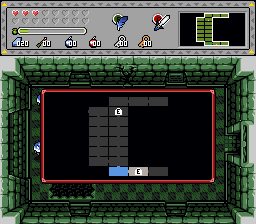
1. Make an 11-tile-wide by 7-tile-high map background. Set MAP_TILE_BG to the number of the top-left tile (not combo, but tile) and MAP_TILE_CSET to its CSet.
2. Make icons for every room feature (or whatever you collect in dungeons), and set their respective tile numbers and CSets in the MAP_TILE_ and MAP_CSET sections. NOTE: these icons must use only the top 8x8 pixels of their respective tiles.
3. Find the colors for the borders of rooms, and unvisited/visited/current room background colors. Set the MAP_COLOR_ constants to their numbers, where each color's number is the CSet number times 16, plus the number of the color in the CSet (from 0 to 15).
4. Compile the script and assign it to the active global slot.
Map setup
1. Set up the map in the big dungMaps[] array (you can duplicate the layout of the map from the DMap editor). It is laid out like an 8x8 dungeon map (note that this script only works with maps no larger than 8x8 screens; no overworlds!). For each room, list all the features with their single-letter names separated by "|". See the code for a working example.
2. For each DMap that will use this feature, make a row in the mapIndex array. See the "mapIndex setup" section for details.
3. Multi-floor dungeons: you can link two or more maps together into a multi-floor dungeon by setting the up and down values in their respective mapIndex rows.
4. The title at the top is the DMap's title as would be shown above the minimap. Note that adding spaces to make it word-wrap on the minimap will make it look odd here.
Note: If you are using ghost.zh, be sure to find and uncomment this line: //DrawGhostFFCs();
Usage
* Press the Ex1 button to open the map.
* By default, the map shows only rooms you've visited.
* When you obtain the dungeon's map (yes, it works with the built-in map item), all the unexplored rooms will appear on the map.
* When you obtain the compass, feature icons (unbeaten bosses, unopened chests, stairs/entrances) will appear in rooms that are on the map. They will not appear in unexplored rooms without the map.
* Press Up/Down to switch floors if you're in a multi-floor dungeon.
* Press Ex1 to close the map again.
Requires
stdExtra.zh; all other headers are included with ZC.