
[2.55] Oracle Minecarts
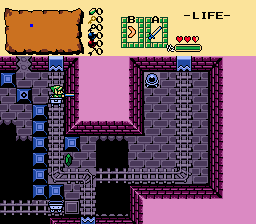
Overview
Creator:
Moosh
Updated: 22 Sep 2025
Tags:
FFC,
Generic
Downloads: 49
|
View Script
Download Example (1.55 MB) |

Information
It's a remake of my Oracle Minecarts script but with 2.55 features. Hopefully easier to use, but barely any less janky.


Description Setup Reviews Comments
Note: This script requires the "Broken scroll/warp frame issue" compatibility quest rule be set due to a limitation with cancelling screen scrolls. If you leave the rule off there'll be a bug where you can "fight" the scrolling transition when riding a minecart.
Set up the constants at the top of the script as indicated.
Under Init Data edit the MinecartGeneric script and check the "Run from Start" check box.
Set up combos for the minecart tracks. These should all have the GBMinecart_Track script attached and the arguments set as indicated in the editor. Each one will need an ID to indicate what type of track it is.
GBMinecart:
Place this FFC where you want your minecarts to spawn. Each cart can have its own speed and combos. The order of the minecart combos in the combo pages should be identical to how they're laid out in the example quest and image. The combo used will determine the direction the cart is facing. If you set "No Reset" to 1, it won't reset its position when the minecarts reset.
Reset_Minecarts:
Place this FFC on top of return square A on your starting screen. It will return all minecarts back to their original positions when you die and respawn there. If "Only This Map" is 1, it will only do this for the current map.
GBMinecart_Shutter:
Place this where you want shutters only the minecart can pass. Set up the combos identically to the example quest and image.
This script requires TempLinkState.zh.
Set up the constants at the top of the script as indicated.
Under Init Data edit the MinecartGeneric script and check the "Run from Start" check box.
Set up combos for the minecart tracks. These should all have the GBMinecart_Track script attached and the arguments set as indicated in the editor. Each one will need an ID to indicate what type of track it is.
GBMinecart:
Place this FFC where you want your minecarts to spawn. Each cart can have its own speed and combos. The order of the minecart combos in the combo pages should be identical to how they're laid out in the example quest and image. The combo used will determine the direction the cart is facing. If you set "No Reset" to 1, it won't reset its position when the minecarts reset.
Reset_Minecarts:
Place this FFC on top of return square A on your starting screen. It will return all minecarts back to their original positions when you die and respawn there. If "Only This Map" is 1, it will only do this for the current map.
GBMinecart_Shutter:
Place this where you want shutters only the minecart can pass. Set up the combos identically to the example quest and image.
This script requires TempLinkState.zh.

