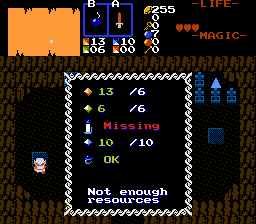
An NPC that offers specific service, either new item, item upgrade, or secret trigger, for cost that consist of multiple counters to be paid simultaneously. Stand on FFC and press Ex1 to render string and then cost (up to 6 different counters with separate cost for each, or items to give away). If you can afford, press Ex1 to confirm payment, or Ex2 to cancel.
If HP is used as part of cost, minimum of 1 heart must be left to afford payment.
Additionally if all one-time purchases are done in the screen, reward can be triggered.
Update 19.02.2025 - UI font shadows. Counters and items can be used in any combination in cost, minor GUI tweak. Shop cleanout reward. Prompt cloud option. See new constants in script file.
Update 13.05.2025 - Added item prerendering option, both on FFC (as if item was displayed on shop counter) and in UI.
1. Set up graphics:
TILE_CR_* for rendering counter icons using CSET_CR_* for shop UI.
3x3 frame for TILE_RESOURCE_FRAME. Needed to render UI frame using CSET_RESOURCE_FRAME CSet.
Combo for "Sold Out sign".
Combo for prompt display, when Link stands on FFC.
2. Set up constants in script file to match graphics you set up.
3. Import and compile the script. 2 FFC script slots to assign.
4. Place FFC st shop position.
D0-D5 - counter costs, for each counter:
#####.____ - ID of counter used to pay. <0 - ID of required item (taken away as part of barter deal)
_____.#### - counter amount to pay.
D6 #####.____ - String to display as intro when standing on FFC and pressing EX1.
D6 _____.#### - String to display on purchase.
D7 #####.____ - Screen D bit to track "Sold Out" status. >12 - infinite stock in shop.
D7 _____.#### - ID of item sold/upgraded into. If D7<0 - secrets trigger instead on purchase (cash gate, building construction).
5. Shop cleanout reward script. Place invisible FFC anywhere in the screen.
D0 - String to display on accomplishment.
D1 - Reward. >0 - Item ID, <0 - permanent secrets.