
Resource Upgrade shop

Overview
Creator:
Alucard648
Updated: 13 Aug 2025
Tags:
FFC
Downloads: 14
|
View Script
Download Package (1011.3 KB) |

Information
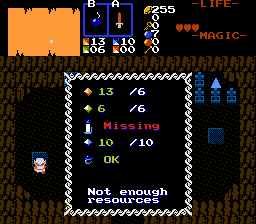
"You need 50 wood, 100 stone and 300 rupees to get this item"
Straight from Skyward Sword. Made on request by SkyFlare.
Straight from Skyward Sword. Made on request by SkyFlare.

Description Setup Reviews Comments
1. Set up graphics:
TILE_CR_* for rendering counter icons using CSET_CR_* for shop UI.
3x3 frame for TILE_RESOURCE_FRAME. Needed to render UI frame using CSET_RESOURCE_FRAME CSet.
Combo for "Sold Out sign".
Combo for prompt display, when Link stands on FFC.
2. Set up constants in script file to match graphics you set up.
3. Import and compile the script. 2 FFC script slots to assign.
4. Place FFC st shop position.
D0-D5 - counter costs, for each counter:
#####.____ - ID of counter used to pay. <0 - ID of required item (taken away as part of barter deal)
_____.#### - counter amount to pay.
D6 #####.____ - String to display as intro when standing on FFC and pressing EX1.
D6 _____.#### - String to display on purchase.
D7 #####.____ - Screen D bit to track "Sold Out" status. >12 - infinite stock in shop.
D7 _____.#### - ID of item sold/upgraded into. If D7<0 - secrets trigger instead on purchase (cash gate, building construction).
5. Shop cleanout reward script. Place invisible FFC anywhere in the screen.
D0 - String to display on accomplishment.
D1 - Reward. >0 - Item ID, <0 - permanent secrets.
TILE_CR_* for rendering counter icons using CSET_CR_* for shop UI.
3x3 frame for TILE_RESOURCE_FRAME. Needed to render UI frame using CSET_RESOURCE_FRAME CSet.
Combo for "Sold Out sign".
Combo for prompt display, when Link stands on FFC.
2. Set up constants in script file to match graphics you set up.
3. Import and compile the script. 2 FFC script slots to assign.
4. Place FFC st shop position.
D0-D5 - counter costs, for each counter:
#####.____ - ID of counter used to pay. <0 - ID of required item (taken away as part of barter deal)
_____.#### - counter amount to pay.
D6 #####.____ - String to display as intro when standing on FFC and pressing EX1.
D6 _____.#### - String to display on purchase.
D7 #####.____ - Screen D bit to track "Sold Out" status. >12 - infinite stock in shop.
D7 _____.#### - ID of item sold/upgraded into. If D7<0 - secrets trigger instead on purchase (cash gate, building construction).
5. Shop cleanout reward script. Place invisible FFC anywhere in the screen.
D0 - String to display on accomplishment.
D1 - Reward. >0 - Item ID, <0 - permanent secrets.

