
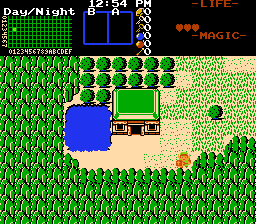
[2.55] NEW Palette Based Day/Night System
Overview
Creator:
Moosh
Updated: 24 Feb 2026
Tags:
2.55,
FFC,
Generic
Downloads: 60
|
Download Example (1.71 MB) |

Information
If you're downloading this script at the time of release, be sure your version of 2.55 is up to date. A bug with classes was preventing it from functioning.
This is an updated version of this script making use of newer 2.55 features.
https://www.purezc.n...=scripts&id=387
This is an updated version of this script making use of newer 2.55 features.
https://www.purezc.n...=scripts&id=387

Description Setup Reviews Comments
In addition to the FFC scripts, this script uses a generic script to function, so be sure to assign that to a slot and edit its properties under Quest->Init Data under the GenScript tab. Check Run From Start so it'll run.
Constants:
Set up the following constants as needed:
These control how fast time advances on the clock. These are unused if you're using the system clock.
These control the digital clock that's drawn to the subscreen.
There's two ways to set up time of day palettes. The first is to edit the DayNightGeneric_UserInit() function in the script. There's a set of functions in the comments that you can call to assign palettes to each of your DMaps. If you're not comfortable editing ZScript, you can use the DayNight_ConfigureDMap or DayNight_ConfigureDMapAutoColor scripts. Place these on a screen the player is guaranteed to cross through. In order for time to advance on a DMap, the DMap flag set by DMF_TIME_CAN_ADVANCE must be checked.
All FFC scripts have metadata so they'll be documented in the editor.
This script only requires std.zh.
Constants:
Set up the following constants as needed:
- DAYNIGHT_USE_SYSTEM_CLOCK: Set to 1 if you want to sync the in-game timer with the system clock.
- DMF_TIME_CAN_ADVANCE: Set to a DMap flag you want to use for DMaps where time can advance. Use the DMF_ constants in std.zh for this.
- DAYNIGHT_STARTING_HOUR: The hour (1-24) the clock starts on.
- PALETTE_UPDATE_FREQ: This controls how frequently the script updates palettes for the current DMap. Lower numbers will mean smoother transitions, but doing this too frequently hurts uncapped framerate.
These control how fast time advances on the clock. These are unused if you're using the system clock.
- DAYNIGHT_TIME_INCREMENT_FRAMES: How many in-game frames between every clock update
- DAYNIGHT_TIME_INCREMENT_SECONDS: How many seconds to add to the clock on each update
- DAYNIGHT_TIME_INCREMENT_MINUTES: How many minutes to add to the clock on each update
- DAYNIGHT_TIME_INCREMENT_HOURS: How many hours to add to the clock on each update
These control the digital clock that's drawn to the subscreen.
- DAYNIGHT_DRAW_CLOCK: Set to 1 to draw the clock, 0 to hide it.
- DAYNIGHT_CLOCK_LAYER: What layer to draw the clock to. With modern rulesets, this should be 7.
- DAYNIGHT_CLOCK_X: X position to draw the clock to.
- DAYNIGHT_CLOCK_Y: Y position to draw the clock to. The subscreen is 56 pixels tall, so start from -56.
- DAYNIGHT_CLOCK_PLACES: How many places to show. 0 for hours only, 1 for hours and minutes, 2 for hours, minutes, and seconds.
- DAYNIGHT_CLOCK_HIDE_AM_PM: Whether or not to show AM and PM on the clock. If 0, they'll be shown, if 1 they'll be hidden, and if 2 the display will show as Military Time.
- FONT_DAYNIGHT_CLOCK: The font to draw the clock in. Use FONT_ constants from std.zh.
- C_DAYNIGHT_CLOCK: The color to draw the clock in.
- C_DAYNIGHT_CLOCK_SHADOW: The color for the clock's shadow, if applicable.
- SHD_DAYNIGHT_CLOCK_SHADOWTYPE: The type of shadow, if applicable. Use the SHD_ constants from std.zh.
There's two ways to set up time of day palettes. The first is to edit the DayNightGeneric_UserInit() function in the script. There's a set of functions in the comments that you can call to assign palettes to each of your DMaps. If you're not comfortable editing ZScript, you can use the DayNight_ConfigureDMap or DayNight_ConfigureDMapAutoColor scripts. Place these on a screen the player is guaranteed to cross through. In order for time to advance on a DMap, the DMap flag set by DMF_TIME_CAN_ADVANCE must be checked.
All FFC scripts have metadata so they'll be documented in the editor.
This script only requires std.zh.

