
Floor Keyboard

Overview
Creator:
Alucard648
Added: 09 May 2023
Tags:
FFC
Downloads: 5
|
View Script
Download Package (1.07 MB) |

Information
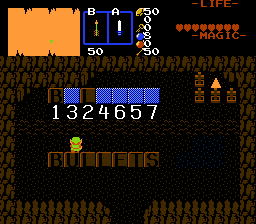
Generic floor keyboard. Made on request by SkyFlare.
Description Setup Reviews Comments
1. Set up input area. Flag 1st input position with CF_KEYBOARD_POS1 combo flag, 2nd with CF_KEYBOARD_POS2 flag and so on.
2. Build keyboard on screen - flag each key on built keyboard with CF_KEYBOARD_KEYS combo flag.
3. Set up puzzle that reads combos from input area, like password script.
4. Place invisible FFC with script anywhere in the screen.
D0 - Number of characters to input, max 16.
D1 - Keyboard pressing animation. Uses next combo in list, that must cycle back into previous combo, or key will input different combos on each press.
D2 - >0 - If Link walks on keyboard without pressing keys, a ghosted key combo will render at cursor position to indicate what will be inputed on key press.
D3 - >0 - Inputing combo also inputs CSet of key pressed.
D4 - >0 - Each key can be pressed only once.
D5 - >0 - Don`t display CMB_KEYBOARD_CURSOR combo at cursor position.
2. Build keyboard on screen - flag each key on built keyboard with CF_KEYBOARD_KEYS combo flag.
3. Set up puzzle that reads combos from input area, like password script.
4. Place invisible FFC with script anywhere in the screen.
D0 - Number of characters to input, max 16.
D1 - Keyboard pressing animation. Uses next combo in list, that must cycle back into previous combo, or key will input different combos on each press.
D2 - >0 - If Link walks on keyboard without pressing keys, a ghosted key combo will render at cursor position to indicate what will be inputed on key press.
D3 - >0 - Inputing combo also inputs CSet of key pressed.
D4 - >0 - Each key can be pressed only once.
D5 - >0 - Don`t display CMB_KEYBOARD_CURSOR combo at cursor position.

