
Combo Specific Effects
Overview
Creator:
Alucard648
Updated: 13 Jul 2023
Tags:
Global
Downloads: 8
|
View Script
Download Package (960.97 KB) |

Information
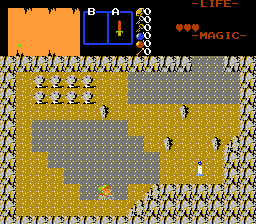
Render combo effects when Link is on specific combo. Made on request by SkyFlare.
Description Setup Reviews Comments
1.Find UpdateComboEffects() function inside script file and copy RenderComboEffect for each combo that should have effect to render with following arguments:
// cmb - leave as this
// targcmb - if Link is on that combo (from combo table), render effect.
// cmbeffect - combo to use for rendering animation
// csetdffect - Cset to use for rendering animation
// itm - item that cancels rendering this animation, for instace, when that item prevents speed penalty when walking on that combo.
// reverse - if true, item mentioned in "itm" will be instead REQUIRED to render combo effect, like protective aura on boots vs damage combos.
// drawover - if true, combo effect will render on top of link, instead of under.
// animatemoving - if true, then different combo effect is used (next in list), when Link is moving on that combo.
2. Global script combining: Put UpdateComboEffects() function after Waitframe() command inside main loop of active global script.
// cmb - leave as this
// targcmb - if Link is on that combo (from combo table), render effect.
// cmbeffect - combo to use for rendering animation
// csetdffect - Cset to use for rendering animation
// itm - item that cancels rendering this animation, for instace, when that item prevents speed penalty when walking on that combo.
// reverse - if true, item mentioned in "itm" will be instead REQUIRED to render combo effect, like protective aura on boots vs damage combos.
// drawover - if true, combo effect will render on top of link, instead of under.
// animatemoving - if true, then different combo effect is used (next in list), when Link is moving on that combo.
2. Global script combining: Put UpdateComboEffects() function after Waitframe() command inside main loop of active global script.

