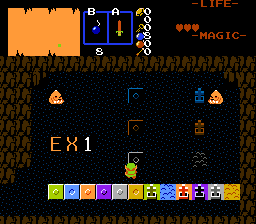
This script is a set of various switches, levers that can define state-switchable combos. Up to 11 switches can be in one screen, 1 per CSet. Switch can be weighted, trigger traps and do more stuff.
Update 12.12.2022 - Added support for solid switches (place FFC on solid combo), levers (hit with any lweapon except whistle) and proper switchable FFCs.
//Simple 2-state switch
//Place FFC st switch location
//D0 - combo to turn flagged combos in off state
//D1 - combo to turn flagged combos in on state
//D2 - Switch type
// 0 - step -> permanent (until leaving screen)
// 1 - step - on, release - off.
// 2 - Toggle state with EX1.
// 3 - Hold EX1 on switch FFC to keep switch on, otherwise off.
// 4 - step - permanent
// 5 - toggle with EX1 - record into register
// 6 - lever - hit with weapon
// 7 - same as above, but registers.
//D3 - Switch only combos with came CSet, as FFC.
//D4 - Quake timer on turning on.
//D5 - trap settings - -1 - fire drop, >0 enemy ID spawn
//D6 - if D5>0 - number of enemies to spawn, else - damage caused by fire eweapons.
//D7 - if (D5<0) - number of fire eweapons to spawn.
//As for switchable FFCs, you can read switch state by passing FFC pointer into SwitchState function that eith returns switch state (true - on, false - off), or generate error and terminates the script.
// Example Switch operated FFC
D0 - ID of FFC running Switch script
D1 - Vx when switch is set to On
D2 - Vy when switch is set to On
D3 - Vx when switch is set to Off
D4 - Vy when switch is set to Off
D5 - X position, when switch is set On
D6 - Y position, when switch is set On
Use FFC changers to limit FFC movements.
If you want solid FFC, set up SolidFFC.zh, then find commented out line inside SwitchableFFC script and un-comment it prior to re-compiling.