
- Current Location:
- PureZC
- » PureZC Forums
- » Scripts
- » Tetris Blocks 4 + Remote controller
Tetris Blocks 4 + Remote controller

Overview
Creator:
Alucard648
Updated: 25 May 2024
Tags:
FFC
Downloads: 17
|
Download Package (1.96 MB) |

Information
Alternate variant of Moosh`s polyomino pushblocks, that evolved into extensive collection of various polyomino puzzle elements. And script for remote controller.
Made on request by SkyFlare.
Made on request by SkyFlare.

Description Setup Reviews Comments
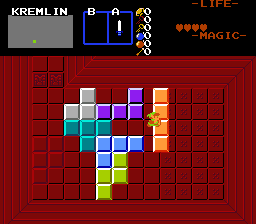
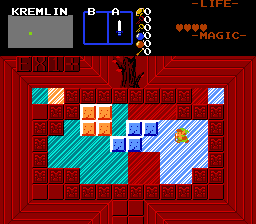
Tetris-like pushable blocks, alternate variant + remote controller that can push and rotate pushblocks at distance.
Remote control has the following actions, when stood on:
Ex1 - push Tetris Block it controls one space in Link`s direction. Works only, if space is free from solid combos
and NoPushblock flags.
Ex2 - rotate Tetris Block clockwise, if unobstructed.
Ex3 - flip Tetris Block horizontally, if unobstructed.
Ex4 - flip Tetris Block vertically, if unobstructed.
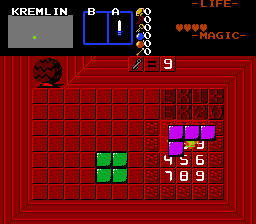
Non-solid klotski-like tetrominoes and their painting variants. Stand on it, face desired direction and press EX1 to move it.
Lift and place polyominoes and their painting variants. Ex1 to lift and place, EX2 to rotate and EX3 to flip horizontally,if held.
Credit goes to Moosh for technical assistancewith all that work.
Update 24.04.2022 - Inherent trigger flags supported.
Update 3.5.2022 - Added 5 new flags - gets stuck after 1 push, gets stuck when landing on trigger, icy block, continue moving in direction until hitting obstacle, ignore triggers, require triggers with same CSet as FFC`s Cset.
Massive Update 9.6.2022:
Unfortunately due to inline script character limit, this script can only be found inside ZIP file with demos.
Update 25.05.2024 - fix compile in 2.55
Remote control has the following actions, when stood on:
Ex1 - push Tetris Block it controls one space in Link`s direction. Works only, if space is free from solid combos
and NoPushblock flags.
Ex2 - rotate Tetris Block clockwise, if unobstructed.
Ex3 - flip Tetris Block horizontally, if unobstructed.
Ex4 - flip Tetris Block vertically, if unobstructed.
Non-solid klotski-like tetrominoes and their painting variants. Stand on it, face desired direction and press EX1 to move it.
Lift and place polyominoes and their painting variants. Ex1 to lift and place, EX2 to rotate and EX3 to flip horizontally,if held.
Credit goes to Moosh for technical assistancewith all that work.
Update 24.04.2022 - Inherent trigger flags supported.
Update 3.5.2022 - Added 5 new flags - gets stuck after 1 push, gets stuck when landing on trigger, icy block, continue moving in direction until hitting obstacle, ignore triggers, require triggers with same CSet as FFC`s Cset.
Massive Update 9.6.2022:
- Added alternate setup process for polyomino shapes
- Added non-solid tetris/klotski like blocks
- Added lift & place tetris block puzzles
- Added Mirror Flip option for Remote Controller - allows flipping polyominoes horizontally and vertically
- Added variants for all 3 scripts that can leave behind undercombos like paint. All those variants use next combo in the list and FFC`s CSet for placing undercombos. Also they use combo flag underneath FFC (placed) to define combos needed to be replaced with undercombos to trigger secrets.
Unfortunately due to inline script character limit, this script can only be found inside ZIP file with demos.
Update 25.05.2024 - fix compile in 2.55
//Tetris-like pushable blocks (normal):
1.Set up solid combo with blank tile for CMB_TETRIS_PUSHBLOCK_SOLID constant.
2.Build floor where blocks can be moved on background layer.
3.Place FFC at block initial position. Assign TileWidth and TileHeight so it encompasses entire block.
D0-D3 Block shape, like Moosh`s way to set up blocks in his script.
[0][1][0][0]
[1][1][0][0]
L-shaped small piece, rotating at center - D0 = 100, D1 = 1100, D2=0, D3=0
[0][1][0][0]
[1][1][0][0]
[1][0][0][0]
Z-shaped piece, rotating at center - D0 = 100, D1 = 1000, D2 = 100, D3=0
As an alternative, you can build shape using combos, place 1x1 FFC with the same combo and CSet at top left corner of shape, and leave D0 as 0.
D4 - Weight, bracelet level needed to push block by hand. If remote controller is used, weight is treated as 0.
D5 - Allowed push directions, both by hand and remote controller. Add together: 1 - Up, 2 - Down, 4 - Left, 8 - Right.
If you leave D5 as 0, all push directions are available.
D6 - add together: 1 - gets stuck after 1 push, 2 - gets stuck when landing on trigger, 4 - icy block, continue moving in direction until hitting obstacle, 8 - ignore triggers, 16 - require triggers with dame CSet as FFC`s Cset, 32 - use FAST Combo automatic rendering.
//Tetris pushblock remote controller:
1.Effect Width and EffectHeight are used.
2.Place FFC at controller`s position.
D0 - ID of FFC. It must run TetrisPushBlock script, of you will get error message into allegro.log
//Non-solid klotski-like tetromino (normal):
1.Set up combo with blank tile and NoPushBlocks inherent flag for CMB_TETRIS_KLOTSKI_NONSOLID constant.
2.Build floor where blocks can be moved on background layer.
3.Place FFC at block initial position. Assign TileWidth and TileHeight so it encompasses entire block.
D0-D3 Block shape, like Moosh`s way to set up blocks.
[0][1][0][0]
[1][1][0][0]
T-shaped piece, rotating at center - D0 = 100, D1 = 1100, D2=0, D3=0
[0][1][0][0]
[1][1][0][0]
[1][0][0][0]
Z-shaped piece, rotating at center - D0 = 100, D1 = 1000, D2 = 100, D3=0
As an alternative, you can build shape using combos, place 1x1 FFC with the same combo and CSet at top left corner of shape, and leave D0 as 0.
D4 - Weight, bracelet level needed to push block.
D5 - Allowed push directions. Add together: 1 - Up, 2 - Down, 4 - Left, 8 - Right.
If you leave D5 as 0, all push directions are available.
D6 - add together: 1 - gets stuck after 1 push, 2 - gets stuck when landing on trigger, 4 - icy block, continue moving in direction until hitting obstacle, 8 - ignore triggers, 16 - require triggers with same CSet as FFC`s Cset, 32 - use FAST Combo automatic rendering.
//Lift and place polyominoes (normal).
1.Set up combo with blank tile and NoPushBlocks inherent flag for CMB_TETRIS_KLOTSKI_NONSOLID constant.
2.Build floor where blocks can be moved on background layer.
3.Place FFC at block initial position. Assign TileWidth and TileHeight so it encompasses entire block.
D0-D3 Block shape, like Moosh`s way to set up blocks.
[0][1][0][0]
[1][1][0][0]
T-shaped piece, rotating at center - D0 = 100, D1 = 1100, D2=0, D3=0
[0][1][0][0]
[1][1][0][0]
[1][0][0][0]
Z-shaped piece, rotating at center - D0 = 100, D1 = 1000, D2 = 100, D3=0
As an alternative, you can build shape using combos, place 1x1 FFC with the same combo and CSet at top left corner of shape, and leave D0 as 0.
D4 - Weight, bracelet level needed to push block by hand. If remote controller is used, weight is treated as 0.
D5 - unused
D6 - add together: 1 - allow rotating with EX2,2 - allow flipping horizontally with EX3, 8 - ignore triggers, 16 - require triggers with same CSet as FFC`s Cset.
//Tetris-like painting pushable block.
1.Set up 2 consecutive combos, 1 for Tetris combo itself, then one to paint combos with.
2.Flag all target combos, including combo under FFC, with the same flag ID.
3.Place FFC at block initial position. Assign TileWidth and TileHeight so it encompasses entire block.
D0-D3 Block shape, like Moosh`s way to set up blocks.
[0][1][0][0]
[1][1][0][0]
T-shaped piece, rotating at center - D0 = 100, D1 = 1100, D2=0, D3=0
[0][1][0][0]
[1][1][0][0]
[1][0][0][0]
Z-shaped piece, rotating at center - D0 = 100, D1 = 1000, D2 = 100, D3=0
As an alternative, you can build shape using 1st combo from step 1, place 1x1 FFC with the same combo and CSet at top left corner of shape, and leave D0 as 0.
D4 - Weight, bracelet level needed to push block by hand. If remote controller is used, weight is treated as 0.
D5 - Allowed push directions, both by hand and remote controller. Add together: 1 - Up, 2 - Down, 4 - Left, 8 - Right.
If you leave D5 as 0, all push directions are available.
D6 - add together: 1 - gets stuck after 1 push, 2 - gets stuck when all target combos are painted, 4 - icy block, continue moving in direction until hitting obstacle, 8 - ignore triggers, 16 - require triggers with same CSet as FFC`s Cset, 32 - use FAST Combo automatic rendering.
//Non-solid klotski-like painting polyomino.
1.Set up 2 consecutive combos, 1 for Tetris combo itself (non-solid, with NoPushBlocks inherent flag), then one to paint combos with.
2.Flag all target combos, including combo under FFC, with the same flag ID.
3.Place FFC at block initial position. Assign TileWidth and TileHeight so it encompasses entire block.
D0-D3 Block shape, like Moosh`s way to set up blocks.
[0][1][0][0]
[1][1][0][0]
T-shaped piece, rotating at center - D0 = 100, D1 = 1100, D2=0, D3=0
[0][1][0][0]
[1][1][0][0]
[1][0][0][0]
Z-shaped piece, rotating at center - D0 = 100, D1 = 1000, D2 = 100, D3=0
As an alternative, you can build shape using combos, place 1x1 FFC with the same combo and CSet at top left corner of shape, and leave D0 as 0.
D4 - Weight, bracelet level needed to push block.
D5 - Allowed push directions. Add together: 1 - Up, 2 - Down, 4 - Left, 8 - Right.
If you leave D5 as 0, all push directions are available.
D6 - add together: 1 - gets stuck after 1 push, 2 - gets stuck when all target combos are painted, 4 - icy block, continue moving in direction until hitting obstacle, 8 - ino secret trigger, 16 - unused, 32 - use FAST Combo automatic rendering.
//Lift and Place Painting Polyomino
1.Set up 2 consecutive combos with the same tile, 1 for Tetris combo itself, then one to paint combos with.
2.Build floor where blocks can be moved on background layer.
3.Place FFC at block initial position. Assign TileWidth and TileHeight so it encompasses entire block.
D0-D3 Block shape, like Moosh`s way to set up blocks.
[0][1][0][0]
[1][1][0][0]
T-shaped piece, rotating at center - D0 = 100, D1 = 1100, D2=0, D3=0
[0][1][0][0]
[1][1][0][0]
[1][0][0][0]
Z-shaped piece, rotating at center - D0 = 100, D1 = 1000, D2 = 100, D3=0
As an alternative, you can build shape using combos, place FFC with the same combo and CSet at top left corner of shape, and leave D0 as 0.
D4 - Weight, bracelet level needed to lift the polyomino. If remote controller is used, weight is treated as 0.
D5 - unused
D6 - add together: 1 - allow rotating with EX2,2 - allow flipping horizontally with EX3, 4 - ban placing on already painted combos, 8 - ignore triggers.
1.Set up solid combo with blank tile for CMB_TETRIS_PUSHBLOCK_SOLID constant.
2.Build floor where blocks can be moved on background layer.
3.Place FFC at block initial position. Assign TileWidth and TileHeight so it encompasses entire block.
D0-D3 Block shape, like Moosh`s way to set up blocks in his script.
[0][1][0][0]
[1][1][0][0]
L-shaped small piece, rotating at center - D0 = 100, D1 = 1100, D2=0, D3=0
[0][1][0][0]
[1][1][0][0]
[1][0][0][0]
Z-shaped piece, rotating at center - D0 = 100, D1 = 1000, D2 = 100, D3=0
As an alternative, you can build shape using combos, place 1x1 FFC with the same combo and CSet at top left corner of shape, and leave D0 as 0.
D4 - Weight, bracelet level needed to push block by hand. If remote controller is used, weight is treated as 0.
D5 - Allowed push directions, both by hand and remote controller. Add together: 1 - Up, 2 - Down, 4 - Left, 8 - Right.
If you leave D5 as 0, all push directions are available.
D6 - add together: 1 - gets stuck after 1 push, 2 - gets stuck when landing on trigger, 4 - icy block, continue moving in direction until hitting obstacle, 8 - ignore triggers, 16 - require triggers with dame CSet as FFC`s Cset, 32 - use FAST Combo automatic rendering.
//Tetris pushblock remote controller:
1.Effect Width and EffectHeight are used.
2.Place FFC at controller`s position.
D0 - ID of FFC. It must run TetrisPushBlock script, of you will get error message into allegro.log
//Non-solid klotski-like tetromino (normal):
1.Set up combo with blank tile and NoPushBlocks inherent flag for CMB_TETRIS_KLOTSKI_NONSOLID constant.
2.Build floor where blocks can be moved on background layer.
3.Place FFC at block initial position. Assign TileWidth and TileHeight so it encompasses entire block.
D0-D3 Block shape, like Moosh`s way to set up blocks.
[0][1][0][0]
[1][1][0][0]
T-shaped piece, rotating at center - D0 = 100, D1 = 1100, D2=0, D3=0
[0][1][0][0]
[1][1][0][0]
[1][0][0][0]
Z-shaped piece, rotating at center - D0 = 100, D1 = 1000, D2 = 100, D3=0
As an alternative, you can build shape using combos, place 1x1 FFC with the same combo and CSet at top left corner of shape, and leave D0 as 0.
D4 - Weight, bracelet level needed to push block.
D5 - Allowed push directions. Add together: 1 - Up, 2 - Down, 4 - Left, 8 - Right.
If you leave D5 as 0, all push directions are available.
D6 - add together: 1 - gets stuck after 1 push, 2 - gets stuck when landing on trigger, 4 - icy block, continue moving in direction until hitting obstacle, 8 - ignore triggers, 16 - require triggers with same CSet as FFC`s Cset, 32 - use FAST Combo automatic rendering.
//Lift and place polyominoes (normal).
1.Set up combo with blank tile and NoPushBlocks inherent flag for CMB_TETRIS_KLOTSKI_NONSOLID constant.
2.Build floor where blocks can be moved on background layer.
3.Place FFC at block initial position. Assign TileWidth and TileHeight so it encompasses entire block.
D0-D3 Block shape, like Moosh`s way to set up blocks.
[0][1][0][0]
[1][1][0][0]
T-shaped piece, rotating at center - D0 = 100, D1 = 1100, D2=0, D3=0
[0][1][0][0]
[1][1][0][0]
[1][0][0][0]
Z-shaped piece, rotating at center - D0 = 100, D1 = 1000, D2 = 100, D3=0
As an alternative, you can build shape using combos, place 1x1 FFC with the same combo and CSet at top left corner of shape, and leave D0 as 0.
D4 - Weight, bracelet level needed to push block by hand. If remote controller is used, weight is treated as 0.
D5 - unused
D6 - add together: 1 - allow rotating with EX2,2 - allow flipping horizontally with EX3, 8 - ignore triggers, 16 - require triggers with same CSet as FFC`s Cset.
//Tetris-like painting pushable block.
1.Set up 2 consecutive combos, 1 for Tetris combo itself, then one to paint combos with.
2.Flag all target combos, including combo under FFC, with the same flag ID.
3.Place FFC at block initial position. Assign TileWidth and TileHeight so it encompasses entire block.
D0-D3 Block shape, like Moosh`s way to set up blocks.
[0][1][0][0]
[1][1][0][0]
T-shaped piece, rotating at center - D0 = 100, D1 = 1100, D2=0, D3=0
[0][1][0][0]
[1][1][0][0]
[1][0][0][0]
Z-shaped piece, rotating at center - D0 = 100, D1 = 1000, D2 = 100, D3=0
As an alternative, you can build shape using 1st combo from step 1, place 1x1 FFC with the same combo and CSet at top left corner of shape, and leave D0 as 0.
D4 - Weight, bracelet level needed to push block by hand. If remote controller is used, weight is treated as 0.
D5 - Allowed push directions, both by hand and remote controller. Add together: 1 - Up, 2 - Down, 4 - Left, 8 - Right.
If you leave D5 as 0, all push directions are available.
D6 - add together: 1 - gets stuck after 1 push, 2 - gets stuck when all target combos are painted, 4 - icy block, continue moving in direction until hitting obstacle, 8 - ignore triggers, 16 - require triggers with same CSet as FFC`s Cset, 32 - use FAST Combo automatic rendering.
//Non-solid klotski-like painting polyomino.
1.Set up 2 consecutive combos, 1 for Tetris combo itself (non-solid, with NoPushBlocks inherent flag), then one to paint combos with.
2.Flag all target combos, including combo under FFC, with the same flag ID.
3.Place FFC at block initial position. Assign TileWidth and TileHeight so it encompasses entire block.
D0-D3 Block shape, like Moosh`s way to set up blocks.
[0][1][0][0]
[1][1][0][0]
T-shaped piece, rotating at center - D0 = 100, D1 = 1100, D2=0, D3=0
[0][1][0][0]
[1][1][0][0]
[1][0][0][0]
Z-shaped piece, rotating at center - D0 = 100, D1 = 1000, D2 = 100, D3=0
As an alternative, you can build shape using combos, place 1x1 FFC with the same combo and CSet at top left corner of shape, and leave D0 as 0.
D4 - Weight, bracelet level needed to push block.
D5 - Allowed push directions. Add together: 1 - Up, 2 - Down, 4 - Left, 8 - Right.
If you leave D5 as 0, all push directions are available.
D6 - add together: 1 - gets stuck after 1 push, 2 - gets stuck when all target combos are painted, 4 - icy block, continue moving in direction until hitting obstacle, 8 - ino secret trigger, 16 - unused, 32 - use FAST Combo automatic rendering.
//Lift and Place Painting Polyomino
1.Set up 2 consecutive combos with the same tile, 1 for Tetris combo itself, then one to paint combos with.
2.Build floor where blocks can be moved on background layer.
3.Place FFC at block initial position. Assign TileWidth and TileHeight so it encompasses entire block.
D0-D3 Block shape, like Moosh`s way to set up blocks.
[0][1][0][0]
[1][1][0][0]
T-shaped piece, rotating at center - D0 = 100, D1 = 1100, D2=0, D3=0
[0][1][0][0]
[1][1][0][0]
[1][0][0][0]
Z-shaped piece, rotating at center - D0 = 100, D1 = 1000, D2 = 100, D3=0
As an alternative, you can build shape using combos, place FFC with the same combo and CSet at top left corner of shape, and leave D0 as 0.
D4 - Weight, bracelet level needed to lift the polyomino. If remote controller is used, weight is treated as 0.
D5 - unused
D6 - add together: 1 - allow rotating with EX2,2 - allow flipping horizontally with EX3, 4 - ban placing on already painted combos, 8 - ignore triggers.
No reviews found!
No comments found!

