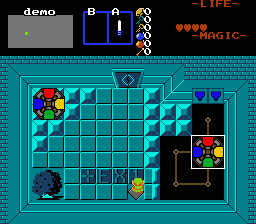
//Railroad Rotating/Moving colored circle 2*2.
Stand on FFC, face desired direction and press EX1, to cause colored circle on rails to start it moving along it until next node (32 pixels per move). As circle moves, it turns 90 degrees every 32 pixels moved. Bring all circles to target positions while having them facing target directions to solve the puzzle.
1. Set up combo pointing to 2*2 tile image. Assign CMB_MOVING_ROTCIRCLE constant in script file to it. Also you need to set CSET_MOVING_ROTCIRCLE to define CSet used to render puzzle element.
2. Build rail paths using CF_MOVING_CIRCLES_PATH flags and referring top-left corner as standpoint.
3. Import and compile the script.
4. Place FFC at operator spot.
D0 - Combo position for starting location of colored circle. Mouse over desired location in ZQuest screen editor and note down combo position to be inpited into D0.
D1 - Starting direction facing for circle. 0 - 3
D2 - Target position for colored circle. Same instructions ad for D0.
D3 - Target direction for colored circle.
D4 - 1 - anti-clockwise rotation, 0 for clockwise rotation.
D5 - Does not stop moving unless obstructed.