
Railroad Rotating/Moving colored circle puzzle
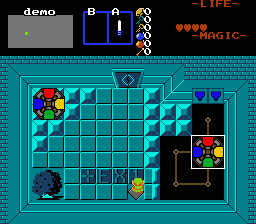
Overview
Creator:
Alucard648
Added: 19 Jan 2022
Tags:
FFC
Downloads: 13
|
View Script
Download Package (862.34 KB) |

Information
Another puzzle done on request by SkyFlare


Description Setup Reviews Comments
1. Set up combo pointing to 2*2 tile image. Assign CMB_MOVING_ROTCIRCLE constant in script file to it. Also you need to set CSET_MOVING_ROTCIRCLE to define CSet used to render puzzle element.
2. Build rail paths using CF_MOVING_CIRCLES_PATH flags and referring top-left corner as standpoint.
3. Import and compile the script.
4. Place FFC at operator spot.
D0 - Combo position for starting location of colored circle. Mouse over desired location in ZQuest screen editor and note down combo position to be inpited into D0.
D1 - Starting direction facing for circle. 0 - 3
D2 - Target position for colored circle. Same instructions ad for D0.
D3 - Target direction for colored circle.
D4 - 1 - anti-clockwise rotation, 0 for clockwise rotation.
D5 - Does not stop moving unless obstructed.
2. Build rail paths using CF_MOVING_CIRCLES_PATH flags and referring top-left corner as standpoint.
3. Import and compile the script.
4. Place FFC at operator spot.
D0 - Combo position for starting location of colored circle. Mouse over desired location in ZQuest screen editor and note down combo position to be inpited into D0.
D1 - Starting direction facing for circle. 0 - 3
D2 - Target position for colored circle. Same instructions ad for D0.
D3 - Target direction for colored circle.
D4 - 1 - anti-clockwise rotation, 0 for clockwise rotation.
D5 - Does not stop moving unless obstructed.

