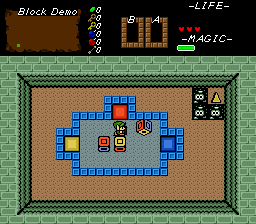
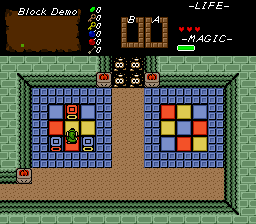
Color Cube. A cube colored red, blue and yellow on opposite sides. Your goal is to roll it so it lands on trigger space same colored side up.
Credit goes to Ywkles for original script.
Update 09.06.2022 - reworked triggers
Update 13.07.2023 - Added option for Color Cubes to leave different undercombos depending on what side Color Cube landed on after each push. Requested by SkyFlare
Update 12.09.2024 - Added Icy Color cube. Once pushed, they continue rolling until hitting an obstacle.
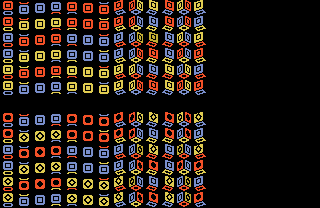
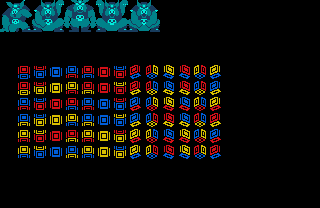
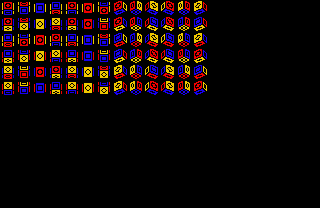
1.Set up tiles and animations as shown in screenshot. You should end up with 6 rows of tiles.
2.Set TILE_COLOR_CUBE_ANIMATION to 1st tile from previous step.
3.Setup 6 solid combos using first tile from each row, in exact the same order up->down.
4. Import and compile the script. It requires stdExtra.zh (packaged with ZC 2.53.1) or Classic.zh.
5. Puzzle building: place floor on background layer, as layer 0 combos will be replaced with undercombo. Keep latter at 0.
6. Place CF_COLOR_CUBE_TRIGGER_* combo flags at trigger spots. Color cubes must land on those positions correct side up to trigger secrets.
7. If you want ColorCube to leave color-specific undercombos (color depends on cube`s top face), set up 6 consecutive combos: Red, Blue, Yellow, Red(solid), Blue(solid), Yellow(solid).
8. Place snd Grid-snap FFC at cube`s initial position. Assign Color Cube script.
D0 - Initial state of the color cube. See state list inside script file for accepted values
D1 - bracelet power needed to push color cubes.
D2 - Add together: 1 - Cube will get stuck on correct landing on trigger. 2 - Use colored undercombos to check triggers (D3>0) See the demo for designing undercombo related color cube puzzles. 4- Ice Color cube - continue rolling, until hitting obstacle.
D3 - ID of 1st combo from step 7, 0 for default undercombo behavior.