
Color Cubes fixed
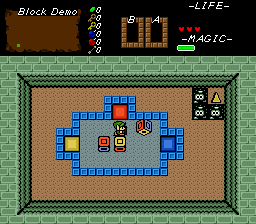
Overview
Creator:
Alucard648
Updated: 12 Sep 2024
Tags:
FFC
Downloads: 39
|
View Script
Download Package (1.39 MB) |

Information
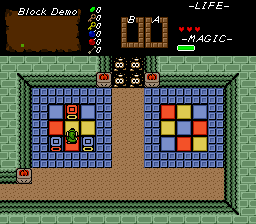
Fixed old script on request by SkyFlare
Description Setup Reviews Comments
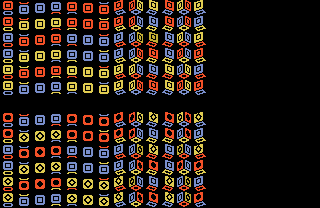
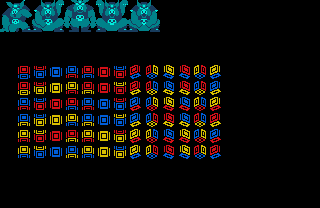
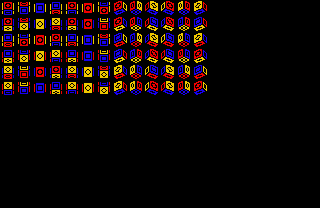
1.Set up tiles and animations as shown in screenshot. You should end up with 6 rows of tiles.
2.Set TILE_COLOR_CUBE_ANIMATION to 1st tile from previous step.
3.Setup 6 solid combos using first tile from each row, in exact the same order up->down.
4. Import and compile the script. It requires stdExtra.zh (packaged with ZC 2.53.1) or Classic.zh.
5. Puzzle building: place floor on background layer, as layer 0 combos will be replaced with undercombo. Keep latter at 0.
6. Place CF_COLOR_CUBE_TRIGGER_* combo flags at trigger spots. Color cubes must land on those positions correct side up to trigger secrets.
7. If you want ColorCube to leave color-specific undercombos (color depends on cube`s top face), set up 6 consecutive combos: Red, Blue, Yellow, Red(solid), Blue(solid), Yellow(solid).
8. Place snd Grid-snap FFC at cube`s initial position. Assign Color Cube script.
D0 - Initial state of the color cube. See state list inside script file for accepted values
D1 - bracelet power needed to push color cubes.
D2 - Add together: 1 - Cube will get stuck on correct landing on trigger. 2 - Use colored undercombos to check triggers (D3>0) See the demo for designing undercombo related color cube puzzles. 4- Ice Color cube - continue rolling, until hitting obstacle.
D3 - ID of 1st combo from step 7, 0 for default undercombo behavior.
2.Set TILE_COLOR_CUBE_ANIMATION to 1st tile from previous step.
3.Setup 6 solid combos using first tile from each row, in exact the same order up->down.
4. Import and compile the script. It requires stdExtra.zh (packaged with ZC 2.53.1) or Classic.zh.
5. Puzzle building: place floor on background layer, as layer 0 combos will be replaced with undercombo. Keep latter at 0.
6. Place CF_COLOR_CUBE_TRIGGER_* combo flags at trigger spots. Color cubes must land on those positions correct side up to trigger secrets.
7. If you want ColorCube to leave color-specific undercombos (color depends on cube`s top face), set up 6 consecutive combos: Red, Blue, Yellow, Red(solid), Blue(solid), Yellow(solid).
8. Place snd Grid-snap FFC at cube`s initial position. Assign Color Cube script.
D0 - Initial state of the color cube. See state list inside script file for accepted values
D1 - bracelet power needed to push color cubes.
D2 - Add together: 1 - Cube will get stuck on correct landing on trigger. 2 - Use colored undercombos to check triggers (D3>0) See the demo for designing undercombo related color cube puzzles. 4- Ice Color cube - continue rolling, until hitting obstacle.
D3 - ID of 1st combo from step 7, 0 for default undercombo behavior.


