
Picture Assembly Puzzle

Overview
Creator:
Alucard648
Added: 17 Oct 2021
Tags:
FFC
Downloads: 10
|
View Script
Download Package (1 MB) |

Information
Made by another request from SkyFlare
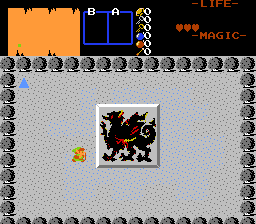
Description Setup Reviews Comments
1. Set up solid combos to form 2*2 to 4*4 picture
2. Place FFC where you want fully assembled picture to be.
3. Assign FFC`s combo to top left corner of picture.
4. Set up Tile Width and Tile Height to determine picture dimensions.
5. Set "Run at Screen Init" FFC flag.
6. No arguments needed. Scatter picture parts (combos from step 1) anywhere in the screen and flag them as pushable.
2. Place FFC where you want fully assembled picture to be.
3. Assign FFC`s combo to top left corner of picture.
4. Set up Tile Width and Tile Height to determine picture dimensions.
5. Set "Run at Screen Init" FFC flag.
6. No arguments needed. Scatter picture parts (combos from step 1) anywhere in the screen and flag them as pushable.

