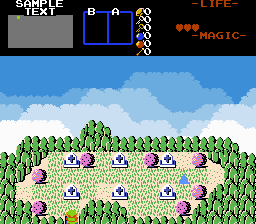
First, combine the global script with your own.
On any DMap where you want to have a scrolling background, place down an FFC with the
ScrollingLayer_Assign script on all entrance screens. Set D0-7 to the following:
- D0: Which scrolling layer slot to write over (0-5)
- D1: Which layer to draw to
- D2: The map to draw the layer from
- D3: The screen to draw the layer from (in decimal)
- D4: The movement speed of the layer on the X-axis
- D5: The movement speed of the layer on the Y-axis
- D6: The opacity of the layer. 0 will erase the current layer. 64 will make it transparent. 128 will make it solid.
- D7: A sum of special flags applied to the layer:
- 1: Layer only scrolls when Link moves on the X-axis
- 2: Layer only scrolls when Link moves on the Y-axis
- 4: Layer only scrolls when the screen is scrolling on the X-axis
- 8: Layer only scrolls when the screen is scrolling on the Y-axis
- 16: Layer uses a 2x2 screen block
- 32: Layer uses a 3x3 screen block
- 64: Layer uses a 4x4 screen block
- 128: Layer will always use DrawScreen()
If you need finer control of your layer, you can also place down an FFC with the
ScrollingLayer_Reposition script on the same screen as the first script. Set D0-7 to the following:
- D0: Which scrolling layer slot to adjust (0-5)
- D1: The new camera X position on the layer
- D2: The new camera Y position on the layer
- D3: The new width of the layer (this will override the flag settings)
- D4: The new height of the layer (this will override the flag settings)
If you want your layers to appear in the background, you'll need to use the Layer 2 is Background or Layer 3 is Background screen flags in the editor and use one of those layers. Transparency effects on background layers may be buggy.
If you're doing effects with scrolling layers, be sure the
SCROLLINGLAYER_FASTSCROLLING constant is set the same as the rule.
Note about transparency on layers -2 and -3: To get working transparency on a background layer in 2.53, set flag 128 (Layer will always use DrawScreen() ) on the FFC and set your reference screen to have its own layer with transparency set. This is a hack solution and not optimal for speed, but it works.