Sounds genius
...I'm gonna' try it, soon
Mog Shop
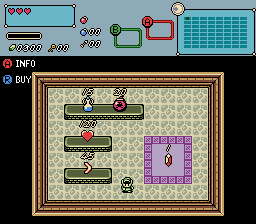
Overview
Creator:
Avaro
Added: 13 Jan 2021
Tags:
FFC
Downloads: 43
|
View Script
Download Example (2.32 MB) |
Information
A flexible shop script. (mog means mega omega glorious)
Description Setup Reviews Comments
Set the const ints inside the script file. When you're done with that import the script. Only requires std.zh.
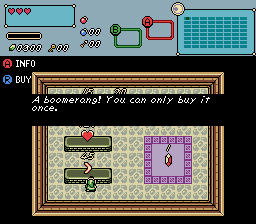
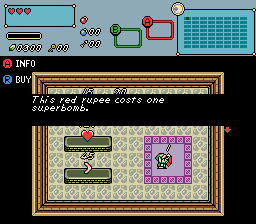
Pressing A plays an info message and pressing R buys the item. Make sure to let the player know about this!
Each shop item is an FFC. Give it a combo and place it on the screen.
D0: Item ID.
D1: Info message.
D2: Price.
D3: Currency. -1 = rupees; 2 = bombs; 3 = arrows; 4 = magic; 5 = normal keys; 6 = super bombs; 7 = script 1; 8 = script 2; ...etc
D4: -1 = can be bought more than once. Otherwise set this to the Screen->D index to use (a number from 0 to 7). Two shop items on the same screen can't use the same index.
D5: Message for when you can't afford the item. -1 = uses your default message.
D6: Shop style. 0 = items on the floor; 1 = items on top of tables.
Items "on the floor" can be placed on solid combos too. The difference for items on tables is that their hitbox is 8 pixels below the FFC and they can only be approached from south. Check out the example quest.
Pressing A plays an info message and pressing R buys the item. Make sure to let the player know about this!
Each shop item is an FFC. Give it a combo and place it on the screen.
D0: Item ID.
D1: Info message.
D2: Price.
D3: Currency. -1 = rupees; 2 = bombs; 3 = arrows; 4 = magic; 5 = normal keys; 6 = super bombs; 7 = script 1; 8 = script 2; ...etc
D4: -1 = can be bought more than once. Otherwise set this to the Screen->D index to use (a number from 0 to 7). Two shop items on the same screen can't use the same index.
D5: Message for when you can't afford the item. -1 = uses your default message.
D6: Shop style. 0 = items on the floor; 1 = items on top of tables.
Items "on the floor" can be placed on solid combos too. The difference for items on tables is that their hitbox is 8 pixels below the FFC and they can only be approached from south. Check out the example quest.