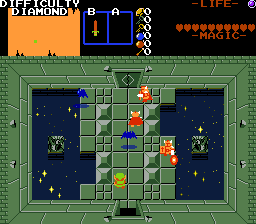
This script allows for dynamic difficulty options like seen in several popular quests. I've also included some FFC scripts to work alongside them.
Included features:
Global damage multiplier
Global enemy multipliers for HP, damage, and step speed
A simple menu for selecting difficulty
A script to override difficulty settings per screen
Scripts to change combos, screen layouts, and warps based on difficulty
A global system to change difficulty per enemy in a quest (Advanced)
Update 7/18/20: Added a 2.55 version of the script with a new function for replacing enemies. Update 12/26/20: Fixed a bug where enemy step speed multipliers were using HP multipliers the whole time and somehow nobody noticed until now.
Global Script:
For this script to work, you'll need to create 2-5 difficulty token items for tracking the player's current selected difficulty. These items can be any itemclass, though Peril Rings (with Maximum Hearts set to 99) are recommended (as they have innate damage divsion) if you're doing global damage multipliers with easy modes. Give each difficulty token its own item level.
Set the following five constants in the script to the item IDs of your difficulty items as seen in the editor:
I_DIFF_VERYEASY
I_DIFF_EASY
I_DIFF_NORMAL
I_DIFF_HARD
I_DIFF_VERYHARD
You don't need to have all 5 difficulties as items if you don't need them. The remaining constants can be left as 0. The names for the five difficulties in the script are completely arbitrary and your difficulty token items don't need to align with them (for example, you could put your hard mode token over I_DIFF_NORMAL), but it may help you stay organized.
Set the following constants to your desired difficulty settings:
Below are global damage multipliers. Any times Link takes damage from any source, it will get multiplied by these. If <1, you'll likely want to use Peril Ring damage divisors on the difficulty tokens instead.
DIFFICULTY_VERYEASY_DAMAGE_MULTIPLIER
DIFFICULTY_EASY_DAMAGE_MULTIPLIER
DIFFICULTY_NORMAL_DAMAGE_MULTIPLIER
DIFFICULTY_HARD_DAMAGE_MULTIPLIER
DIFFICULTY_VERYHARD_DAMAGE_MULTIPLIER?
The following three sets of constants require DIFFICULTY_APPLY_NPC_SCALING to be set to 1 in order to function, else they will be ignored:
Below are enemy damage multipliers. These will be applied only to enemies when they spawn in. They will not affect damage caused by combos or scripts.
DIFFICULTY_ENEMY_VERYEASY_DAMAGE_MULTIPLIER
DIFFICULTY_ENEMY_EASY_DAMAGE_MULTIPLIER
DIFFICULTY_ENEMY_NORMAL_DAMAGE_MULTIPLIER
DIFFICULTY_ENEMY_HARD_DAMAGE_MULTIPLIER
DIFFICULTY_ENEMY_VERYHARD_DAMAGE_MULTIPLIER
Below are enemy HP multipliers. These will be applied only to enemies when they spawn in. Some enemies (splitters and gleeoks) will not apply these due to ZC behaviors.
DIFFICULTY_ENEMY_VERYEASY_HP_MULTIPLIER
DIFFICULTY_ENEMY_EASY_HP_MULTIPLIER
DIFFICULTY_ENEMY_NORMAL_HP_MULTIPLIER
DIFFICULTY_ENEMY_HARD_HP_MULTIPLIER
DIFFICULTY_ENEMY_VERYHARD_HP_MULTIPLIER
Below are enemy step speed multipliers. These will be applied only to enemies when they spawn in. Changing enemy step can have more dramatic consequences, so not using large multipliers and adding exceptions as needed is recommended.
DIFFICULTY_ENEMY_VERYEASY_STEP_MULTIPLIER
DIFFICULTY_ENEMY_EASY_STEP_MULTIPLIER
DIFFICULTY_ENEMY_NORMAL_STEP_MULTIPLIER
DIFFICULTY_ENEMY_HARD_STEP_MULTIPLIER
DIFFICULTY_ENEMY_VERYHARD_STEP_MULTIPLIER
The script also depends on an NPC Misc[] index to remember which enemies have already had their stats altered. These are occasionally used by other scripts, so if something breaks, make sure NPCM_DIFFICULTYFLAG is set to a unique value for NPC Misc[].
If you're using ghost.zh, you should also swap the commented lines (//) in the following comments. So if you're using ghost.zh
void DifficultyGlobal_SetEnemyHP(npc n, int val){
	//If using ghost.zh, uncomment the following and comment out the line below
		//SetEnemyProperty(n, ENPROP_HP, val);
		n->HP = val;
}

int DifficultyGlobal_GetEnemyHP(npc n){
	//If using ghost.zh, uncomment the following and comment out the line below
		//return GetEnemyProperty(n, ENPROP_HP);
		return n->HP;
}
would become:
void DifficultyGlobal_SetEnemyHP(npc n, int val){
	//If using ghost.zh, uncomment the following and comment out the line below
		SetEnemyProperty(n, ENPROP_HP, val);
		// n->HP = val;
}

int DifficultyGlobal_GetEnemyHP(npc n){
	//If using ghost.zh, uncomment the following and comment out the line below
		return GetEnemyProperty(n, ENPROP_HP);
		// return n->HP;
}
For the final step, you'll need to combine Difficulty_Example with your quest's global script.
FFC and Item Scripts:
Item Script: Difficulty_PickupItem
This script is only needed if you're selling your difficulty tokens in a shop or otherwise giving them out as items in the quest. It makes it so the items remove each other from Link's inventory when picked up.
D0: Set this to the item's ID, visible at the top left of the item editor tab.
FFC Script: Difficulty_Override
This script allows you to override the difficulty on a or sequence, making it behave as one difficulty only.
D0: What difficulty to set it to. See DIFF_ constants in comparison with your difficulty tokens (I_DIFF_) to determine what this should be set to.
D1: Whether the change should be permanent
0 - The change is temporary
1 - The change is permanent, Link will be given the new difficulty item
2 - The change persists until F6 or encountering an instance of this script with D0 set to -1
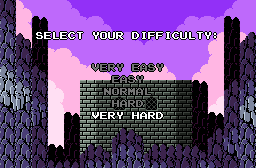
FFC Script: Difficulty_SelectionScreen
This script creates a simple difficulty selection menu. Once a difficulty has been selected, Link will be side warped to another screen through Side Warp A.
The script uses the following constants:
SFX_DIFFICULTY_SELECT: The sound played when the selection cursor is moved.
CMB_AUTOWARPA: An invisible combo with the combo type set to Auto Side Warp A.
C_WHITE: The color white in the main palette, in hexadecimal.
C_GRAY: The color gray in the main palette, in hexadecimal.
C_BLACK: The color black in the main palette, in hexadecimal.
It also uses the following arguments:
D0: Set this to the default difficulty. See the DIFF_ constants in comparison with your difficulty tokens (I_DIFF_).
D3: A ZQuest editor string with the name for your "Very Easy" difficulty. Skipped if 0.
D4: A ZQuest editor string with the name for your "Easy" difficulty. Skipped if 0.
D5: A ZQuest editor string with the name for your "Normal" difficulty. Skipped if 0.
D6: A ZQuest editor string with the name for your "Hard" difficulty. Skipped if 0.
D7: A ZQuest editor string with the name for your "Very Hard" difficulty. Skipped if 0.
FFC Script: Difficulty_ReplaceScreen
This script copies the contents of an entire screen's combos over one of the current screen's layers based on difficulty.
D0: The map to pull all the replacement screens from.
D1: The layer to replace on the current screen
D3: The screen to pull from on "Very Easy". -1 for none.
D4: The screen to pull from on "Easy". -1 for none.
D5: The screen to pull from on "Normal". -1 for none.
D6: The screen to pull from on "Hard". -1 for none.
D7: The screen to pull from on "Very Hard". -1 for none.
FFC Script: Difficulty_ReplaceCombo
This script is like the previous one, but for small changes where only certain combo IDs need to be replaced.
D0: The combo to search for.
D3: The combo to replace it with on "Very Easy". 0 for none.
D4: The combo to replace it with on "Easy". 0 for none.
D5: The combo to replace it with on "Normal". 0 for none.
D6: The combo to replace it with on "Hard". 0 for none.
D7: The combo to replace it with on "Very Hard". 0 for none.
FFC Script: Difficulty_ChangeWarp
This script will change a side warp based on difficulty. It'll need an instance per warp, per difficulty.
D0: The new DMap to warp to.
D1: The new DMap screen to warp to (in decimal).
D2: Whether to change the tile warp or side warp.
0 - Tile Warp
1 - Side Warp
D3: Which of the four warps to change.
0 - A
1 - B
2 - C
3 - D
D4: Which difficulty to check for when changing the warp. See the DIFF_ constants in comparison with your difficulty tokens (I_DIFF_).
Enemy Specific Exceptions (Advanced):
Spoiler
If you need to add exceptions to the scaling for certain enemies, including access to attributes that don't scale normally (random rate, item set, weapon), you'll have to get a little more involved with the script itself than just changing some numbers.
In the script, there's a function called DifficultyGlobal_InitEnemyTables() and a set of functions to call within it. I've included a full list of all these functions and an example enemy set up commented in the function. You only need to call them for each attribute on the enemy that's affected by difficulty. Each function has the same set of 6 arguments in this order:
NPCID: The ID of the enemy in the enemy editor. Both constants (NPC_ in std.zh) and numbers will work for this.
VeryEasy: The stat on "Very Easy". -1 will use global scaling settings instead. -2 will use enemy editor settings instead.
Easy: The stat on "Easy". -1 will use global scaling settings instead. -2 will use enemy editor settings instead.
Normal: The stat on "Normal". -1 will use global scaling settings instead. -2 will use enemy editor settings instead.
Hard: The stat on "Hard". -1 will use global scaling settings instead. -2 will use enemy editor settings instead.
VeryHard: The stat on "Very Hard". -1 will use global scaling settings instead. -2 will use enemy editor settings instead.
For the most part you can copy and paste the functions around and fill in the numbers as needed. For setting weapons you should exclusively use the WPN_ constants in std_constants.zh instead of raw numbers.
I'll list off the functions commented in the script here as well:
EnemyDiff_HP(NPCID, VeryEasy, Easy, Normal, Hard, VeryHard) - Sets enemy HP
EnemyDiff_Replace(NPCID, VeryEasy, Easy, Normal, Hard, VeryHard) - Only in the 2.55 version. Replaces an enemy with another enemy when spawning. 0 to remove an enemy.
Lastly, and somewhat unrelated, for scripters and tinkerers, the following function can be used for integrating difficulty into your other scripts.
Difficulty_DiffMod(int dVeryEasy, int dEasy, int dNormal, int dHard, int dVeryHard)
The five arguments are settings for the five difficulties in order from "Very Easy" to "Very Hard". You can plug this in pretty much wherever to return different numbers based on difficulty. Happy tinkering!
This script only requires std.zh. If you're on 2.53 and need to reference constants for some of the setup, remember it's been moved to include/std_zh/std_constants.zh.
No reviews found!
Max Headroom
Posted 23 January 2026 - 11:21 AM
A neat addition, An idea inspired by the bloodmoon in the Botw/totk games, after a set amount of time or how many macguffins one has, the game gets harder with an option to add a text box / cutscene. Ex "Its an awful time to have a curse." / "Ganon's fury is growing."
Blackpaintbowser
Posted 11 May 2022 - 10:02 PM
I can't seem to figure out how to set what difficulty the menu starts on
Deedee
Posted 18 June 2020 - 02:34 PM
Random idea: have it so difficulty mode can additionally change the csets and/or tiles of enemies for harder difficulties (say if you want a darknut with two swords instead of one as a sprite to signify they're harder, or you want to recolor red darknuts to blue on harder difficulties)
Mani Kanina
Posted 18 June 2020 - 01:16 PM
The mad lad went and did it. I wish I could say I'm surprised, but isn't the first time Moosh has done the big stuff.
Going to be interesting to see if any quests puts this to use.