Jump Button
Overview
Creator:
Moosh
Added: 24 Aug 2019
Tags:
Global
Downloads: 39
|
View Script
Download Example (912.97 KB) |

Information
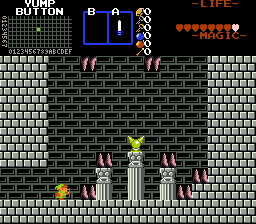
A global script that adds a jump button and some upgrade items to go with it.
Description Setup Reviews Comments
Combine the script with your own globals and then set the following constants:
Items:
These are the only real essential constants. If you don't want the upgrade items, set the IDs to something that isn't an equipment item. If you do want them, set up equipment items them. High Jump and Double Jump are designed to be mutually exclusive since they serve a similar purpose, but that's up to you.
The sound effects for the three jump types. Double jump and space jump will both follow one regular jump and can use the same sound as it or different ones if you prefer.
Items:
These are the only real essential constants. If you don't want the upgrade items, set the IDs to something that isn't an equipment item. If you do want them, set up equipment items them. High Jump and Double Jump are designed to be mutually exclusive since they serve a similar purpose, but that's up to you.
- I_HIGHJUMP
- I_DOUBLEJUMP
- I_SPACEJUMP
The sound effects for the three jump types. Double jump and space jump will both follow one regular jump and can use the same sound as it or different ones if you prefer.
- SFX_JUMPBUTTON_JUMP
- SFX_JUMPBUTTON_DOUBLEJUMP
- SFX_JUMPBUTTON_SPACEJUMP
- JUMPBUTTON_BUTTON: Which button you want the jump to be assigned to - 0 ( L ), 1 ( R ), 2 ( Ex1 ), 3 ( Ex2 ), 4 ( Ex3 ), 5 ( Ex4 )
- JUMPBUTTON_ONLY_SIDEVIEW: If this is set to 1, the jump button will only work while on sideview screens.
- JUMPBUTTON_DECAY_IS_PERCENTAGE: If this is set to 1, the decay speed of Link's jump when the button isn't held is a percentage of the current value instead of a constant.
- JUMPBUTTON_IGNORE_SWEETSPOTS: If this is set to 1, Link can always double jump/space jump regardless of the current jump value.
- JUMPBUTTON_JUMP_HEIGHT: Link's base jump height
- JUMPBUTTON_HIGH_JUMP_HEIGHT: The height of high jump
- JUMPBUTTON_DOUBLE_JUMP_HEIGHT: The height of the second jump in a double jump
- JUMPBUTTON_SPACE_JUMP_HEIGHT: The height of space jump. If 0, this will be the same as either normal or high jump
- JUMPBUTTON_JUMP_DECAY: How fast Link's jump value decays each frame after releasing the button.
- JUMPBUTTON_PRESSDOWN_DECAY: How fast Link's jump value decays when pressing down in sideview
- JUMPBUTTON_TERMINAL_VELOCITY: Terminal velocity as set in ZQuest
- JUMPBUTTON_TERMINAL_VELOCITY_DOWNINPUT: Secondary terminal velocity when holding down, if you want it to exceed the normal one
- JUMPBUTTON_DOUBLE_JUMP_RANGE_MIN / JUMPBUTTON_DOUBLE_JUMP_RANGE_MAX: Min and max for the range of Link's jump value (Starts positive and counts down to -3.2 in increments of 0.16 each frame by default) where he can perform a double jump. If min is less than negative terminal velocity, it can be possible to miss the jump entirely.
- JUMPBUTTON_SPACE_JUMP_RANGE_MIN / JUMPBUTTON_SPACE_JUMP_RANGE_MAX: Same as above but for space jump.
- JUMPBUTTON_SPACE_JUMP_COOLDOWN: If space jump has a missable sweet spot range in the above setting, this determines the number of frames it takes before Link gets his jump back if he misses a jump.
- JUMPBUTTON_JUMP_FORGIVENESS_FRAMES: This is the number of frames after Link walks off a ledge where he's still allowed to jump as if he was still on it. The length of "coyote time"