Crystal Switch and Colored (Red/Blue) Barriers
Overview
Creator:
Moosh
Updated: 07 Mar 2019
Tags:
FFC,
Global
Downloads: 82
|
View Script
Download Example (882.22 KB) |
Information
Notice: If you're still using 2.50.2 the script won't compile right due to a bug. Use the latest version, folks.
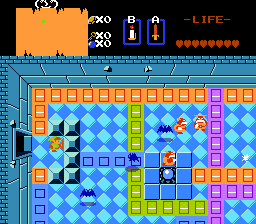
I know there's a few of these scripts floating around, but I looked at what was there and wasn't really a fan. (Combo cycling? Eww!) Here's my own take at it with some extra bells and whistles included.
I know there's a few of these scripts floating around, but I looked at what was there and wasn't really a fan. (Combo cycling? Eww!) Here's my own take at it with some extra bells and whistles included.
Description Setup Reviews Comments
Constants:
Set these constants in the script file. Ordered from most to least important:
Critical:
The script needs these constants assigned to work with your quest.
These are settings that can further customize the script for your quest:
This step is optional. If you don't set these in the script, all dungeons will default to all barriers alternating between raised and lowered to start with.
In the script find, this section. You can Ctrl+F the %FINDME to jump to it quickly.
The arguments (stuff that goes between the commas) of the function go as follows:
This script is a global script, so you'll have to combine it (CrystalSwitch_Example) with your existing script if you're using more than one in your quest. If you don't know how to do this manually I've made a tool that semi-automates the process.
CrystalSwitch_Trigger FFC Script:
Place an FFC with this script anywhere you want a Crystal Switch on your screen. It should be aligned with the combo grid (X and Y divisible by 16). Graphics on the FFC are optional. Set the FFC Flag Run Script At Screen Init.
The FFC's script arguments go as follows:
Set these constants in the script file. Ordered from most to least important:
Critical:
The script needs these constants assigned to work with your quest.
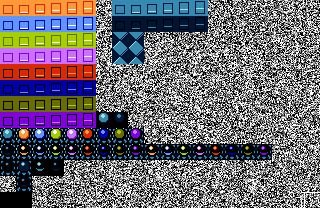
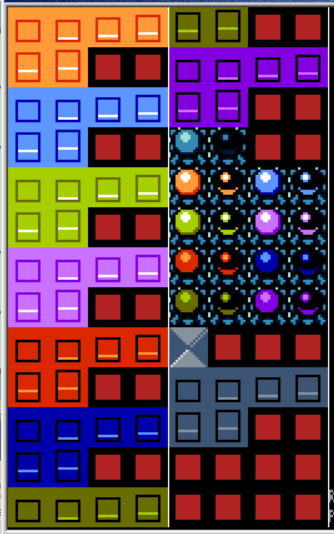
- CMB_CRYSTALSWITCH_BLOCKS: The first of the combos for the raising blocks. Up to 8 groups of combos in all depending on the number of color states you're using. Goes in the order of [Lowered Combo] - [Raising Animation Combos] - [Raised Combo]. See the example combo page.
- CMB_CRYSTALSWITCH_TRIGGERS: The first of the combos for the crystal switches. Up to 9 groups of combos in pairs of two: active, then inactive. The first pair is a generic color used for certain cases. See the example combo page.
- CMB_CRYSTALSWITCH_STATICBLOCKS: The first of the combos for an extra raising block type. This is triggered by secrets.
These are settings that can further customize the script for your quest:
- CRYSTALSWITCH_CAN_WALK_ON_TOP: If 1, Link can walk on top of crystal switches and their solidity is handled by the script. Else they're whatever solidity you give them.
- CRYSTALSWITCH_RESET_ON_F6: If 1, the script will reset switch states to their defaults every time you F6. Otherwise it will remember them and only assign them when you first load the save.
- CRYSTALSWITCH_USE_BLANK_TRIGGER: If 1, some cases where switches represent multiple colors will use color neutral tiles instead of defaulting to one of the selected colors.
- CRYSTALSWITCH_USE_FFC_GRAPHICS: If 1, the CrystalSwitch script will use the FFC's graphics for the switch and not the combo under it. Helpful if you want to layer your switches over things, but you'll have to set solidity under the FFC yourself.
- CRYSTALSWITCH_RAISELINK: If >0, Link will rise that many pixels with the blocks.
- CRYSTALSWITCH_NUM_COLORS: The max number of switch colors [2-8]. You can reduce it if you don't plan to use all 8 colors and want less combo setup.
- CRYSTALSWITCH_RISINGCOMBOS: The number of combos in the block's rising animation. You can raise or lower this to make the transition animation as smooth or abrupt as you want.
- CRYSTALSWITCH_RISINGASPEED: The number of frames each step of the animation takes.
- SFX_CRYSTALSWITCH_TRIGGER: The sound when the Crystal Switch trigger is hit.
This step is optional. If you don't set these in the script, all dungeons will default to all barriers alternating between raised and lowered to start with.
In the script find, this section. You can Ctrl+F the %FINDME to jump to it quickly.
	//%FINDME CrystalSwitch Init States
	//Define special starting states for the levels in your quest here.
	//True = Raised. False = Lowered.
	//                 ss, Level, Color1, Color2, Color3, Color4, Color5, Color6, Color7, Color8
	//CS_StartingState(ss, 1,     true,   false,  true,   true,   false,  true,   true,   true);
Under the example function CS_StartingState(), you can paste similar copies of that function to assign the starting state of all blocks in a dungeon.
The arguments (stuff that goes between the commas) of the function go as follows:
- [Argument 1] - ss - This is just something that goes at the start of every instance of the function.
- [Argument 2] - Level Number - This is the level number for the dungeon from the DMap editor.
- [Argument 3-10] - Color States - These are the color states for the dungeon. True means the block will start raised and False means it will start lower. You don't need to include all 8 of these, once you've set all the states you'll be using you can close the function off early.
This script is a global script, so you'll have to combine it (CrystalSwitch_Example) with your existing script if you're using more than one in your quest. If you don't know how to do this manually I've made a tool that semi-automates the process.
CrystalSwitch_Trigger FFC Script:
Place an FFC with this script anywhere you want a Crystal Switch on your screen. It should be aligned with the combo grid (X and Y divisible by 16). Graphics on the FFC are optional. Set the FFC Flag Run Script At Screen Init.
The FFC's script arguments go as follows:
- D0-D3: Switch colors [1-8] to toggle with the switch. 0 for none.
- D6: If >0, forces the switch to use custom combos. The first of the two is the lowered block state, followed by the raised one. Unlike the default combos, this has no context for more complex interactions with >2 colors and merely references the current state of the first color of block in the set.
- D7: A special argument that affects the behavior of the switch:
- 0 - D0-D3 toggle on/off.
- 1 - D0 lowers, all others raise.
- 2 - Cycles one lowered color between D0-D3. All the others raise.