Newbie Item
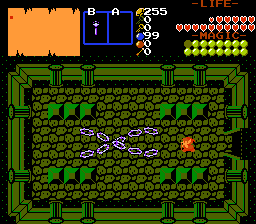
Overview
Creator:
Moosh
Updated: 18 Mar 2018
Tags:
FFC,
Item
Downloads: 124
|
View Script
Download Example (1.15 MB) |

Information
The abyss whispers in my ear...It demands more highly customizable scripts...I answer the call...
Oh yeah, this is meant to be like my Newbie Boss script, only for items this time.
Oh yeah, this is meant to be like my Newbie Boss script, only for items this time.
Description Setup Reviews Comments
First you'll want to verify a couple constants in the script:
Next, compile the three scripts and assign them to slots. Create your custom item with one of the empty item classes (Custom Item XX or zzXXX) and assign MooshItem to the active item script.
Next, for setting up the D0-7 arguments, there's a concept that I'll need to explain: Many of the D arguments on this script are split in two on both halves of the decimal point. I did this to squeeze out more arguments than ZC normally allows. So in a case where you have 0088.0032, 88 would be the left half and 32 would be the right. The right half of the argument must be four digits long. You fill in the remaining places with zeroes.
So now, on to the arguments:
0: V Spread Shot
Shoots a V shaped fan of bullets
Shoots a line of bullets of varying speeds all at once
Shoots a stream of bullets in a sine wave motion
Shoots bullets that home in on enemies
A charged attack with a few options
A circular shield of bullets that can block projectiles
Shoots a continuous stream of bullets in a fan pattern as the button is held
Shoots a spread shot of bullets that block projectiles
Shoots projectiles that bounce off walls
D7 of the item is the addition of the following binary flags. Add up the ones you want to use together:
The base damage of items made with this script is determined by the power setting in the first tab. Additionally, if you set a Counter Reference in the Pickup tab, the script will reference that counter instead of Link's MP for the MP cost.
This script requires std.zh, DrawLayerFix.zh, and ffcscript.zh.
Note if you're using 2.53, you can leave out DrawLayerFix.
- LW_MOOSHITEM_MELEE: Set this to a weapon type to be used for sword weapons. See LW_ in std_constants.zh. Set to script 1 by default.
- TIL_INVISIBLE: An invisible tile. The default value should probably work for most tilesets.
Next, compile the three scripts and assign them to slots. Create your custom item with one of the empty item classes (Custom Item XX or zzXXX) and assign MooshItem to the active item script.
Next, for setting up the D0-7 arguments, there's a concept that I'll need to explain: Many of the D arguments on this script are split in two on both halves of the decimal point. I did this to squeeze out more arguments than ZC normally allows. So in a case where you have 0088.0032, 88 would be the left half and 32 would be the right. The right half of the argument must be four digits long. You fill in the remaining places with zeroes.
So now, on to the arguments:
- D0: This is left unused for compatibility with the pickup message script.
- D1 - Left: Set this to the item ID of the current item in the item editor. You can see it listed at the top of the window next to the item's name.
- D1 - Right: Set this to the MP cost for the item. 0 for none.
- D2 - Left: Set this to the behavior type of the item. See behavior types below.
- D2 - Right: Set this to the step speed of the projectiles. This works similar to enemy step speeds where 100 equals 1 pixel per frame.
- D3 - Left: Set this to the weapon type to use. See LW_ in std_constants.zh. This mainly determines how the weapon will interact with enemy defenses and secret flags.
- D3 - Right: Set this to the max number of extra copies of the script that are allowed to be active. If 0, you can only run use one at a time and the current attacks weapons need to clear before more can be created.
- D6 - Left: Set this to the sprite to use for the projectile.
- D6 - Right: Set this to the SFX to play when the weapon fires
- D7: Set this to the combination of flags to use. See flags below.
0: V Spread Shot
Shoots a V shaped fan of bullets
- D4 - Left: Set this to how many frames the bullets will last for. 0 for until they hit the edge of the screen.
- D4 - Right: Set this to the number of bullets in the pattern.
- D5 - Left: Set this to the angle for the spread
- D5 - Right: Set this to the secondary step speed. Bullets along the spread will gradually slide from this to the main step speed, and then back to this again forming the V pattern.
Shoots a line of bullets of varying speeds all at once
- D4 - Left: Set this to how many frames the bullets will last for. 0 for until they hit the edge of the screen.
- D4 - Right: Set this to the number of bullets in the pattern.
- D5 - Left: Set this to the max angle of variance in the shots' path. At 0 they'll all travel in a straight line.
- D5 - Right: Set this to the secondary step speed. Bullets along the line will gradually slide from one step speed to the other.
Shoots a stream of bullets in a sine wave motion
- D4 - Left: Set this to the amplitude of the wave.
- D4 - Right: Set this to the frequency of the wave.
- D5 - Left: Set this to the number of shots to fire at once. If there's more than one, they'll alternate directions to form a helix pattern.
- D5 - Right: Set this to the number of times to repeat fire.
Shoots bullets that home in on enemies
- D4 - Left: Set this to how many frames the bullets will last for. 0 for until they hit the edge of the screen.
- D4 - Right: Set this to the turn speed of the bullets. 100 is 1 degree per frame.
- D5 - Left: Set this to the number of bullets in the pattern.
- D5 - Right: Set this to the angle of the spread to fire them in.
A charged attack with a few options
- D4 - Left: Set this to the number of frames it takes to change up the attack.
- D4 - Right: Set this to the type of charge shot: 0 - 2x2 bullet, 1 - 12 bullet spread, 2 - 12 homing shots
- D5 - Left: Set this to the sprite of the charge shot
- D5 - Right: Set this to the damage of the charge shot
A circular shield of bullets that can block projectiles
- D4 - Left: Set this to the number of bullets in the shield
- D4 - Right: Set this to the distance from Link to create the shield.
- D5 - Left: Set this to a skew angle for the shield, to make it go at a diagonal to Link
- D5 - Right: Set this to the block flags of the bullets. These work the same as shield block flags, but with the added flag 512 to block bomb weapons.
Shoots a continuous stream of bullets in a fan pattern as the button is held
- D4 - Left: Set this to how many frames the bullets will last for. 0 for until they hit the edge of the screen.
- D4 - Right: Set this to the spread angle of the breath cone.
- D5 - Left: Set this to the weapon type of the breath cone.
- 0: Normal Shots
- D5 - Right: Set this to the secondary step of the bullets.
- 1: Sine Wave
- D5 - Right: Set this to the amplitude of the wave.
- 2: Homing Shots
- D5 - Right: Set this to the turn speed of the bullets.
- 3: Wall Bounce
- D5 - Right: Set this to the number of bounces.
Shoots a spread shot of bullets that block projectiles
- D4 - Left: Set this to how many frames the bullets will last for. 0 for until they hit the edge of the screen.
- D4 - Right: Set this to the number of bullets in the pattern.
- D5 - Left: Set this to the spread angle for the bullets.
- D5 - Right: Set this to the block flags of the bullets. These work the same as shield block flags, but with the added flag 512 to block bomb weapons.
Shoots projectiles that bounce off walls
- D4 - Left: Set this to how many frames the bullets will last for. 0 for until they hit the edge of the screen.
- D4 - Right: Set this to the number of bullets in the pattern.
- D5 - Left: Set this to the random angle for the bullets.
- D5 - Right: Set this to the number of bounces.
D7 of the item is the addition of the following binary flags. Add up the ones you want to use together:
- 1 - 4Way: Makes the projectiles use four way sprites laid out in the order of up, down, left, right.
- 2 - 8Way: Makes the projectiles use eight way sprites laid out in the order of up, down, left, right, leftup, rightup, leftdown, rightdown.
- 4 - 360 Degree: Draws the projectile's sprite to the screen rotated based on its angle. The base direction for this is facing right.
- 8 - 2x2 Sprite: Makes the sprite and hitbox of the projectiles 2x2 tiles.
- 16 - Piercing: Makes it so the projectile isn't destroyed when it hits enemies.
- 32 - Stab Animation: Attaches a stabbing sword/wand animation before the projectile comes out. The sprite for the animation is the next sprite in the list after the projectile's. Sword sprites have their tiles laid out in the order of up, down, left, right, leftup, rightup, leftdown, rightdown.
- 64 - Slash animation: Same as above, but for a slash animation. If both flags are checked, the animation becomes a 45 degree Z3 style slash.
- 128 - 8 Directional Aiming: Allows the weapon to fire at diagonals when that direction is held.
- 256 - Explodes When Destroyed: Makes the projectile explode when it's destroyed.
- 512 - Drains MP Over Time: Makes the item drain MP as you use it. Only compatible with Orbiting Shield and Breath.
The base damage of items made with this script is determined by the power setting in the first tab. Additionally, if you set a Counter Reference in the Pickup tab, the script will reference that counter instead of Link's MP for the MP cost.
This script requires std.zh, DrawLayerFix.zh, and ffcscript.zh.
Note if you're using 2.53, you can leave out DrawLayerFix.