



Very cool script (if a giant pain in the ass to set up). It'd be nice if there was a way to hide floors you haven't been to yet on the map if you don't have the dungeon map, and one thing I noticed is that if I wanted to have layerable objects (like stairs) on the map, I had to have two identical combos where the first one is a step next. Also, the title has a giant space in it if you spaced some stuff out to fit on the second line of the DMap Title. Also, despite being able to set a custom BG, you can't have custom Map/Compass positions (say, for minidungeons where the boss key might not exist)
Could also be potentially improved by porting to dmapdata map scripts in 2.55, given those freeze screen action automatically (removing the need for Freezing FFCs) and dmapdata has InitD's for the Map script; I did that with a project of mine, though I didn't utilize the InitD's at all.
LttP/Oracle Dungeon Map Subscreen
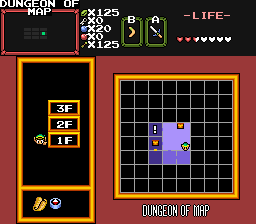
Overview
Creator:
Moosh
Updated: 29 Jul 2025
Tags:
2.55,
Global,
DMap,
Generic
Downloads: 219
|
View Script
Download Example (5.13 MB) |
Information
This script adds a custom subscreen over the normal spacebar map that behaves like the dungeon maps seen in ALttP and the Oracle games.


Description Setup Reviews Comments

Demonlink

Posted 28 May 2021 - 12:49 AM
I'm using 2.55, not sure if that has to do with anything but, I can't seem to find the reason of why it isn't drawing Link's floor marker or point on the map... I double checked if I set the right value to the combo that it is supposed to be set to in the script, and it's correct... The MOOSHMAP_DRAWLINKPOSITION constant is set to 1 as well. (Ignore the blue font and the double 1F stuff, that's something I'm still working on).

Noire

Posted 19 March 2018 - 08:24 PM
I got a little problem: I setting anything like your exemple quest (i do changes certain number of required tiles) but when i press in the Map (subspace) it's doesn't do anything else then showing me the classic map view. i did enable the "View Overworld Map by pressing 'map'".

