Seed Shooter/Satchel
Overview
Creator:
Moosh
Added: 16 Oct 2017
Tags:
FFC,
Global,
Item
Downloads: 100
|
View Script
Download Example (1.92 MB) |

Information
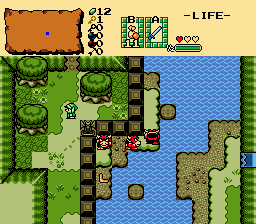
The seed shooter and satchel items from the Oracle games.

Description Setup Reviews Comments
Fill in some of the genera constants at the top of the script file and combine the SeedShooter_Example global script with your own. Create the 5 Seed Shooter items and 5 Seed Sachel items.
These items use one of the script item classes. Each should have a unique item level so it appears on the subscreen correctly with item override. The item's action script should be SeedShooter. Its arguments go as follows:
These items use one of the script item classes. Each should have a unique item level so it appears on the subscreen correctly with item override. The item's action script should be SeedSatchel. Its arguments go as follows:
Ember Seed:
Ember and Gale seeds can one hit kill some enemies and mystery seeds can stun some enemies. These defenses are set by three functions in the script which you can edit:
Seed_Ember_GetEnemyDefense()
Seed_Pegasus_GetEnemyDefense()
Seed_Gale_GetEnemyDefense()
To add an enemy to the list of vulnerable ones, just add this function to the list of enemies:
SeedTree FFC:
Place an FFC with this script over the top-left corner of a 2x2 seed bearing tree. Warp square A should be placed under the tree. Arguments go as follows:
Place this script as a 3x1 FFC of the owl statue over an invisible solid combo. Its combo should be the first of two combos: the owl statue with its wings closed followed by the owl statue with its wings open. Arguements go as follows:
If you want to give all the different types of seed shooters/satchels as one item, have a dummy item with this script on its pickup. Arguments go as follows:
- CMB_SEEDSHOOTERLINKAIM: The first of 8 directional combos (U,D,L,R,UL,UR,DL,DR) of Link holding the seed shooter out
- CMB_SEEDSHOOTERSEEDSHOOTER: The first of 8 directional combos of the seed shooter
- CS_SEEDSHOOTERSEEDSHOOTER: The CSet of the seed shooter
- LW_SEED: Weapon type used by most seeds when their collision is off. Script 10 by default. See LW_ in std_constants.zh
- SFX_SEEDSHOOTER: The sound when a seed is fired
- SEED_MAX_BOUNCE: How many times a seed will bounce off a wall before breaking
- SEED_STEP: Step speed of seeds
- SEEDTREE_COOLDOWN: Number of screen transitions before seed trees respawn their seeds
- SUB_COUNTER_DRAW: Set to 1 and counters will be drawn on the passive subscreen under the items when they're selected.
- SUB_COUNTER_FONT: Font used for the counters on the subscreen
- SUB_COUNTER_SHADOW: Shadow type used for the counters (0 = None, 1 = Shadow, 2 = Shadow (U), 3 = Shadow(O), 4 = Shadow(+), 5 = Shadow(X)
- SUB_COUNTER_C: Color of the counter
- SUB_COUNTER_C_OUTLINE: Color of the counter's outline
- SUB_A_BUTTON_POS_X/Y: X/Y positions of the A button item on the subscreen. Check in the subscreen editor.
- SUB_B_BUTTON_POS_X/Y: X/Y positions of the B button item on the subscreen. Check in the subscreen editor.
- I_SEEDSHOOTER_*: Constants for the five seed shooter items. Used for determining when they're equipped on the passive subscreen
- I_SEEDSATCHEL_*: Constants for the five seed satchel items. Used for determining when they're equipped on the passive subscreen
These items use one of the script item classes. Each should have a unique item level so it appears on the subscreen correctly with item override. The item's action script should be SeedShooter. Its arguments go as follows:
- D0: Reserved for pickup message script to use
- D1: The item's ID in the editor (should be visible at the top of the window)
- D2: The type of seed it uses: 0 = Ember, 1 = Scent, 2 = Pegasus, 3 = Gale, 4 = Mystery
These items use one of the script item classes. Each should have a unique item level so it appears on the subscreen correctly with item override. The item's action script should be SeedSatchel. Its arguments go as follows:
- D0: Reserved for pickup message script to use
- D1: The type of seed it uses: 0 = Ember, 1 = Scent, 2 = Pegasus, 3 = Gale, 4 = Mystery
Ember Seed:
- CMB_SEED_EMBERFIRE: Combo drawn over burning enemies
- CS_SEED_EMBERFIRE: CSet of burn combo
- SPR_SEED_EMBER: Sprite used for the seed
- SPR_SEED_EMBER_POOF: Sprite when the seed ignites. Animation length determines how long the fire hitbox lasts
- CR_SEED_EMBER: Counter used by the seed
- DAMAGE_SEED_EMBER: Damage the seed deals
- SFX_SEED_EMBER: Sound when the seed ignites
- SPR_SEED_SCENT: Sprite used for the seed
- SPR_SEED_SCENT_POOF: Sprite when the seed makes impact
- SPR_SCENT_BAIT: Sprite when the seed is used as bait
- CR_SEED_SCENT: Counter used for the seed
- LW_SEED_SCENT: LWeapon type used by the seed. Arrow by default.
- DAMAGE_SEED_SCENT: Damage the seed deals
- SFX_SEED_SCENT: Sound when the seed makes impact
- SFX_SCENT_BAIT: Sound when used as bait
- SPR_SEED_PEGASUS: Sprite used for the seed
- SPR_SEED_PEGASUS_POOF: Sprite when the seed makes impact
- SPR_PEGASUS_DUST: Sprite for the dust drawn under Link when he runs after using the seed
- CR_SEED_PEGASUS: Counter used for the seed
- SFX_SEED_PEGASUS: Sound when the seed makes impact
- SFX_PEGASUS_RUN: Looping sound when Link is running
- PEGASUS_SFX_FREQ: Frequency of the loop in frames (60ths of a second)
- SEED_PEGASUS_STUN: How long the seeds stun enemies for in frames
- SEED_PEGASUS_SPEEDFRAMES: How long the seeds speed up Link for in frames
- SEED_PEGASUS_SPEEDBOOST_STEP: How much the seeds boost Link's speed by
- CMB_SEED_GALEWIND: Combo for the wind drawn over enemies and Link when lifted into the air
- CS_SEED_GALEWIND: CSet of wind combo
- SPR_SEED_GALE: Sprite used for the seed
- SPR_SEED_GALE_POOF: Sprite for the warping whirlwind the seed creates
- CR_SEED_GALE: Counter used for the seed
- SFX_SEED_GALE: Sound of the whirlwind
- SFX_GALE_CEILINGBUMP: Sound when Link hits the ceiling with a gale seed
- DMF_NOGALE: DMap flag marking a DMap where Link cannot warp with gale seeds. Script 1 by default
- DMAP_SEED_GALE_WARP: DMap used by the warp screen
- SCREEN_SEED_GALE_WARP: Screen used by the warp screen
- SFX_SEED_WARP_CURSOR: Sound when the warp cursor selection is moved
- SFX_SEED_WARP_SELECT: Sound when a warp is selected
- C_BLACK: The color black
- C_SEED_WARP: The color of warp screen text
- C_SEED_WARP_SELECTED: The text color for a selected warp
- SEED_WARP_TITLE_FONT: The font used for the warp header
- SEED_WARP_TITLE_X/Y: Position for the warp header
- SEED_WARP_SELECTION_FONT: The font used for the warp selections
- SEED_WARP_SELECTION_X/Y: Position for the first selection
- SEED_WARP_SELECTION_HEIGHT: Y distance between selections
- SPR_SEED_MYSTERY: Sprite used for the seed
- SPR_SEED_MYSTERY_POOF: Sprite when the seed makes impact
- CR_SEED_MYSTERY: Counter used for the seed
- LW_SEED_MYSTERY: Weapon type for the poof and when the seed deals damage. Script 1 by default
- DAMAGE_SEED_MYSTERY_LOW: Lowest damage the seed can do
- DAMAGE_SEED_MYSTERY_HIGH: Highest damage the seed can do
- SFX_SEED_MYSTERY: Sound when the seed makes impact
Ember and Gale seeds can one hit kill some enemies and mystery seeds can stun some enemies. These defenses are set by three functions in the script which you can edit:
Seed_Ember_GetEnemyDefense()
Seed_Pegasus_GetEnemyDefense()
Seed_Gale_GetEnemyDefense()
To add an enemy to the list of vulnerable ones, just add this function to the list of enemies:
Seed_SetDef(def, n);n in this case should be replaced with the enemy ID of the enemy you want to make vulnerable. For example:
Seed_SetDef(def, 106); //Bat
Seed_SetDef(def, 160); //Bombchu
Seed_SetDef(def, 68); //Digdogger Kid
Bat, bombchu, and digdogger kid would all be made vulnerable to the effect. It doesn't matter what order you add them in as long as they each have a copy of the function. You can put a comment (//) at the end of the line so you remember which enemies are which in the list.
SeedTree FFC:
Place an FFC with this script over the top-left corner of a 2x2 seed bearing tree. Warp square A should be placed under the tree. Arguments go as follows:
- D0: Item ID of the seed refill item that grows on the tree
- D1: A unique ID for the tree (0-15) that tells it which warp to use
- D2: A string number for the name of the tree as it should appear in the warps list when you warp with a Gale Seed
Place this script as a 3x1 FFC of the owl statue over an invisible solid combo. Its combo should be the first of two combos: the owl statue with its wings closed followed by the owl statue with its wings open. Arguements go as follows:
- D0: String the owl statue plays when a mystery seed is used on it.
If you want to give all the different types of seed shooters/satchels as one item, have a dummy item with this script on its pickup. Arguments go as follows:
- D0: Message to play on pickup
- D1: First item to give
- D2: Second item to give
- D3: Third item to give
- D4: Fourth item to give
- D5: Fifth item to give
- D6: Sixth item to give
- D7: Seventh item to give