Jump to content

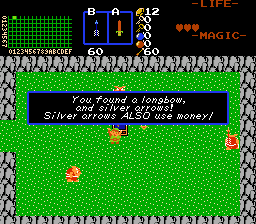
Combined Bow, Arrow, and Quiver Pick-Up

Overview
Creator: Timelord Updated: 09 Jul 2015 Tags: Item Downloads: 59
Rating[?]: No rating
View Script Download Package
(865.41 KB)
Information

Description Setup Reviews Comments

If you are not using any other scripts, uncomment the first line: ' import "std.zh" '.
  • Add the script to your ZC buffer, or use an import directive to add it.
  • Compile, and assign the item script BowPickup to an item script slot.
  • If desired, create a string to display for this pick-up in Quest->Strings.
  • If desired, add a custom sound for this pick-up in Quest->Audio->SFX Data
  • Go to the item editor, and select a bow, then open it in the editor.
  • Attach the script 'BowPickup' to the item's Pick-Up slot on the 'Scripts' tab.
  • While still in the item editor, note the item numbers for the arrow type (e.g. silver), the quiver item, and the item number of the bow itself. A series of default values are listed in the script comments for easy access.
Script Arguments
While on the 'Scripts' tab of the bow item attributes pages of the Item Editor...
  • Set up the arguments (D0, D1, D2, D3, D4, D5, and D6) as follows:
D0: A number of starting arrows to give the player with the bow.
  • Setting this to '0' will award no arrows.
  • Setting it to a positive value (1 or more), will award arrows equal to the number.
  • Setting it to a NEGATIVE number ( e.g. -20) will award a value in rupees equal to that number, if it was positive (e.g. -20 gives 20 rupees). This is for legacy style games that use rupees as ammo.
D1: The Quiver to give the player, if desired.
  • If you wish to award a quiver, enter the item number for it here.
  • If you are not using the 'True Arrows' quest rule, you do not need to award a quiver.
  • Note: You may leave this blank ( 0 ), when not using 'True Arrows'. Otherwise, leave it blank only if you either do not wish to award a quiver, or if the player already has one. Without a quiver, no arrows will be awarded, and the player will be unable to pick up arrow ammo drops, or use the arrow item.
D2: The type of arrow to award:
  • If the player already has an arrow type, and you do not wish to upgrade it, you may leave this blank ( 0 ).
  • Otherwise, add the item number of the arrow type that you wish to award here.
D3: The sound effect to play when the player is given the item bundle.
  • The standard 'Special Item' sound in ZC is '20'.
  • If you leave this blank ( 0 ), it will not play a sound.
D4: The message string (from Quest->Strings) ID number to display when awarding the player a bundle.
  • If you do not wish to display a string, set this value to '0'.
  • Otherwise, assign the value of the String ID that you wish to display.
D5: Set to a value of '1' or higher, to cause Link to hold the item over his head.


Values:

0: Do not hold above head.

1: Holds with one hand.

2: holds with two hands.

3: Holds with one hand, as a Dive (water) secret

4: Holds with two hands, as a Dive (water) secret.


D6: If you are causing the player to hold the item overhead, set this to the item ID number of the bow that you are awarding. You can actually specify any item number here, and Link will hold that overhead. If you, as an example, want to make a special item that has the bow, and arrow together (not matching what you place on your subscreen), you can call the ID of that here.

Please see the values in the example quest if you need a reference.
The distributed package includes a text file with a copy of these set-up instructions.
Requires: std.zh