Well damn. This looks amazing, I probably will end up using this soon.
10/5
MC Subscreen Pack [DoR]
Overview
Creator:
Master Maniac
Added: 01 Feb 2014
Downloads: 83
|
Download Tile (14.16 KB) |
||
| Tags: 16-color, Subscreen | |||
Information
I was thinking one day, "I wonder if I could make a decent looking MC subscreen."
And then I did it, because I'm awesome. And now the tiles are here, free to use for anyone who wants them.
And then I did it, because I'm awesome. And now the tiles are here, free to use for anyone who wants them.
About Reviews
Description
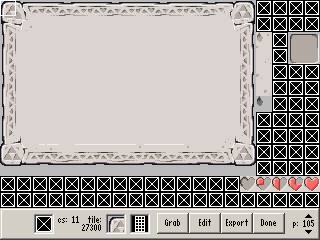
First and foremost, ALL of this uses DoR Cset 11. Simple setup and use goes as follows:
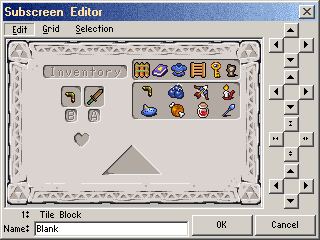
For the 2x2 frame, in the subscreen editor create a new subscreen element (2x2 frame). In the Appearance tab, click the box and select the upper left hand corner of the tile block. MAKE SURE TO CLICK OVERLAY! Otherwise, it won't look right.
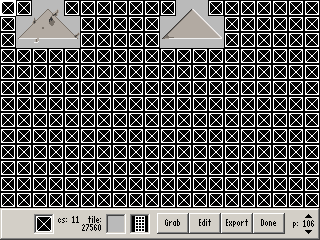
For the Triforce frame: Follow the same steps as above, replacing 2x2 frame with Triforce frame. When selecting the tiles for this, you'll notice that the box for the tiles is quite a bit larger than the 2x2 frame one. Select the top left corner tile as if it were a 6 block wide, 3 block tall sprite with the frame directly in the center. If done properly, it should appear in the middle of the black box. Then, be sure to check the "show frame" tickbox.
For the detail tiles, simply copy/paste them onto the background sheet as you feel necessary. The deep chip has 2 variants, one solid and one overlay piece.
To set up the background, add a new subscreen element (tile block). In the "position" tab, make the width 16, and the height 11. Then in "appearance", set the tile to the upper left hand corner of the background.
That should be all. Everyone enjoy these tiles! I don't need any credit, just as long as nobody uses them for evil. >.>
For the 2x2 frame, in the subscreen editor create a new subscreen element (2x2 frame). In the Appearance tab, click the box and select the upper left hand corner of the tile block. MAKE SURE TO CLICK OVERLAY! Otherwise, it won't look right.
For the Triforce frame: Follow the same steps as above, replacing 2x2 frame with Triforce frame. When selecting the tiles for this, you'll notice that the box for the tiles is quite a bit larger than the 2x2 frame one. Select the top left corner tile as if it were a 6 block wide, 3 block tall sprite with the frame directly in the center. If done properly, it should appear in the middle of the black box. Then, be sure to check the "show frame" tickbox.
For the detail tiles, simply copy/paste them onto the background sheet as you feel necessary. The deep chip has 2 variants, one solid and one overlay piece.
To set up the background, add a new subscreen element (tile block). In the "position" tab, make the width 16, and the height 11. Then in "appearance", set the tile to the upper left hand corner of the background.
That should be all. Everyone enjoy these tiles! I don't need any credit, just as long as nobody uses them for evil. >.>
Credits
Nintendo, obviously.
Giggidy for the original recolor.
Myself, for the hand drawn work.
Giggidy for the original recolor.
Myself, for the hand drawn work.