Encrypted Signboard
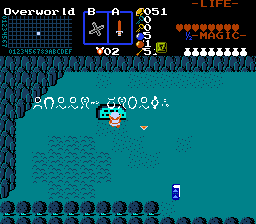
Overview
Creator:
Alucard648
Added: 07 Jul 2014
Tags:
FFC
|
View Script |

Information
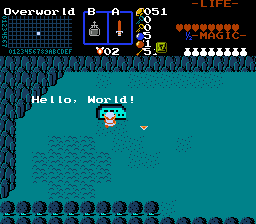
A signboard, that is written in a hyeroglyphic language. Requires special item to read.
Update #1: Allow specific signboards to require different item for decrypting.
Update #1: Allow specific signboards to require different item for decrypting.
Description Setup Reviews Comments
1. Find the constant named I_BOOK_OF_DECRYPTING, and change it to ID of your deciphering item (like Book of Mudora).
2. Import and compile the script.
3. Place FFC at the bottom of your signboard/tablet.
4. Set the aguments as followed:
//D0: String number for encrypted message.
//D1: String number for decrypted message.
//D2:
// 0 - No secret triggering, when decrypting message.
// 1 - Trigger temporary secrets after decrypting message.
// 2+ - Trigger permanent secrets after decrypting message.
D3: ID of item needed to decrypt text. Use this if you want to require different item for deciphering. Leave as 0 to use default item ID written in constant.
5. Assign the script to FFC.
6. Test and enjoy.
Headers: none beyond "std.zh".
2. Import and compile the script.
3. Place FFC at the bottom of your signboard/tablet.
4. Set the aguments as followed:
//D0: String number for encrypted message.
//D1: String number for decrypted message.
//D2:
// 0 - No secret triggering, when decrypting message.
// 1 - Trigger temporary secrets after decrypting message.
// 2+ - Trigger permanent secrets after decrypting message.
D3: ID of item needed to decrypt text. Use this if you want to require different item for deciphering. Leave as 0 to use default item ID written in constant.
5. Assign the script to FFC.
6. Test and enjoy.
Headers: none beyond "std.zh".