It's was incredibly easy to set up, and worked like a charm!
The only things that could have improved it would be if the font used for the boss's name could be adjusted more easily, whether through an argument or with a variable that could be easily changed, since the main selling point here is being able to easily match any tileset the quest comes in. The other thing that could be added would be to adjust the Y-coordinate via an argument, for fights that include multiple targets.
Still, it's a great script and I'm very happy with how it turned out.
EDIT: All of my comments have been addressed with the new update. Now it works perfectly and I can't think of a single negative thing to this, however minor.
Tile-based Boss HP meter
Overview
Creator:
Alucard648
Updated: 24 May 2024
Tags:
FFC
Downloads: 25
|
View Script
Download Package (1009.36 KB) |
Information
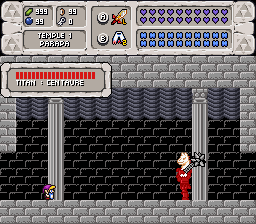
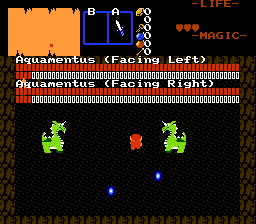
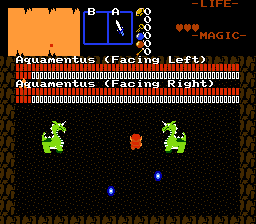
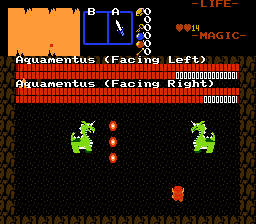
Draws enemy`s HP meter in a similar way as Link`s HP and MP gauges are drawn in passive subscreen.


Description Setup Reviews Comments
Requires std.zh and string.zh.
1. Set up 5 consecutive tiles in a row in Tile Editor as following:
1. Full heart.
2. 3/4 heart.
3. 1/2 heart.
4. 1/4 heart.
5. Empty heart.
2. Note down ID of the first tile in the row (the "Full Heart" one).
A. Set up 3*3 frame for Boss HP meter background, if you want one.
3. Import and compile the script.
4. In your boss screen, place the invisible FFC, one for each boss, if multiple bosses are in one screen, and assign the following arguments:
X and Y position: Position of HP meter.
CSet - Cset used for drawing the life gauge. Setting value to 0 results in health meter flashing trough all csets.
D0: ID of the tile you noted down in step 2.
D1: Slot number of the boss enemy, or his weak spot.
D2: Hit Points per tile. Larger values means smaller life meter and vise versa.
D3: Tile, top left of 3*3 frame, used to render background. 0 to disable.
D4: Quake power on boss introdiction. Best used for jump scares.
D5: >0 - Logarithmic boss HP meter. Rendered HP is smaller than actual boss HP. A very cuesed and deceiving way to make player waste potions in very hard boss battles.
D6: Maximum tiles in row before carrying over to nex one. Recommended to be even one.
D7: String to display at the start of the battle.
Otherwise, it sets Y position of boss health gauge.
5. Assign the script to FFC.
6. Test and enjoy.
1. Set up 5 consecutive tiles in a row in Tile Editor as following:
1. Full heart.
2. 3/4 heart.
3. 1/2 heart.
4. 1/4 heart.
5. Empty heart.
2. Note down ID of the first tile in the row (the "Full Heart" one).
A. Set up 3*3 frame for Boss HP meter background, if you want one.
3. Import and compile the script.
4. In your boss screen, place the invisible FFC, one for each boss, if multiple bosses are in one screen, and assign the following arguments:
X and Y position: Position of HP meter.
CSet - Cset used for drawing the life gauge. Setting value to 0 results in health meter flashing trough all csets.
D0: ID of the tile you noted down in step 2.
D1: Slot number of the boss enemy, or his weak spot.
D2: Hit Points per tile. Larger values means smaller life meter and vise versa.
D3: Tile, top left of 3*3 frame, used to render background. 0 to disable.
D4: Quake power on boss introdiction. Best used for jump scares.
D5: >0 - Logarithmic boss HP meter. Rendered HP is smaller than actual boss HP. A very cuesed and deceiving way to make player waste potions in very hard boss battles.
D6: Maximum tiles in row before carrying over to nex one. Recommended to be even one.
D7: String to display at the start of the battle.
Otherwise, it sets Y position of boss health gauge.
5. Assign the script to FFC.
6. Test and enjoy.