
Shooter
Overview
Creator:
LinktheMaster
Added: 12 May 2014
Tags:
FFC
Downloads: 63
|
View Script
Download Example (1.51 MB) |

Information
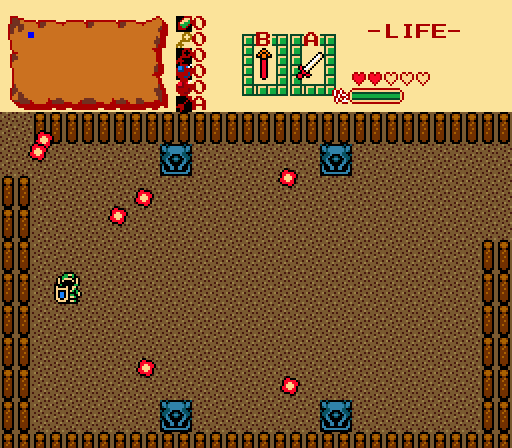
This is a basic Freeform Combo script which allows the FFC to fire weapons either in a specific direction or at Link. They can be used for statues that shoot things other than fireballs, or if used with inherit combo flags and FFC changers, it can be used to help spruce up "2.10 custom bosses."



Setup Reviews Comments
Setup Instructions
The only header that is required is std.zh.
After adding this to your scripts, simply add a FFC with the script attached to it and set any parameters you want. With no parameters modified, it'll shoot fireballs at Link at a relatively slow pace.
FFC Script Parameters
d0 - This is the weapon ID you wish to attach. EW_ values listed in std_constants will work, or you can use...
d3 - Speed (100 = 60 pixels a second) (DEFAULT: 100)
d4 - Damage (DEFAULT: 1)
d5 - Sound effect ID (DEFAULT: Fireball)
d6 - Initial Delay before firing
d7 - Flags
The download consists of the example quest you see in the video.
The only header that is required is std.zh.
After adding this to your scripts, simply add a FFC with the script attached to it and set any parameters you want. With no parameters modified, it'll shoot fireballs at Link at a relatively slow pace.
FFC Script Parameters
d0 - This is the weapon ID you wish to attach. EW_ values listed in std_constants will work, or you can use...
0 = Fireball
1 = Boss fireball
2 = Rock
3 = Fire (short distance)
4 = Fire (long distance)
5 = Wind
6 = Bomb
d1 - This is the direction to fire in. You can use DIR_ constants, but you have to add 1 to them0 = At Link
1 = Up
2 = Down
3 = Left
4 = Right
5 = Left Up
6 = Right Up
7 = Left Down
8 = Right Down
d2 - Frequency (60 is about 1 shot per second) (DEFAULT: 120)d3 - Speed (100 = 60 pixels a second) (DEFAULT: 100)
d4 - Damage (DEFAULT: 1)
d5 - Sound effect ID (DEFAULT: Fireball)
d6 - Initial Delay before firing
d7 - Flags
0 = No Flags. Normal shooter
1 = Weapons fired are unblockable
2 = Stops when the FFC's combo changes
3 = Unblockable and stops when the FFC's combo changes
The download consists of the example quest you see in the video.




 It is nothing special, but due to the fact that this can easily enhance quests in many different ways, it's an easy 5 stars for me.

