Warp Doll
Overview
Creator:
Fox
Added: 01 May 2014
Tags:
FFC,
Item
Downloads: 73
|
View Script
Download Example (890.57 KB) |

Information
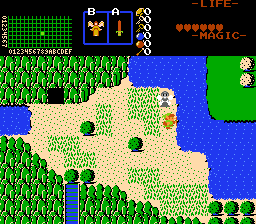
This item acts as a custom warp-point for the player. The first time it is used on the screen, a doll is dropped. When you go somewhere else on the same screen and use the item again, Link and the doll swap positions.
Description Setup Reviews Comments
Upon compiling the script, assign the item script and the two ffc scripts to slots of your choice. Create a new item in the item editor, and assign it the item script under "Action Script." Set the variables of the item as follows:
D0: The slot of the FFC script switchLink.
D1: The slot of the FFC script appearAtLink
D2: The combo number that the Warp Doll should use when placed.
D3: The CSet of the Warp Doll when placed.
D4: The combo to use for Link as he is warping. If set to 0, Link's current frame of animation is used, and D5 is ignored.
D5: The CSet to use for the combo in D4.
D6: The number of seconds the animation takes to complete.
D7: The animation type. Setting this to 1 will use straight lines to switch. Setting this to 2 will use circular switching.
By default, the item plays the whistle whirlwind sfx when used. However, this can be changed by changing the value of sfx_num at the beginning of the ffc script switchlink.
Requires ffcscript.zh
D0: The slot of the FFC script switchLink.
D1: The slot of the FFC script appearAtLink
D2: The combo number that the Warp Doll should use when placed.
D3: The CSet of the Warp Doll when placed.
D4: The combo to use for Link as he is warping. If set to 0, Link's current frame of animation is used, and D5 is ignored.
D5: The CSet to use for the combo in D4.
D6: The number of seconds the animation takes to complete.
D7: The animation type. Setting this to 1 will use straight lines to switch. Setting this to 2 will use circular switching.
By default, the item plays the whistle whirlwind sfx when used. However, this can be changed by changing the value of sfx_num at the beginning of the ffc script switchlink.
Requires ffcscript.zh