Jump to content

Photo

Returning member from 15 years past.


  • Please log in to reply
7 replies to this topic

#1 JayyH92

JayyH92

    Newbie

  • Members
  • Pronouns:He / Him

Posted 21 April 2026 - 05:16 PM

Hello community! I'm glad to be connecting with you all again. 15 years ago I was very active here, I had no substantial achievements, but I created and played a lot as a hobby. I'm at a stage in life where I am looking to replace bad habits and hobbies with old/good ones, and ZC came to mind. I was very pleased to see the community is still going! I decided to try my hand again at creation, immediately filled again with nostalgia and genuine joy.


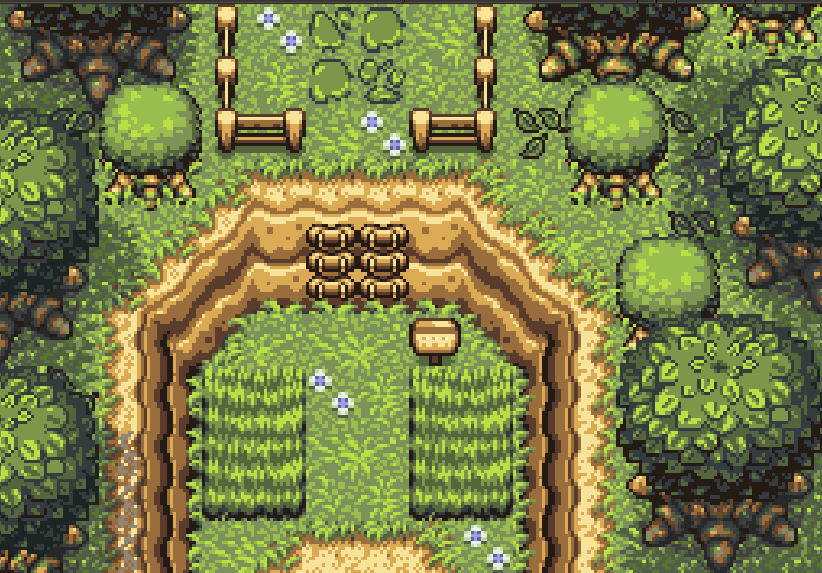
I would like to share a screenshot from a project I have begun. I am open to and encourage criticism and advice, please and thank you! I need help figuring out how to share the image though, I've been away from computers as long as ZC. I'm using a Chromebook.
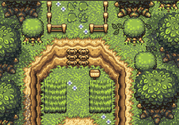
Screenshot-2026-04-21-3-44-36-PM.png


Edited by JayyH92, 21 April 2026 - 10:52 PM.

  • Twilight Knight likes this

#2 Moosh

Moosh

    The Mush

  • Moderators

Posted 21 April 2026 - 08:46 PM

Always nice to see more faces around. Even if you say you've not achieved much, I'd say playing quests and learning the editor are both underappreciated roles. People with enthusiasm help keep ZC going. 
 
Image hosting has become rather slim pickings these days. When last I used it, postimages was pretty good. After you have the image uploaded you'll want to open it, right click, and select "Copy Image Address." Alternatively on some sites there's a little share button which will pop up a bunch of links, the Direct Link being the one you want. You'll know you've got a direct link if it has the image's file type on the end (.png, .gif, ect).
 
Next for posting it in the forum, there's two options. The rich text editor is what's enabled on the forum by default. It's a little rough around the edges but serviceable for images. Click the little tree in a frame icon to popup the image prompt where you paste your url. The other way is in plaintext mode where you edit the bbcodes directly. To access this, tap the light switch in the top left. bbcode for an image looks like:

[img=https://i.postimg.cc/JnNqL43x/Base-SR29.png]

Which would result in this.
Base-SR29.png
You can copy these around and swap out the URL to insert an image into your post.


Lastly hit the More Reply Options button to preview how the post will look on the forum.

Hope this helps.


  • Twilight Knight and Mani Kanina like this

#3 JayyH92

JayyH92

    Newbie

  • Members
  • Pronouns:He / Him

Posted 21 April 2026 - 10:53 PM

Thank you Moosh! You are one of the members I remember well, I've always been a big fan of your work. I added the image now.


#4 Twilight Knight

Twilight Knight

    Tell all with glee, Argon's on PureZC

  • Members
  • Real Name:Sven
  • Location:Rotterdam, NL

Posted 22 April 2026 - 08:57 AM

Welcome back Jay!


#5 JayyH92

JayyH92

    Newbie

  • Members
  • Pronouns:He / Him

Posted 22 April 2026 - 09:26 AM

Thank you Sven! Glad to be back. I wasnt able to get back into my original Jay user account, so I just made a new one.


  • Twilight Knight likes this

#6 Moosh

Moosh

    The Mush

  • Moderators

Posted 22 April 2026 - 11:30 AM

Looking good! Jumping right back into ZC with DoR is quite a challenge I feel.
 

The image you posted came out a little small on the forum, likely because it was just a thumbnail. If you click thumbnails once on postimages it'll zoom in and give you the full sized one. If you click it again it sends you to a separate page for that image. Curiously when I tried to save the thumbnail in the OP, postimages knew something was wrong and redirected me to the full size one anyways.


So here's how it looks at full size:


Screenshot-2026-04-21-3-44-36-PM.png


#7 JayyH92

JayyH92

    Newbie

  • Members
  • Pronouns:He / Him

Posted 22 April 2026 - 12:40 PM

Thank you, I was wondering why it was so tiny. I'm glad you think it looks good! I just finished that first area and the dungeon that coincides with it. Nothing too fancy mechanic wise mind you, I'll settle for a beautiful simpler quest for my first full quest. I'd eventually like to learn how to use the scripts and advanced mechanics, but for now that is just foreign to me.


#8 Jay

Jay

    Magus

  • Members
  • Real Name:Justin

Posted 22 April 2026 - 05:51 PM

I was able to recover my original account I opened in 2006! Excellent. I'll keep this thread going, but I will use my proper original account again.


  • Twilight Knight and Moon like this


1 user(s) are reading this topic

0 members, 1 guests, 0 anonymous users