Jump to content

Photo

Zelda Classic 2.50 RC5


  • This topic is locked This topic is locked

234 replies to this topic

#91 Timelord

Timelord

    The Timelord

  • Banned
  • Location:Prydon Academy

Posted 18 November 2012 - 01:16 AM

QUOTE(ZoriaRPG @ Nov 17 2012, 03:41 PM) View Post

I have to report that RC5 wiped another zc.sav file: I saved, exited cleanly, and ::poof::. When I reloaded, all of the games were gone. I back up every time that I save, so I never lose anything, but this seems to be a recurring bug that will cause no end of pain to others.

If you want to know anything specific to help narrow down what could cause this, or want me to try anything, please let me know.

QUOTE(Saffith @ Nov 17 2012, 03:54 PM) View Post

Did you start a new quest recently? Have you been switching between playing two or more different quests, or just one? Did you get a message at startup saying there was a problem?


I was playing Origin after a long break and started the following quests in addition to it:

Path of Shadows
Carnage in Space
Lost Isle (My save)
Lost Isle (Mike's save)

There is a bit of switching, but not in the same session, as far as I recall. I don't think I was playing one of the games, saved and started a different game without exiting first, but I'm not 100% certain. I can fiddle with switching games if you want (mid-session).

There was no error on start-up, or on saving... Just shock of no save files when I re-opened ZC.

This happened twice while saving in 'Lost Isle'.

Unfortunately I don't think I saved the blank zc.sav file. I can send you the current zc.sav file for you to examine if you wish, and if it happens again, send you the blank one to see if it does contain data that isn't being read/for inspection.

I believe that ZC had to be force-closed both times (ZC wouldn't close cleanly): Perhaps the reason that ZC isn't closing is that the zc.sav file is left open for some reason, or a thread isn't stopping that relates to the zc.sav file, and force-closing it is wiping it and that these issues (losing the zc.sav and ZC not closing) are intertwined.

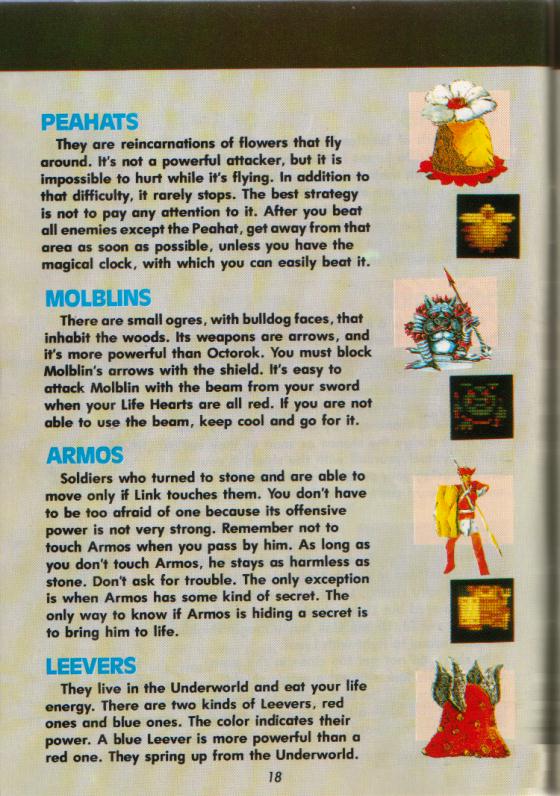
On another note, I don't recall if I mentioned this: In TLoZ (NES), the clock is supposed to freeze all enemies, which also makes Peahats vulnerable (this is even mentioned in TLoZ 'Tips & Tactics'). When I played 1st.qst in 2.50RC5, I think that I got a clock on a Peahat screen and they didn't take damage when frozen. Is that a known bug?


QUOTE(Jared @ Nov 17 2012, 07:05 PM) View Post

The same thing happened to me. I played Isle of Rebirth for over 70 hours-poof. It was ALL gone.

I closed out ZC, and reopened. It was gone. Any reasoning for this? Glad I wasn't the only one.


What OS are you using? I'm lucky that I keep backups, but if you are using a recent Windows release, you can always try to restore the zc.sav file to a previous version, if you don't have a backup of any of your progress. I had to do that once, as Mike was playing one of my files and muddled it.

#92 Saffith

Saffith

    IPv7 user

  • Members

Posted 18 November 2012 - 02:18 AM

If it hangs, see if there's a .tmp file. Should be the most recently created and modified, if there's more than one. That'd probably be the most useful file, if you can get it.

Also, have you had any of these problems in Linux?

#93 Timelord

Timelord

    The Timelord

  • Banned
  • Location:Prydon Academy

Posted 18 November 2012 - 06:17 AM

QUOTE(Saffith @ Nov 18 2012, 02:18 AM) View Post

If it hangs, see if there's a .tmp file. Should be the most recently created and modified, if there's more than one. That'd probably be the most useful file, if you can get it.

Also, have you had any of these problems in Linux?


I'll check the next time it happens... the problem being that it is unpredictable, and I only know that it happens when I see the blank quest slots. i am duplicating the zc.sav file every time that I save, so if it does happen and the copy is also blank, then I will have some useful comparative samples for you to examine.

I will look to see what temporary files exist. I presume that they'd be gone now though, as I have restored the zc.sav file and played since the last wipe happened.

I haven't been able to do any extensive testing in Linux because of the speed issue. I will try adjusting the settings as you described, but I think that it's just an issue with my (Intel Atom) system (running ubuntu 10.04) not being powerful-enough to run it and draw the screens.

Edited by ZoriaRPG, 18 November 2012 - 06:19 AM.


#94 aaa2

aaa2

    Wizard

  • Banned

Posted 18 November 2012 - 06:45 AM

QUOTE(Saffith @ Nov 17 2012, 05:37 PM) View Post

If I'm understanding you right, that may be working correctly. Do the scripts you're running with ffcscript.zh set this->Data to 0 when they're finished? If they don't, and they're set to carry over, then they'll prevent other FFCs from loading.

Thank you very much that fixed it. I just wonder why that is not added to the Quit() command i was expecting it to really quit the ffc if i explicitly call Quit().

Edited by aaa2, 18 November 2012 - 09:45 AM.


#95 Saffith

Saffith

    IPv7 user

  • Members

Posted 18 November 2012 - 10:07 AM

QUOTE(ZoriaRPG @ Nov 18 2012, 06:17 AM) View Post
I will look to see what temporary files exist. I presume that they'd be gone now though, as I have restored the zc.sav file and played since the last wipe happened.

If you had to kill the application, they won't have been deleted. I'll be glad to look at any you've still got around.

#96 Mero

Mero

    Touch Fluffy Tail

  • Banned
  • Real Name:Tamamo No Mae
  • Location:Rainbow Factory

Posted 18 November 2012 - 07:51 PM

Grammatical Error in script.txt.

CODE
/**
    * The original values of the FFC's 8 D input values are they are stored in the
    * .qst file, regardles of whether they have been modified by ZScript.
    */
    float InitD[];


#97 ShadowTiger

ShadowTiger

    The Doctor Is In

  • Members

Posted 18 November 2012 - 08:15 PM

So if zelda-w.exe crashes, when is the .tmp file created? It never froze or anything, just crashed. I should pay better attention next time.

#98 Saffith

Saffith

    IPv7 user

  • Members

Posted 19 November 2012 - 12:06 AM

That's if it hangs while saving, and possibly on exit. Crashes probably won't leave any.
What were you doing when it crashed?

#99 trudatman

trudatman

    one point nine hero

  • Members
  • Real Name:that guy
  • Location:State Of Love And Trust, The United State Of Amorica.

Posted 19 November 2012 - 12:13 AM

I've been playing our programs so much I don't remember if the peahats things is correct. really? have we had a bug this long?

#100 Saffith

Saffith

    IPv7 user

  • Members

Posted 19 November 2012 - 02:19 AM

Another updated Windows executable.
http://filesmelt.com/dl/zelda-w.zip

This one attempts to fix the MIDI patch issue.
I also made a change that might fix the save issue and hanging on exit. Let me know if you can determine a change in either problem, or if you notice a lot of .tmp files not getting deleted.

#101 Timelord

Timelord

    The Timelord

  • Banned
  • Location:Prydon Academy

Posted 19 November 2012 - 08:12 AM

QUOTE(Saffith @ Nov 18 2012, 10:07 AM) View Post

If you had to kill the application, they won't have been deleted. I'll be glad to look at any you've still got around.


You've got it: I put them here. The .tmp files are the only two that seem to have stuck around, dated 8th and 15th November, which IIRC correlates to the dates that the save slots wiped themselves. I also put my .sav files up there, and Mike's .sav files (which share some of my saves for RC5).

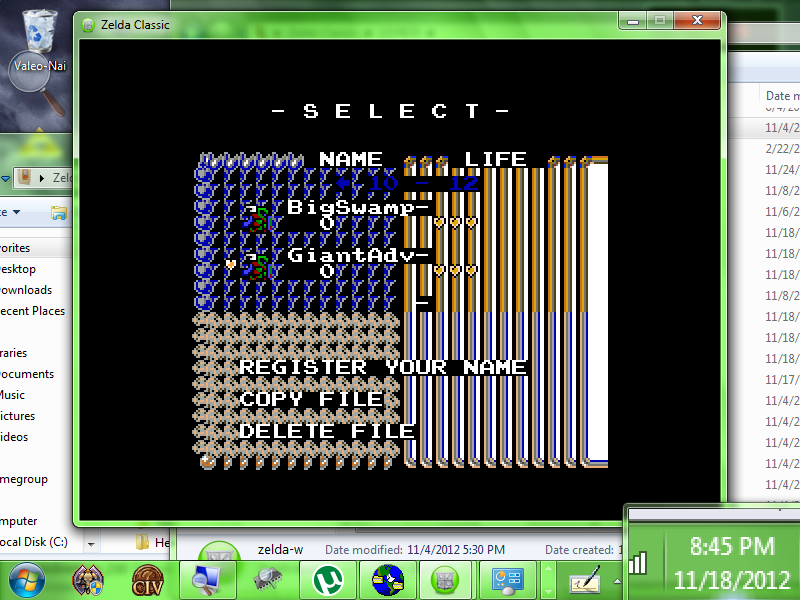
One of these, named ZC-Corrupted.sav or something like that relates to a video corruption that occurred when I added 'Big Swamp Adventure' to my loaded quests. (See: Scrambled Screen Image)

Closing and relaunching ZC fixes it, as does loading a quest, but it is unusual that it's happening at all.

When you have a moment... I also uploaded ZIP archives of the 'Lexx' and 'BS Remake' quests to the same spot. These two are the ones that have a start script requiring a 'down' press that doesn't seem to work in RC5 (or 2.50 in general), and you might be able to figure out what has changed to break them.

Here is the promised shot of The Matrix invading Hyrule:

IPB Image

When this happens, there is no way to clear it: The screensaver locks to the ZC window and there is no way to access the menus, requiring a force-quit. This occurs even when the screensaver would not be active... While I was using Firefox with ZC paused int he background, when I returned to ZC I found that the Matrix had eaten it up in the background and was living in its window. The system was in use (actively) that entire time, so the screensaver should never have loaded; and yet, there it was.

I can't explain that one, aside that 'it's Windows'.

QUOTE(trudatman @ Nov 19 2012, 12:13 AM) View Post

I've been playing our programs so much I don't remember if the peahats things is correct. really? have we had a bug this long?


Here is a page from TLoZ 'Tips & Tactics' (1986/87), regarding Peahats and the clock.

IPB Image

Edited by ZoriaRPG, 19 November 2012 - 10:05 AM.


#102 Saffith

Saffith

    IPv7 user

  • Members

Posted 19 November 2012 - 10:27 AM

QUOTE(ZoriaRPG @ Nov 19 2012, 08:12 AM) View Post
When you have a moment... I also uploaded ZIP archives of the 'Lexx' and 'BS Remake' quests to the same spot. These two are the ones that have a start script requiring a 'down' press that doesn't seem to work in RC5 (or 2.50 in general), and you might be able to figure out what has changed to break them.

Well, I think I see why you're having issues with pre-2.50 quests. You just happen to be picking quests all affected by the same bug. icon_razz.gif
That one is fixed. You should actually be able to play them with that last updated executable.

QUOTE
Here is the promised shot of The Matrix invading Hyrule:

That actually looks like ZC's built-in screensaver. Except I haven't seen it colored like that, and I don't think there's an option for that...
You should be able to disable it via Misc -> Screen Saver... I'll see if I can figure out why it's hanging.

#103 MoscowModder

MoscowModder

    Sometimes lurking. Rarely posting.

  • Members
  • Location:Wisconsin

Posted 19 November 2012 - 10:54 AM

What exactly is the MIDI patch issue?

As for the screensaver - I've occasionally had it exactly like that (those colors, too) when I leave ZC paused in the background for a while. It stays there if I continue or reset, but I can use F8 and Enter to quit.

#104 Saffith

Saffith

    IPv7 user

  • Members

Posted 19 November 2012 - 11:16 AM

QUOTE(ZoriaRPG @ Nov 19 2012, 08:12 AM) View Post
You've got it: I put them here. The .tmp files are the only two that seem to have stuck around, dated 8th and 15th November, which IIRC correlates to the dates that the save slots wiped themselves. I also put my .sav files up there, and Mike's .sav files (which share some of my saves for RC5).

As I suspected, those temp files were actually save files in progress. I ran them through the encoder and they appear to work fine. Try these out: http://filesmelt.com...av_zoriarpg.zip

That gives me some hope that the update above will fix the problem. ZC's been doing some weird stuff with temp files, and that's what I changed. I can't be sure yet, though, so be prepared.


Jared, if you've got a .tmp file from when your saves were lost, put it up and I'll see if I can recover it.

QUOTE(MoscowModder @ Nov 19 2012, 10:54 AM) View Post
What exactly is the MIDI patch issue?

Apparently, if you use certain MIDI software on Windows, switching windows unloads all the patches, making everything play on the default piano.

#105 MoscowModder

MoscowModder

    Sometimes lurking. Rarely posting.

  • Members
  • Location:Wisconsin

Posted 19 November 2012 - 11:18 AM

Oh THAT bug! I really hate that one!

Unfortunately, I downloaded and installed the new ZC executable and the bug is still there.


0 user(s) are reading this topic

0 members, 0 guests, 0 anonymous users