Jump to content

Photo

ZC 2.50.1 RC3


  • Please log in to reply
100 replies to this topic

#76 Avaro

Avaro

    >w<

  • Members

Posted 24 September 2014 - 01:21 PM

No catastrophic bug reports after four weeks. Is it about time to call this thing done, or is there something major I've overlooked? There are a few small issues I still want to fix, but I'm not aware of any remaining serious problems.

I'm using the windows version and I'm playing and making quests. I got nothing to report. :)


#77 ShadowTiger

ShadowTiger

    The Doctor Is In

  • Members

Posted 24 September 2014 - 03:42 PM

I still get the "Return to ZQuest from an alt-tab and the window focus continually tabs over everything rapid-fire" bug very often on Windows 7 ServPack1. Definitely happens when ZC is open too.

#78 MoscowModder

MoscowModder

    Sometimes lurking. Rarely posting.

  • Members
  • Location:Wisconsin

Posted 24 September 2014 - 04:44 PM

I still get the "Return to ZQuest from an alt-tab and the window focus continually tabs over everything rapid-fire" bug very often on Windows 7 ServPack1. Definitely happens when ZC is open too.


I also have this bug pretty much any time I Alt-Tab to/from ZQ or ZC. It goes away when I press and release an arrow key, though.


#79 Saffith

Saffith

    IPv7 user

  • Members

Posted 24 September 2014 - 09:15 PM

I'm not too sure there's anything we can do about that one... Do ZC and ZQuest both do that? And maybe Romview? If there's a difference between them, it ought to be fixable.

#80 SkyLizardGirl

SkyLizardGirl

    Unbeknownst to danger we call upon your help

  • Banned
  • Real Name:Arianna Crystal Ritter
  • Location:Earthia

Posted 24 September 2014 - 10:51 PM

Are you one the main Zelda Classic Engines modifier and if so, .. Could you possible do a number of these things? :

****
1. Look into loading scrolling backdrop pictures into the program somehow by just using a root folder similar too rpg maker 2003?


2. Keep it original NES style yet kinda bust the mold and allowing the character sprite color palates not be dictated by the older Nes Link battle sprite limits? - Means we would be able to have extended color selections as we could have both NES and Snes palates in one game and not be limited like always.


3. Allow the Screen data - option to choose if the room can be filled with water or bubbles both flowing instead of depending on the D map option silently by itself? Just like when you choose any room the be a DARK Room.


4. When i deactivate Old wise men and their 'fires' - in dungeons - when slashing at the old hint givers,

i still want the shooting fire to happen but doesn't when i deactivate the rule - It should at least only be - Screen Data optional.

5. There is no Screen Data option for Enhanced music or mp3s being able to access in the screen data option for single screens. Should be able to access in Screen Data for a single screen.


6. In timed warp option - Events need a new device made that you can move link according to a number of times - Up arrow - down arrow - Left arrow and right - over-ridding the players control until the characters commands are done moving and an end option after movement can be programed for Zelda scenes must like the old rpg maker 2003 does it. 

7. I want to be able to switch a character sprite to another one without characters changing colors and stay within the chosen color palates. - This is also how you can make LINK himself enter into a vehicle or become a vehicle himself, or even enter into the vehicle he is = just another ordinary map - If Link needs a Starship or boat or something RPG like.

8. Fairy fountains should be where the caves and item cellars are next too them as an extra added feature - however - music is always forbidden there, which screws things up alot for me for scenes and i want 'music access and enhanced music' in the caves near the 3 stair warp - and next too the three stair warp gives option for a fairy fountain inside caves much like Link too the past.

9. Extend the items and make the Digging claw tool and Vacuuming tool for heavy objects or screen enemies.

10. Extend the limit of Maps in Map count one person can use in Zelda classic up too at least 500 or 999 as limit if possible.


11. Everything - every item in the subscreen inventory must appear in the subscreen using an override appear option box. This makes - for instance if you collect items such as Rupees and to know you have gathered 1 of that type of rupee to appear in your subscreen if you have come across say a 500 or 700 Rupee and it appears as item gotten in your subscreen even though you can get others, the subscreen lets you know when you picked up these items as soon as they appear such as clocks and fairies.

As in meaning this below:   

ZELDA_Harps_Menu.jpg   


Any item i pick up - even being a Minor item must appear for sake of obtaining at least 1 of each at first in the game.

Even if they aren't important items - it gives a 'fun un-lockable bonus' to adding new features too things.

12. Lastly Fairies should be able to bottle up and use for later like soft drinks. Including water for quests but using liquids as 'flags' at least. The fairies could be imputed as an extra item with a New option class in the Items labeled - BOTTLE Up.  That means any items that move around like the fairies - the Annoying Prescription Note -New or used it says for medicines - items replaced with Clear bottles - and when you switch your item too them, Link can use the bottle to reach out at moving fairies or over lakes too to collect odd liquids as they can be just new flag options the liquids would be.  Flag 0 - Bottle Up liquids.' 


13. A Leveling up - system should be opitional to gain experience for killing enemies and link getting more powerful just like with Zelda II and should be Optional boxes in rules if wanted or not.


****  

Where is the main engine developers and can they just do this too the updated new future engine itself?? !0_0!  

i simply mean just, overhaul and build onto what is already there in place?  

Unlock Zelda classics limits and no can doz?


Edited by SkyLizardGirl, 25 September 2014 - 04:25 PM.


#81 Saffith

Saffith

    IPv7 user

  • Members

Posted 25 September 2014 - 12:00 PM

That's... going to take a while.

#82 ShadowTiger

ShadowTiger

    The Doctor Is In

  • Members

Posted 25 September 2014 - 12:51 PM

I'm not too sure there's anything we can do about that one... Do ZC and ZQuest both do that? And maybe Romview? If there's a difference between them, it ought to be fixable.


I just started up ZC 2.5 RC3, alt-tabbed once, then twice, back to ZC, and made and opened a quest, began the quest, (C-Dawg's Dreams of Yesterday, if it makes any difference. It probably doesn't. O.o ) and then immediately went into the Settings -> Controls -> Keyboard Buttons. The highlight/focus on the button was already roving in reverse order when I arrived at the keyboard buttons screen. It's true that pressing an arrow key (I use "up") stops it in its tracks.

ZQuest was not open. The Launcher still was, though.

Then I went back into a browser, and alt-tabbed back in, and the buttons were reverse-highlighting in rapid order again. In fact they still move even before I let go of Tab, in the preview.

#83 Saffith

Saffith

    IPv7 user

  • Members

Posted 25 September 2014 - 02:21 PM

I suspect it's something that would have to be fixed in Allegro. Presumably, there's a key pressed event for tab, but not a key released event.
Did this happen in ZC in earlier versions? There used to be a call to clear_keybuf() in the switch in/out callbacks, which might have prevented it. That was removed because it made it more likely that the GUI would stop responding to input entirely. That one's also an Allegro issue, by the way; the key buffer is used from multiple threads, but it isn't thread-safe.

#84 LinktheMaster

LinktheMaster

    Hey Listen, Kid

  • Members
  • Real Name:Matt
  • Location:United States

Posted 25 September 2014 - 02:58 PM

I figured I'd maybe toss this change to ZQuest out there.  If it's not in there, no big deal.  It's just a minor gripe. :P


Would there be any way to change the way the string duplication works? What it does now is basically takes the current string, creates a new string at the bottom, then pulls in the value from the string you had selected.  Where this gets annoying is that we have a template string that we use which contains the font, background, etc.  We then just copy that template.  However, to keep the strings in a more linear order, we have to save that string, then select the original template we had to edit.  It just gets to be a pretty big nuisance if a lot of strings have to be written.  Sometimes I'll accidentally type over the new string, then I'll have to shuffle the order of the strings.  Thankfully I'm not too OCD. :P


The simplest "hacky" way to solve this would be to do what it does now sort of, but automatically "hit" OK, then move the duplicated string up to below the string that was previously selected.


There's also always the option of being able to specify string defaults for background, font, etc.  That would also solve the problem as duplicating strings wouldn't really be needed as often after that.


Again, if this is all too much trouble to implement, it's fine.  Just thought I'd toss it out there. :P


  • ShadowTiger likes this

#85 ShadowTiger

ShadowTiger

    The Doctor Is In

  • Members

Posted 25 September 2014 - 03:18 PM

^ This.

It's true. Of all the areas of ZQuest that have been touched and retouched through out the ages, Strings have been the odd man out.

In fact, I'm surprised that there isn't a "Continue this string in the same style" button that does the following: (After you just finished typing out the first string (String "A") in a line of them)
  • Creates a new string. String "B" for example's sake.
  • Links String "A"'s "Next" string to String B.
  • Copies every attribute of String A to String B.
  • Brings us into editing String B, which is currently devoid of characters, Except for a starting string code, but contains all other attributes of String A.
That button would save people about three years of ZQuesting.

Also amazed that there isn't a "Apply attribute to all" button, that takes a single string and copies its attributes to all other strings that currently exist. That's a very dangerous button, but boy oh boy would it be so handy. 2x2 Frames, fonts, spacing, etc.

#86 SkyLizardGirl

SkyLizardGirl

    Unbeknownst to danger we call upon your help

  • Banned
  • Real Name:Arianna Crystal Ritter
  • Location:Earthia

Posted 25 September 2014 - 04:40 PM

14. Organize the d*mnz strings by number and not always next too each other - Sorting Option <3 /// check box in message strings engine.

There should be an Extra page too the strings - allowing an option to show where the strings will appear in the game over the guy sitting in the cave screens
-when you change the sizes of the message strings.


15. Also allow 3 or 4 messages in a single sentence check-box option.


16. All the extra features could just be extra check box options i just mentioned for many things above.
-I likes how you made the 'BACKWARD Compatibility' Extra page option - As you should do more of that for many other features.


17. Imagine an image picture root-file where you could place Pictures that move for the background or like a cartoon animation set them as the backdrop or over a floor scene or screen. -That way you could flip the pictures using a flip switch timer just like timed warp option works and you can set commands just like the character moving option for EVENT scenes - that disables the players control - allows the character to MOVE around for that scene alone - Then with the END Movement switch when the scene is done in the program - Allows the character to move again once more.

-Anyways you can have images damage a hero option for image cartoon bosses just like regular enemies without doing all that stressful Armo Tile box stuffs.

And yes i saw you do this: IPv7 user / Mr. SaffithZC
https://www.youtube....h?v=CXVD2gIfE7w


18.
I Completely say you guys could ADD new features too this engine without messing with the engine as it 'already is' and just create Tons more check boxes for adding new features too the already existing engine.


19. MAKE Morez Check Boxes!!!

Edited by SkyLizardGirl, 25 September 2014 - 04:47 PM.


#87 Jamian

Jamian

    ZC enthusiast

  • Members

Posted 25 September 2014 - 06:26 PM

I suspect it's something that would have to be fixed in Allegro. Presumably, there's a key pressed event for tab, but not a key released event.
Did this happen in ZC in earlier versions? There used to be a call to clear_keybuf() in the switch in/out callbacks, which might have prevented it. That was removed because it made it more likely that the GUI would stop responding to input entirely. That one's also an Allegro issue, by the way; the key buffer is used from multiple threads, but it isn't thread-safe.


It's not only ZC, it has happened to me with other programs that run in a window.


#88 Saffith

Saffith

    IPv7 user

  • Members

Posted 26 September 2014 - 01:29 PM

I don't know if I can do much with the string editor. The way the ordering works is pretty messy, and it's hard to change anything without completely breaking it. I should be able to add a copy/paste properties menu, but that may be all I can do.
  • ShadowTiger likes this

#89 LinktheMaster

LinktheMaster

    Hey Listen, Kid

  • Members
  • Real Name:Matt
  • Location:United States

Posted 26 September 2014 - 04:05 PM

That's alright. :) If it would take a lot of time or possibly open the door for a crazy amount of bugs, it's okay.  What we have no is alright.  I just figured I'd mention it in case it wouldn't be too hard to do.


As usual, thanks for all the hard work you've put into making ZC.


  • ShadowTiger likes this

#90 Saffith

Saffith

    IPv7 user

  • Members

Posted 26 September 2014 - 11:56 PM

I added copy/paste properties, as well as the option to use an existing message as a template for new ones.

That renders the "Duplicate" button almost useless, doesn't it? If I removed the duplication functionality, it would just add a new string after the current selection. That would probably be more useful.

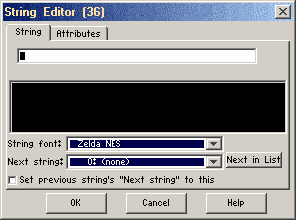
Edit: Trying that out now. I can also add a checkbox to follow from the previous string:
editor.png
Should that only be enabled when adding a new string? Seems odd to have it there in other cases.
  • Russ, Jared and HavoX like this


1 user(s) are reading this topic

0 members, 1 guests, 0 anonymous users