Jump to content

Photo

?Epona Script?


  • Please log in to reply
138 replies to this topic

#76 ZebraStallion

ZebraStallion

    Follower of Destiny

  • Members

Posted 15 January 2008 - 04:55 PM

Thanks! icon_wink.gif And I will wait patiently for the 4 screen example quest. icon_razz.gif

#77 Joe123

Joe123

    Retired

  • Members

Posted 15 January 2008 - 05:07 PM

QUOTE(ZebraStallion @ Jan 13 2008, 08:31 PM) View Post
And, in the video that plisken made, the horse came in from the side. What if it hits a solid combo?

Then it walks over the solid combo icon_shrug.gif

It's 'Whistle Whirlwind' stylee, not amazing, but better than not at all.

QUOTE
I am setting up a really small demo quest, just about four screens, to show how to use Epona, and it will be unpassworded, so you can see how to set it up.

Thankyou so much Russ!

That's really the sort of thing I needed to do, but I'm getting caught up with KttH now.
I've finished a screen and everything icon_biggrin.gif


There are, however, a few changes to the script(s) that I really should post up, rather than just keeping them to myself, because they do make all the difference.

So I'll do that in a bit, if you want to grab the script from there Russ.

#78 Joe123

Joe123

    Retired

  • Members

Posted 16 January 2008 - 01:44 PM

Solidity detection is now a lot less blocky (although not flag 98 detection; this is intentional)
The ffc script for booting Link off Epona is also fixed
CODE
import "std.zh"

//==============//
//Epona;        //
//     By Joe123//
//==============//

//These are utility variables. Don't mess with them (unless you know what you're doing;) )
bool epona; bool wrdg;
bool ep1; bool ep2;
bool runoff; bool chring;

//This boolean, by Saffith, checks for the solidity of combos, and is used for walkability detection
bool isSolid(int x, int y) {
    if(x<0 || x>255 || y<0 || y>175)
                    return false;
    int mask=1111b;
    if(x%16<8)
        mask&=0011b;
    else
        mask&=1100b;
    if(y%16<8)
        mask&=0101b;
    else
        mask&=1010b;
    return (!(Screen->ComboS[ComboAt(x, y)]&mask)==0);
}

//These are for disabling items
bool hshot; bool hammr; bool fethr;

//These variables are to be user-set, and are specific to each quest
//SFX Constants
const int essfx = 68; // Epona's Song
const int gsfx = 66; // noise made whilst Epona gallops
const int offsfx = 67; // noise made by Epona when Link dismounts

//Utility Constants
const int sfxcap = 35; // Time delay, in frames, between looping the 'Galloping' SFX
const int eslng = 180; // Length, in frames, of your 'Epona's Song' SFX
const int spd = 1; // Epona's speed. 0 is fastest (twice Link's speed), increase the number to reduce Epona's walking speed
const int flg = 98; // Number of the Flag used for 'No Epona' zones.


//Combo Reference Constants
const int ecmb = 23980; // Combo ID number of the first combo of the 8 Epona combos
const int lcmb = 23964; // Combo ID number of the first combo of the 13 Link Riding combos

//Item Constant
const int I_INVIS = 124; // Item ID number of an item with LTM that will make Link invisible


//This script basically runs all of (almost) the functions that make Epona. Load it into Global Script slot 2.
global script slot2{
    void run(){
    //Load the ffcs for Link and Epona. You'll have to make sure you're not using ffc 32 or 31 anywhere else.
    ffc lnk = Screen->LoadFFC(31);
    ffc epa = Screen->LoadFFC(32);
    //Just some utility integers and booleans here, dealing with various different things
    int fdly; int sfxfdly;
    int i; int schk;
    int hp;
    bool solid;        
        while(true){

            //The next if statement deals with making sure that Epona can't be called on flag 98, but makes sure
            //that the animation with Link playing the whistle still occurs
            if(Screen->ComboF[ComboAt(Link->X+8,Link->Y+8)] == flg || Screen->ComboI[ComboAt(Link->X+8,Link->Y+8)] == flg){
                if(epona){
                    Link->Item[I_INVIS] = true;
                    lnk->Data = lcmb+12; lnk->CSet = 6;
                    lnk->X = Link->X; lnk->Y = Link->Y;
                    Link->Action = LA_FROZEN; Link->Dir = 1;
                    hp = Link->HP;
                    for(i=0; i<eslng; i++){
                        Link->HP = hp;
                        Waitframe();
                    }
                    Link->Action = 0;
                    Link->Item[I_INVIS] = false;
                    lnk->Data = 0;
                }
                ep2 = true;
                epona = false;
                wrdg = false;
                runoff = false;
            }
            //This if checks whether the main body of the Epona script has been activated via the item script
            if(epona && !ep2){
                //This one is for parts of the script that only happen once, such as making Link invicible,
                //and calling Epona over
                if(ep1){
                    Link->Item[I_INVIS] = true;
                    ep1 = false;
                    wrdg = true;
                    
                    //These next few lines can be used to remove Link's items whilst he is riding on Epona
                    //this will require some user-setup though.
                    //You'll have to find the item ID of what you want to disable, and copy one of the
                    //lines below, and then put that item ID in the [] instead.
                    if(hshot) Link->Item[52] = false;
                    if(hammr) Link->Item[54] = false;
                    if(fethr) Link->Item[91] = false;
                    if(Link->Item[94]){chring = true; Link->Item[94] = false;}

                    //Here, Link's ffc is moved over, and the whistle animation is played.
                    lnk->Data = lcmb+12; lnk->CSet = 6;
                    lnk->X = Link->X; lnk->Y = Link->Y;
                    lnk->Flags[3] = true; lnk->Flags[0] = true;
                    Link->Action = LA_FROZEN; Link->Dir = 3;
                    hp = Link->HP;
                    for(i=0; i<eslng; i++){
                        Link->InputStart = false;
                        Link->HP = hp;
                        Waitframe();
                    }
            
                    //The next few lines check to make sure Link is far enough away from a solid object,
                    //move the Epona ffc over to him, and make it 2x2 instead of 1x1.
                    epa->TileWidth = 2;
                    epa->TileHeight = 2;
                    epa->CSet = 5; epa->Data = ecmb+7;
                    epa->Flags[3] = true; epa->Flags[0] = true;
                    epa->X = 0; epa->Vx = 1;
                    if(Link->Y > 20) epa->Y = Link->Y-16;
                    else epa->Y = Link->Y;
                    sfxfdly = sfxcap;
                    for(i=0; i<Link->X-16; i++){
                        Link->InputStart = false;
                        Link->HP = hp;
                        if(sfxfdly == sfxcap){Game->PlaySound(gsfx); sfxfdly = 0;}
                        else sfxfdly ++;
                        Waitframe();
                    }
                    Game->PlaySound(offsfx);
                    
                    //These next lines make Link jump up onto Epona (provided he isn't at the top of
                    //the screen)
                    for(i=0; i<16; i++){
                        if(!isSolid(Link->X, Link->Y-i) == true) schk = i;
                    }
                    if(schk > 0 && Link->Y > 20){Link->Y -= schk; schk = 0;}
                    epa->X = Link->X-8; epa->Y = Link->Y;
                    lnk->X = epa->X+8; lnk->Y = epa->Y;
                    Link->Action = 0;
                    epa->Flags[0] = false;
                }

                //These ifs are what actually attach Epona's ffc to Link, and change her graphics and whatnot
                solid = false;
                //Link->Z = 16;
                if(Link->Dir == 0){
                    if(epa->TileWidth != 1) epa->TileWidth = 1;
                    if(Link->InputUp){
                        for(i = 0; i<16; i+=2){
                        if(isSolid(epa->X+i,epa->Y+14) || Screen->ComboF[ComboAt(epa->X+i,epa->Y)] == flg || Screen->ComboI[ComboAt(epa->X+i,epa->Y)] == flg) solid = true;    
                        }
                        if(!solid){
                            epa->Data = ecmb+4; lnk->Data = lcmb+4;
                            Link->Y -= 1;
                            if(sfxfdly == sfxcap){Game->PlaySound(gsfx); sfxfdly = 0;}
                            else sfxfdly ++;
                            if(fdly == spd){Link->Y -= 1; fdly = 0;}
                            else fdly++;
                        }else{epa->Data = ecmb; lnk->Data = lcmb;}
                    }else{epa->Data = ecmb; lnk->Data = lcmb;}
                    if(Link->Action == LA_ATTACKING) lnk->Data = lcmb+8;
                    epa->X = Link->X; epa->Y = Link->Y;
                    lnk->X = epa->X; lnk->Y = epa->Y;
                }
                if(Link->Dir == 1){
                    if(epa->TileWidth != 1) epa->TileWidth = 1;
                    if(Link->InputDown){
                        for(i = 0; i<16; i+=2){
                        if(isSolid(epa->X+i,epa->Y+30) || Screen->ComboF[ComboAt(epa->X+i,epa->Y+32)] == flg || Screen->ComboI[ComboAt(epa->X+i,epa->Y+32)] == flg) solid = true;    
                        }
                        if(!solid){
                            epa->Data = ecmb+5; lnk->Data = lcmb+5;
                            Link->Y += 1;
                            if(sfxfdly == sfxcap){Game->PlaySound(gsfx); sfxfdly = 0;}
                            else sfxfdly ++;
                            if(fdly == spd){Link->Y += 1; fdly = 0;}
                            else fdly++;
                        }else{epa->Data = ecmb+1; lnk->Data = lcmb+1;}
                    }else{epa->Data = ecmb+1; lnk->Data = lcmb+1;}
                    if(Link->Action == LA_ATTACKING) lnk->Data = lcmb+9;
                    epa->X = Link->X; epa->Y = Link->Y;
                    lnk->X = epa->X; lnk->Y = epa->Y;
                }
                if(Link->Dir == 2){
                    if(epa->TileWidth != 2) epa->TileWidth = 2;
                    if(Link->InputLeft){
                        for(i = 0; i<32; i+=2){
                        if(i<14 && isSolid(epa->X+2,epa->Y+16+i)) solid = true;
                        if(Screen->ComboF[ComboAt(epa->X,epa->Y+i)] == flg || Screen->ComboI[ComboAt(epa->X,epa->Y+i)] == flg) solid = true;    
                        }
                        if(!solid){
                            epa->Data = ecmb+6; lnk->Data = lcmb+6;
                            Link->X -= 1;
                            if(sfxfdly == sfxcap){Game->PlaySound(gsfx); sfxfdly = 0;}
                            else sfxfdly ++;
                            if(fdly == spd){Link->X -= 1; fdly = 0;}
                            else fdly++;
                        }else{epa->Data = ecmb+2; lnk->Data = lcmb+2;}
                    }else{epa->Data = ecmb+2; lnk->Data = lcmb+2;}
                    if(Link->Action == LA_ATTACKING) lnk->Data = lcmb+10;
                    epa->X = Link->X-8; epa->Y = Link->Y;
                    lnk->X = epa->X+10; lnk->Y = epa->Y+1;
                }
                if(Link->Dir == 3){
                    if(epa->TileWidth != 2) epa->TileWidth = 2;
                    if(Link->InputRight){
                        for(i = 0; i<32; i+=2){
                        if(i<14 && isSolid(epa->X+30,epa->Y+16+i)) solid = true;
                        if(Screen->ComboF[ComboAt(epa->X+32,epa->Y+i)] == flg || Screen->ComboI[ComboAt(epa->X+32,epa->Y+i)] == flg) solid = true;    
                        }                        
                        if(!solid){
                            epa->Data = ecmb+7; lnk->Data = lcmb+7;
                            Link->X += 1;
                            if(sfxfdly == sfxcap){Game->PlaySound(gsfx); sfxfdly = 0;}
                            else sfxfdly ++;
                            if(fdly == spd){Link->X += 1; fdly = 0;}
                            else fdly++;
                        }else{epa->Data = ecmb+3; lnk->Data = lcmb+3;}
                    }else{epa->Data = ecmb+3; lnk->Data = lcmb+3;}
                    if(Link->Action == LA_ATTACKING) lnk->Data = lcmb+11;
                    epa->X = Link->X-8; epa->Y = Link->Y;
                    lnk->X = epa->X+6; lnk->Y = epa->Y+1;
                }
                if(Link->InputUp){Link->Dir = 0; Link->InputUp = false;}
                if(Link->InputDown){Link->Dir = 1; Link->InputDown = false;}
                if(Link->InputLeft){Link->Dir = 2; Link->InputLeft = false;}
                if(Link->InputRight){Link->Dir = 3; Link->InputRight = false;}
            }    
            //this part of the script runs every frame that Epona is not activated
            if(!epona){
                //however this boolean, ep2, makes sure that the effects of dismounting Epona happen only
                //once
                if(!Link->Item[94] && chring) Link->Item[94] = true;    
                if(ep2){
                    if(!falling) Link->Item[I_INVIS] = false;
                    ep2 = false;
                    //This part makes Link dismount, and the wrdg (wasriding) boolean makes sure he only
                    //hops down if he was actually on Epona (ep2 can be accessed even if Link wasn't on
                    //Epona)
                    if(wrdg){
                        for(i=0; i<16; i++){
                            if(!isSolid(Link->X, Link->Y+16+i) == true) schk = i;
                        }
                        if(schk > 0 && Link->Y < 148){Link->Y += schk; schk = 0;}
                        Link->Dir = 1;
                        epa->Vx = 2.25; epa->Data = ecmb+7;
                        epa->TileWidth = 2;
                        wrdg = false; runoff = true;
                        sfxfdly = sfxcap;        
                    }
                    //This if deals with the SFX loop while Epona runs away
                    if(runoff){
                        if(sfxfdly == sfxcap){Game->PlaySound(gsfx); sfxfdly = 0;}
                        else sfxfdly ++;
                        if(epa->X >256) runoff = false;
                    }
                    
                    //To re-enable the items when Link gets off of Epona, you'll have to put an if
                    //statement here that has each level of the item (as you've set them with the item
                    //scripts) and then have that set the appropriate item ID to true.
                    if(hshot) Link->Item[52] = true;
                    if(hammr) Link->Item[54] = true;
                    if(fethr) Link->Item[91] = true;                
                    
                    lnk->Data = 0;
                    if(epa->X > 256) epa->Data = 0;
                }
            }
        Waitframe();
        }
    }
}

//This script just makes sure Link gets off Epona when you save and reload the file. Add it to script slot 3.
//And DON'T think to yourself 'oh, it's ok, I'll just have the game reload with Link on Epona', that's bad. Very bad.
global script slot3{
    void run(){
        epona = false;
        wrdg = false;
        ep2 = true;
    }
}


//For disabling the items, you'll have to make item scripts like this for each item you want removed, and have them reference
//the itemclass numbers you typed above.
//Have it set the level of the item here (the first script sets the integer hshot to 1)
item script hshot{
    void run(){
        hshot = true;
    }
}

item script hammr{
    void run(){
        hammr = true;
    }
}

item script fethr{
    void run(){
        fethr = true;
    }
}


//This is the activation script for Epona. I've made it into an item that plays a SFX, so the idea is really that it's
//Epona's song on the ocarina, but that's up to you =)
//A different sound effect plays when Link dismounts.
item script eponassong{
    void run(){
        if(Link->Z == 0){
            if(!ep2){
                epona = !epona;
                if(epona) ep1 = true;
                if(!epona) ep2 = true;
            }
            if(epona) Game->PlaySound(essfx);
            if(!epona) Game->PlaySound(offsfx);
        }
    }
}

//Just a little script for use in areas where the Ocarina is disabled
item script eponassongdisabled{
    void run(int m){
        Screen->Message(m);
    }
}


//This script should make sure that Link can't get on Epona on screens that you don't want him to. He should also get off
//instantly upon entering a screen with this script applied.
ffc script gerroffthathorse{
    void run(){
    int play; int hp;
    ffc lnk = Screen->LoadFFC(30);
        epona = false;
        while(true){
            if(epona){
                Link->Item[I_INVIS] = true;
                falling = true;
                Link->Action = LA_FROZEN;
                Link->Dir = 1;
                lnk->Data = lcmb+12; lnk->CSet = 6;
                hp = Link->HP;
                play = eslng;
            }
            ep2 = true;
            epona = false;
            wrdg = false;
            runoff = false;
            while(play > 0){    
                if(play == eslng){    
                lnk->X = Link->X; lnk->Y = Link->Y;
                Link->HP = hp;
                }
                if(play == 1){
                    Link->Action = 0;
                    falling = false;
                    Link->Item[I_INVIS] = false;
                    lnk->Data = 0;
                }
                play--;
            Waitframe();
            }
        Waitframe();
        }
    }
}

And I go now to write the set-up manual.

Edited by Joe123, 16 January 2008 - 04:25 PM.

  • Bagu likes this

#79 Joe123

Joe123

    Retired

  • Members

Posted 16 January 2008 - 02:50 PM

Apologies for the double (well, triple...) post, but here it is:
How to use the Epona script
By Joe123

1) Setting up the tiles
Firstly, find what Epona and Link Riding tiles you will use.
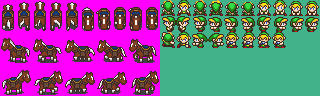
IPB Image
Here are the ones I am using; the Epona uses it's own CSet, and obviously they will only fit with DoR Link.

This picture also serves to show the layout on the tilepage.
It is not necessary to have the tiles laid out exactly like this, however this picture shows what tiles you will need for Epona as it is set up at present.

The Epona tiles are organised as follows:
CODE
First row, left to right:
*1 tileblock for Epona facing north, standing still.
*4 tileblocks for Epona facing north, galloping.
*1 tileblock for Epona facing south, standing still.
*4 tileblocks for Epona facing south, galloping.
Second row, left to right:
*1 tileblock for Epona facing left, standing still.
*4 tileblocks for Epona facing left, galloping.
Third row, left to right:
*1 tileblock for Epona facing right, standing still.
*4 tileblocks for Epona facing right, galloping.


The Link tiles are organised as follows:
CODE
First row, left to right:
*Link facing up, still.
*Link facing down, still.
*4 tile animation for Link riding, up.
*4 tile animation for Link riding, down.
Second row, left to right:
*Link facing left, still.
*Link facing right, still.
*4 tile animation for Link riding, left.
*4 tile animation for Link riding, right.
Third row, left to right:
*Link attacking, up.
*Link attacking, down.
*Link attacking, left.
*Link attacking, right.
*4 tile animation for Link playing the Ocarina.


This format is not essential by any means, as it is the combo organisation that the script references, however it does show what tiles need to be included.


2) Setting up the combos
Once you have found and ripped in your Epona and Link Riding sprites, you need to set them up on the combopage.
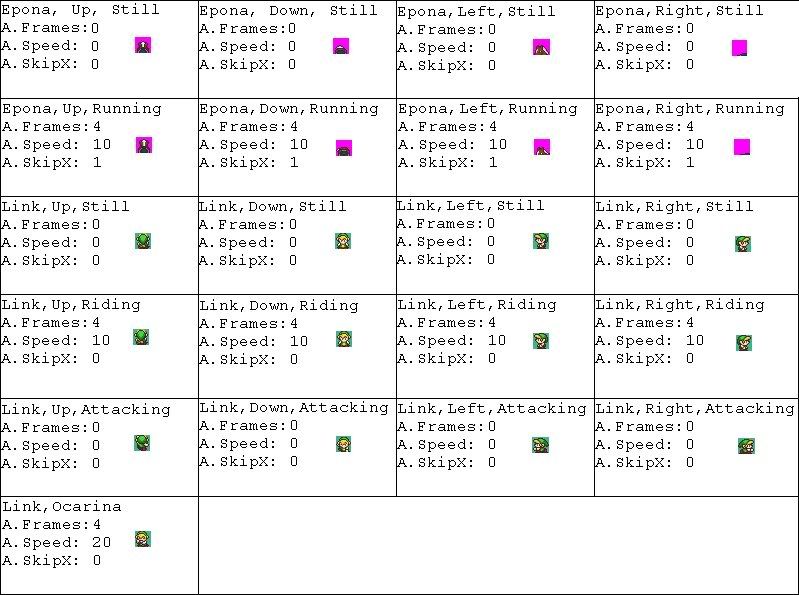
This Grid shows how your Epona and Link Riding combos must be set up on the combopage.

Please note that there is no necessity for them to be next to each other (Link's combos can be as far away from Epona's as you like), however Epona's combos must all be in that order, one after the other, as must Link's.

Obviously the A.Speed values can be set to anything you like, but take heed of the 'A.SkipX' values, as the script will not function if you do not set them up as shown.

Once you have organised your combos as shown, take a note of the Combo ID number of the top-left Epona combo, and the top-left Link combo.


3) Sound Effects
The Epona script uses three custom Sound Effects;
Epona's Song, played by Link to call Epona
Galloping, used when Epona is moving
Neighing, used when Link mounts and dismounts Epona

I have always found This Website to be good when dealing with Sound Effects.

Once you have found those three Sound Effects, you will need to add them using the Sound Effect Editor.

Take a note of the slot numbers you have assigned the Sound Effects to, and time the length in frames (there are 60 frames in one second) of your Epona's Song sound effect, taking a note of this also.


4) Making Link Invisible
For the Epona Script to function, it is required that Link be made invisible.
The only way to access doing this in Zelda Classic, is to make a gap after where your Link Sprites are located, and make an item with a Link Tile Modifier that will move his sprites along so he is no longer seen.

Firstly, go to the Item Editor.
Press 'Z', and you will arrive at a list of currently un-used items.
Select the first one, and press 'Edit'.
In the 'Data' tab, set the itemclass to 'Non-Gameplay Items', the Level to 1, and check the 'Equipment Item' box.
In the 'GFX' tab, set the graphic to be a non-0 tile (what it is is irrelevant; it will never be seen), and in the box labelled 'Link Tile Modification', enter a value that, when added to Link's tiles, would move them down to an area of completely empty combos.

In the tab at the top of the editor, it will say 'Item ##:'. Make a note of the number shown here.


5) Quest Rules
The following Quest Rules are required:
*FFCs Are Visible When The Screen Is Scrolling

The following Quest Rules are advised:
*Expanded Link Tile Modifiers
If this rule is checked, you will have to re-organise your Link Sprites, and set them up again to take into account the fact that they will now all be modified, instead of just the walking sprites, using the Link Sprite Editor.
*Flip Right-Facing Slash
Although this may seem undesirable, if it is not checked, Link cannot attack underneath Epona whilst riding left or right.


6) The Script
Select the entire script in the previous thread, and copy it all into a 'Notepad' document.
If you already have scripts in your quest, make sure to keep them in the same file.

If you do not, press 'Save As'.
Write in the name you want to save your script file as, and put at the end '.z' (so '####.z')
On the menu that says 'Save As Type:', change the type from '.txt' to 'All Files'.
Press Save.

Now you must update the constants located at the top of the script, in reference to your quest.
CODE
//These variables are to be user-set, and are specific to each quest
//SFX Constants
const int essfx = 68; // Epona's Song
const int gsfx = 66; // noise made whilst Epona gallops
const int offsfx = 67; // noise made by Epona when Link dismounts

//Utility Constants
const int sfxcap = 35; // Time delay, in frames, between looping the 'Galloping' SFX
const int eslng = 180; // Length, in frames, of your 'Epona's Song' SFX
const int spd = 1; // Epona's speed. 0 is fastest (twice Link's speed), increase the number to reduce Epona's walking speed
const int flg = 98; // Number of the Flag used for 'No Epona' zones.


//Combo Reference Constants
const int ecmb = 23980; // Combo ID number of the first combo of the 8 Epona combos
const int lcmb = 23964; // Combo ID number of the first combo of the 13 Link Riding combos

//Item Constant
const int I_INVIS = 124; // Item ID number of an item with LTM that will make Link invisible


This section should appear in your file.
To change the numbers to your specific needs, just erase the current value (values are located between '=' and ';'), and

write in your value for the appropriate number.

Now press 'Save' again, and return to ZQuest.
Go to Tools->Scripts->Compile ZScript.

Click 'Load', and find the file you just made.

Press 'Compile'.

The names of the scripts included in the Epona Script file should appear on the right hand side of each tab.

Select a script and press the '<<' button to copy it over into the applicable slot. Make sure to assign all types of scripts, and make a note of the numbers you have your item scripts applied to.


Press 'OK'.

6) Epona's Song and other Item Scripts
Contained within the Epona Script file are 5 item scripts, which must be applied for usage.

Go to the Item Editor.
Select the 'Hammer' item.
Go to the 'Pickup' tab, and in the box labelled 'Script', write in the number of the scipt labelled 'hammr' that you made a note of earlier.


Select the 'Hookshot' item.
Go to the 'Pickup' tab, and in the box labelled 'Script', write in the number of the scipt labelled 'hshot' that you made a note of earlier.


Select the 'Roc's Feather' item.
Go to the 'Pickup' tab, and in the box labelled 'Script', write in the number of the scipt labelled 'fethr' that you made a note of earlier.


Now make a new item, by pressing 'Z' and then 'Edit'.
Name the item 'Epona's Ocarina' (or simmilar).
In the 'Data' tab:
*Give the item an item class that is not currently used (ie. z089).
*Give the item a level of '2'.
*Check the 'Equipment Item' box.

In the 'GFX' tab:
*Select the tile and set up any animation you want the subscreen entry for the item to have.

In the 'Pickup' tab:
*Check the 'Gain All Lower Level Items' box.

In the 'Action' tab:
*Write in the number of the script labelled 'eponassong' that you made a note of earlier.


Now go to the String Editor, and write a new string that says something along the lines of 'You can't call Epona here', and make a note of what number string it is.


Now make another item.
Name the item 'Epona's Ocarina (Disabled)' (or simmilar).
In the 'Data' tab:
*Give the item the same item class you gave the previous item.
*Give the item a level of '1'.
*Check the 'Equipment Item' box.

In the 'GFX' tab:
*Select the tile and set up any animation you want the subscreen entry for the item to have.

In the 'Action' tab:
*Write in the number of the script labelled 'eponassongdisabled' that you made a note of earlier.

In the 'Arguments' tab:
*Write in the number of the string you just wrote down


7) The Subscreen
Go to Quest->Misc. Data->Subscreens.

Select your active subscreen.

If you wish to replace another item with Epona's Ocarina, right-click on the item, and select 'Properties'.
In the 'Attributes' tab, replace the 'Item Class' with the one you assigned Epona's Ocarina to previously.

If you wish to create a new item, press 'Ins' on your keyboard, and assign that itemclass to the item. The other boxes in the 'Attributes' tab must also be set up correctly to be able to select the item.


8 ) Other Notes
*By default, Epona cannot enter any combos with flag '98' layed onto them. If you want to change this to another flag, go to the user-set integers section at the start of your script, and change the value of the integer, 'flg'.
*If you wish for Epona not to enter a certain screen, then apply the FFC Script 'gerrofthathorse' to the room. Epona cannot be summoned in rooms with this script applied, and Link will dismount upon entering the room.
*If you wish for Epona not to enter an entire DMap, in the DMap options, go to the 'Disable' tab. Select 'Epona's Ocarina', and press '<-'.
*Link can use his weapons whilst on Epona, but not the Hammer, Hookshot, Feather or Scroll: Spin Attack, because they do not work well with Epona.


And apologies to anyone who feels patronised by the post, it is meant to be for people who don't really understand what they're doing. If you do, however, I'm sure it could still be of use - just be aware that it is not an insult to your intellegence =P.

Edited by Joe123, 16 January 2008 - 02:56 PM.


#80 Twilight Knight

Twilight Knight

    Tell all with glee, Argon's on PureZC

  • Members
  • Real Name:Sven
  • Location:Rotterdam, NL

Posted 16 January 2008 - 03:28 PM

For the epona song, I have made a Wave SFX file, here:
http://www.freewebs....ducts/epona.wav
You might need to paste it in your browser to listen to it, but right click+save works so...

#81 ElLibertador

ElLibertador

    Love and Peace

  • Members

Posted 16 January 2008 - 11:34 PM

Grreaat job on this! I really appreciate how you took the time to do this.

/me bows

#82 Twilight Knight

Twilight Knight

    Tell all with glee, Argon's on PureZC

  • Members
  • Real Name:Sven
  • Location:Rotterdam, NL

Posted 17 January 2008 - 01:05 PM

QUOTE(Joe123 @ Jan 16 2008, 08:50 PM) View Post

Go to the Item Editor.
Select the 'Hammer' item.
Go to the 'Pickup' tab, and in the box labelled 'Script', write in the number of the scipt labelled 'hammr' that you made a note of earlier.
Select the 'Hookshot' item.
Go to the 'Pickup' tab, and in the box labelled 'Script', write in the number of the scipt labelled 'hshot' that you made a note of earlier.
Select the 'Roc's Feather' item.
Go to the 'Pickup' tab, and in the box labelled 'Script', write in the number of the scipt labelled 'fethr' that you made a note of earlier.


Pardon me, did I take a note of those 'fethr' 'hshot' and 'hammr' earlier, because I have no script like that.

#83 Joe123

Joe123

    Retired

  • Members

Posted 17 January 2008 - 01:38 PM

Heh, are you using the latest script?

They're in that one icon_wink.gif

Those bits aren't essential, they're for disabling the hammer, hookshot and roc's feather whilst Link is riding, however those items are rather buggy with Epona, so I did leave them in for a reason.

#84 ZebraStallion

ZebraStallion

    Follower of Destiny

  • Members

Posted 17 January 2008 - 08:03 PM

Thanks for the tutorial! icon_biggrin.gif

edit: 100th post!!!

Edited by ZebraStallion, 17 January 2008 - 08:03 PM.


#85 Russ

Russ

    Caelan, the Encouraging

  • Administrators
  • Location:Washington

Posted 17 January 2008 - 08:07 PM

QUOTE(ZebraStallion @ Jan 17 2008, 05:03 PM) View Post

edit: 100th post!!!

Congratulations.

#86 Joe123

Joe123

    Retired

  • Members

Posted 18 January 2008 - 03:11 AM

That's ok Mr Stallion, d'yu have it working now?

Congrats by the way.

I got 1200 and overtook my AGN post count yesterday or the day before, but I missed it icon_frown.gif

#87 Bayta

Bayta

    Follower of Destiny

  • Members
  • Real Name:Robin Evans
  • Location:Suffolk County, NY

Posted 27 January 2008 - 11:58 AM

Holy crap! Why didn't I see this topic before!? Excellent work on the script, Joe! I know there was never a horse in Link's Awakening... But I just might use it in Island of Dreams. icon_smile.gif

#88 Russ

Russ

    Caelan, the Encouraging

  • Administrators
  • Location:Washington

Posted 28 January 2008 - 11:12 PM

QUOTE(Beta Link @ Jan 27 2008, 08:58 AM) View Post

Holy crap! Why didn't I see this topic before!? Excellent work on the script, Joe! I know there was never a horse in Link's Awakening... But I just might use it in Island of Dreams. icon_smile.gif

Use it. It would be perfect. Who says you can't change a few things?

#89 ZebraStallion

ZebraStallion

    Follower of Destiny

  • Members

Posted 20 February 2008 - 06:14 PM

WOW! I finally got around to testing it and it was awsome! But, I have one problem. Here it is:

IPB Image
that is Link calling Epona

IPB Image
and that is Epona...

I set up the sprite sheet like it says, but where do I put in which sprites I'm using?

#90 Joe123

Joe123

    Retired

  • Members

Posted 20 February 2008 - 07:29 PM

QUOTE
Now you must update the constants located at the top of the script, in reference to your quest.
CODE
//These variables are to be user-set, and are specific to each quest
//SFX Constants
const int essfx = 68; // Epona's Song
const int gsfx = 66; // noise made whilst Epona gallops
const int offsfx = 67; // noise made by Epona when Link dismounts

//Utility Constants
const int sfxcap = 35; // Time delay, in frames, between looping the 'Galloping' SFX
const int eslng = 180; // Length, in frames, of your 'Epona's Song' SFX
const int spd = 1; // Epona's speed. 0 is fastest (twice Link's speed), increase the number to reduce Epona's walking speed
const int flg = 98; // Number of the Flag used for 'No Epona' zones.
//Combo Reference Constants
const int ecmb = 23980; // Combo ID number of the first combo of the 8 Epona combos
const int lcmb = 23964; // Combo ID number of the first combo of the 13 Link Riding combos

//Item Constant
const int I_INVIS = 124; // Item ID number of an item with LTM that will make Link invisible


This section should appear in your file.
To change the numbers to your specific needs, just erase the current value (values are located between '=' and ';'), and write in your value for the appropriate number.


Go read the tutorial again �_�


0 user(s) are reading this topic

0 members, 0 guests, 0 anonymous users