


Here's one from my new quest.



Lurking in the shadows...


Posted 18 September 2016 - 02:59 PM

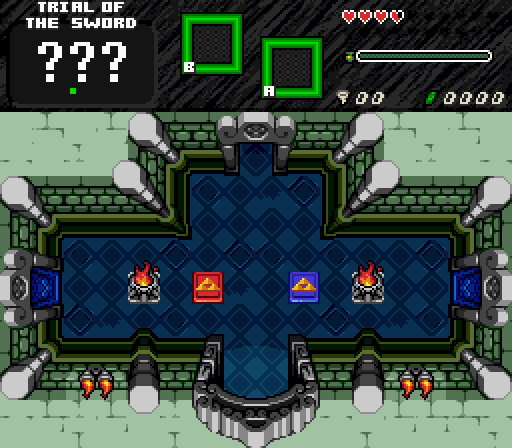
So this is what was inside those stairs! It's not a dungeon, but it's an important area indeed...
Thoughts? Especially palette wise? All I can hint at is that this is an idea I got (stole?) from Pineconn's A Link to the Heavens. The colors used were to make this area feel like an underground cave that apart from having been abandoned, for it to have a "sea-like" design. The reason for this is that the overworld outside is a bit wet on a few screens (see the post above), and so, this cave has been surrounded by humidity and the likes... Oh yeah, and I'm using this BGM in midi format.
Edited by Demonlink, 18 September 2016 - 03:06 PM.
I play guitar


Posted 18 September 2016 - 03:11 PM
So this is what was inside those stairs! It's not a dungeon, but it's an important area indeed...
Thoughts? Especially palette wise? All I can hint at is that this is an idea I got (stole?) from Pineconn's A Link to the Heavens. The colors used were to make this area feel like an underground cave that apart from having been abandoned, for it to have a "sea-like" design. The reason for this is that the overworld outside is a bit wet on a few screens (see the post above), and so, this cave has been surrounded by humidity and the likes... Oh yeah, and I'm using this BGM in midi format.
I like the screen itself  but could you make it little darker, for me it seems to be to bright
The Legendary Sephiroth

Posted 18 September 2016 - 08:51 PM
Follower of Destiny

Posted 18 September 2016 - 09:18 PM
You should go into the Tile Editor for those corner tiles and fix the brick pattern so they line up with the rest of the walls. It doesn't look very good when you just rotate the tile.
The Legendary Sephiroth
Posted 20 September 2016 - 09:36 PM
You should go into the Tile Editor for those corner tiles and fix the brick pattern so they line up with the rest of the walls. It doesn't look very good when you just rotate the tile.


Edited by Sephiroth, 20 September 2016 - 09:44 PM.
Follower of Destiny
Posted 21 September 2016 - 02:33 PM
I really like the newer palette over the old one. The old palette is rather monochrome in comparison, while the grey accent colors on the new one make the room features like the doors stand out, as well as gives the player an easier time seeing the general shape of the room at an instant glance from the corner pillars.
Sometimes lurking. Rarely posting.


Posted 24 September 2016 - 02:06 PM
Seems more purple or magenta than crimson. Looks nice though. My one complaint would be the odd, flat-looking water transition.
The Legendary Sephiroth
Posted 24 September 2016 - 05:43 PM

Link happens to stumble across an interesting structure while taking a stroll on the beach.
🤍

Posted 25 September 2016 - 02:28 AM
Re colours: It was meant to be more pale than actual pure crimson (I think it'd look terrible otherwise). I agree that it's on the monochrome side however. As for the mushrooms, they were intended to glow so I didn't have to get them a crimson look. I might redo the palette, we'll see.
Nice screen by the way! Besides that little shallow water oddity at the bottom left area, the screen's perfect.
Magus


Posted 25 September 2016 - 06:20 AM
I love your edited mc-grass-sprite, shane. The palette, while monochrome, looks also good. The glowing mushroom-shadows are too much for me, looks hilarious for ezgbz in my eyes. A transition to the ground, no shadow and only their caps (?, I mean the upper part of the mushrooms) "glowing" would be fine though. You could also add some glowing insects (like in links awakening - i just replayed it - with the mushroom colors). You also could add the glowing through a transperent overlayer or even add mist or clouds, if anyone can do so for ezgbz than you.
Lurking in the shadows...
Posted 25 September 2016 - 11:21 AM
@Feenicks: My only complaint would be the font you're using for the DMap title, sticks out a bit. Other than that, pretty nice! (And what up with those eggs!?)
Here's a revised palette of my last shot. Also, CHEST!

DA F**K is in here?
0 members, 2 guests, 0 anonymous users


