


Looks good, bruh.

A Sprite A Day Keeps the Rust Away.
Started by
Koh
, Jan 10 2014 04:29 PM
512 replies to this topic
#362

NoeL
-

- Members
-

Legend
- Real Name:Jerram
Posted 23 August 2014 - 03:32 AM
I don't fully understand it either TBH. I like the revamp though!I'm not sure if I get the whole neutralizer thing. It sounds like the contrasting colors thing I heard in Art History, with colors on opposite sides of the wheel, but I've heard they make each other stand out (like red and green).
#363
DragonDePlatino
-

- Members
-

Pixel Dragon
Posted 31 August 2014 - 06:02 PM
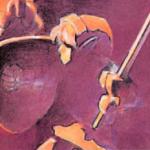
You know how in Classic there are the big versions of the armos statue? I made one of those for Koten but always felt a little guilty for just blowing up the tile and drawing over it. So for the newest update I'm manning up and spriting a new one from scratch:

I'm not that happy with this, though. The hand doesn't look right to me and I couldn't decide on a metallic or stone-like texture. Any suggestions?
Edited by DragonDePlatino, 31 August 2014 - 06:04 PM.
- Koh and Astromeow like this
#364
link3505
-
- Members
-

Ancientierest
- Real Name:Ben
- Pronouns:He / Him
- Location:The Edge of Infinity
Posted 31 August 2014 - 07:06 PM
I would put a spear or some sort of staff in the hand. Looks like its gripping something now, so that would be perfect. Otherwise, I think a stone texture would look cool on it.
#365
Koh
-

- Members
-

Tamer Koh
- Real Name:Dominic
- Location:Monsbaiya, Virginia
Posted 01 September 2014 - 07:36 PM
Finally redid Koh's midres sprite.

Now I've more space to show things like the bent knees. So I can try doing the better walking animation from this new version. Also, the animations aren't simply flipped, so his battle stance will look different facing left.
#366
DragonDePlatino
-
- Members
-
Pixel Dragon
Posted 01 September 2014 - 08:17 PM
Ohh...I'm liking the new 3/4 perspective you've given to Koh! The way you thickened his limbs and gave him a more dramatic pose fondly reminds me of Final Fantasy IV. The shading separating his face is nice touch, too.
But I don't like the external AA at all. I can understand other games pulling it off, but unless you make all of your tilesets incredibly washed out like ML:SS, that external AA won't look right everywhere. And In other news...

Poke poke. I went with a gritty dithered texture and added a spear. I think I'll go ahead and call this finished. Thanks, Relic!
Edited by DragonDePlatino, 01 September 2014 - 08:17 PM.
- Sheik, Aevin and Astromeow like this
#367
Koh
-
- Members
-
Tamer Koh
- Real Name:Dominic
- Location:Monsbaiya, Virginia
Posted 01 September 2014 - 08:32 PM
The way I'm handling it will allow it to work anywhere. See, M&L didn't have alpha transparency =). The 24, 24, 24 corner pixels you see will actually be the outline color 8, 8, 8, at 50% transparency. This will allow them to go anywhere, while still having that bolder outline effect. This will show what I mean.

It's just that with GIFs, you can't have translucent pixels; they have to be either fully opaque or fully transparent.
As for your armor texture, I think it looks pretty good. but I personally prefer the more lustrous texture of the first one.
Edited by Koh, 01 September 2014 - 08:33 PM.
#368
NoeL
-
- Members
-
Legend
- Real Name:Jerram
Posted 03 September 2014 - 12:05 AM
I'm interested to see if that effect works or just makes the characters look blurry.
#369
DragonDePlatino
-
- Members
-
Pixel Dragon
Posted 03 September 2014 - 07:48 PM
Yup. Anti-aliasing sprites with alpha transparency works just fine on all kinds of backgrounds. If I plop Koh's sprite into an upper layer and shove a checkerboard in the lower layer like so...

It looks nice on any brightness. Really, anti-aliasing like this is encouraged because a lot of modern games use it. The only reason it isn't as widespread is because a lot of game engines can't handle partial alpha-transparency, ZQuest to name one.
Edited by DragonDePlatino, 03 September 2014 - 07:49 PM.
- Koh and Astromeow like this
#370
Koh
-
- Members
-
Tamer Koh
- Real Name:Dominic
- Location:Monsbaiya, Virginia
Posted 03 September 2014 - 10:39 PM
Yup, that's exactly what I was going for. Most dev tools allow for this though. Really, all that happens is the pixels are like that in the PNG spritesheet files.
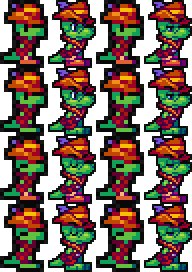
In other news...

#371
Koh
-
- Members
-
Tamer Koh
- Real Name:Dominic
- Location:Monsbaiya, Virginia
Posted 08 September 2014 - 06:20 AM
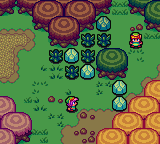
Just practicing less aggressive, but still noticeable shifting on tiles. A Link to the Past's flat colors were used, while I made my own highlights and shades. Why is Zelda always my default experimental route?
#372
Astromeow
-
- Members
-

RESPECT DA OBOE SOLO
Posted 08 September 2014 - 06:46 AM
Good stuff. Very spiffy and presentable
The ground may need new grass detail tiles though
The ground may need new grass detail tiles though
#373
link3505
-
- Members
-
Ancientierest
- Real Name:Ben
- Pronouns:He / Him
- Location:The Edge of Infinity
Posted 08 September 2014 - 10:40 PM
Just practicing less aggressive, but still noticeable shifting on tiles. A Link to the Past's flat colors were used, while I made my own highlights and shades. Why is Zelda always my default experimental route?
Not a fan of the trees, honestly. The rest of the objects have nice, thick, black outlines, and the trees look like they have the typical 1-pixel outlines. Personally, I'd bump them up to 2x3 (3x2, whichever is taller) tile trees, and do them up right with plenty of room for a thick border and good detail. However, the rest of those tiles are excellent.
#374
Koh
-
- Members
-
Tamer Koh
- Real Name:Dominic
- Location:Monsbaiya, Virginia
Posted 09 September 2014 - 10:47 AM
There's a reason for that, actually. The tiles COULD have thick outlines, but only entities are given black outlines, so that they can be distinguished from the environment. One look at them says "Hey, I can touch this!" Not in a dirty way, but rather, the object can be moved or interacted with in some fashion, rather than just being a barricade or part of the background. Many games use this technique, and I've grown quite fond of it. I've also got an extra layer, where the entities have more vibrant hue-shifting than the tiles, so they stand out a bit more, and can clearly be distinguished as to what's just background, and what's something that can be touched.
As is Link and any other mobile entity, objects that can be touched and moved should also considered to be entities. Bushes can be slashed or lifted, rocks can be lifted, chests can be opened, etc. therefore, they should be treated as an entity, and not as a tile. The tiles will lack black outlines and filling (except for special cases, like a Cave entrance), and will have more subtle hue-shifting.
What you COULD do is the same thing I did with the black outline on the entities for tiles, and make it so that the outside AA corner pixels are the outline color at 75% transparency, to give that outline a bolder effect.
Edited by Koh, 09 September 2014 - 10:55 AM.
#375
Koh
-
- Members
-
Tamer Koh
- Real Name:Dominic
- Location:Monsbaiya, Virginia
Posted 13 September 2014 - 11:14 AM

The grass does look better with some texture. I used the GB Tall Grass texture minus the shading and highlights. I used the same texture for the actual tall grass, yes, but I made tiles to fit every possible scenario of tall grass. Now I need to find a suitable GB texture for the dirt. I'll probably redo the trees too, where instead of making it look like LTTP's trees, I just use the flat colors from them + my own shades like all the other tiles do, and add detail to the original design.
Also, I made it so entity objects now have a dark outline that isn't black, but they still use the more aggressive shifting like sprites so that they stand out more. Hopefully, this still screams "Hey, I can touch this!"
Edited by Koh, 13 September 2014 - 11:16 AM.
1 user(s) are reading this topic
0 members, 1 guests, 0 anonymous users

